This Julian date example uses an ordinal YYYYDDD code. I distinguish that business encoding from an astronomical Julian day number.

The input 2012146 means the 146th day of 2012, or May 25. DATEFROMPARTS constructs the year’s starting date explicitly. That avoids an implicit conversion of year digits.
DECLARE @Encoded int = 2012146;
DECLARE @Year int = @Encoded / 1000, @Day int = @Encoded % 1000;
IF @Year NOT BETWEEN 1 AND 9999 THROW 50000, 'Year is outside the date range.', 1;
DECLARE @Start date = DATEFROMPARTS(@Year,1,1);
DECLARE @DaysInYear int = DATEDIFF(day,@Start,EOMONTH(@Start,11)) + 1;
IF @Day NOT BETWEEN 1 AND @DaysInYear THROW 50000, 'Invalid day of year.', 1;
SELECT DATEADD(day,@Day - 1,@Start) AS converted_date;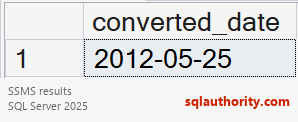
This example requires SQL Server 2012 or later. It validates the year and day. Leap years permit day 366; ordinary years don’t. Day zero and out-of-range days are rejected.
January 1 is day 1, so I subtract one before adding days. Keep the encoded input separate from the typed date. That distinction makes the conversion rule easier to test.
Related reading
- SQL SERVER – Puzzle – Playing with Datetime with Customer Data
- SQL SERVER – Alternate to AGENT_DATETIME Function
- SQL SERVER – Adding Datetime and Time Values Using Variables
- SQL SERVER – Puzzle – Inside Working of Datatype smalldatetime
- SQL SERVER – Find Weekend and Weekdays from Datetime in SQL Server 2012
An ordinal date code is not a datetime value, it is an encoding that needs validation before conversion.
Published by Pinal Dave on SQLAuthority. More of my work at pinaldave.com.
Discover more from SQL Authority with Pinal Dave
Subscribe to get the latest posts sent to your email.