
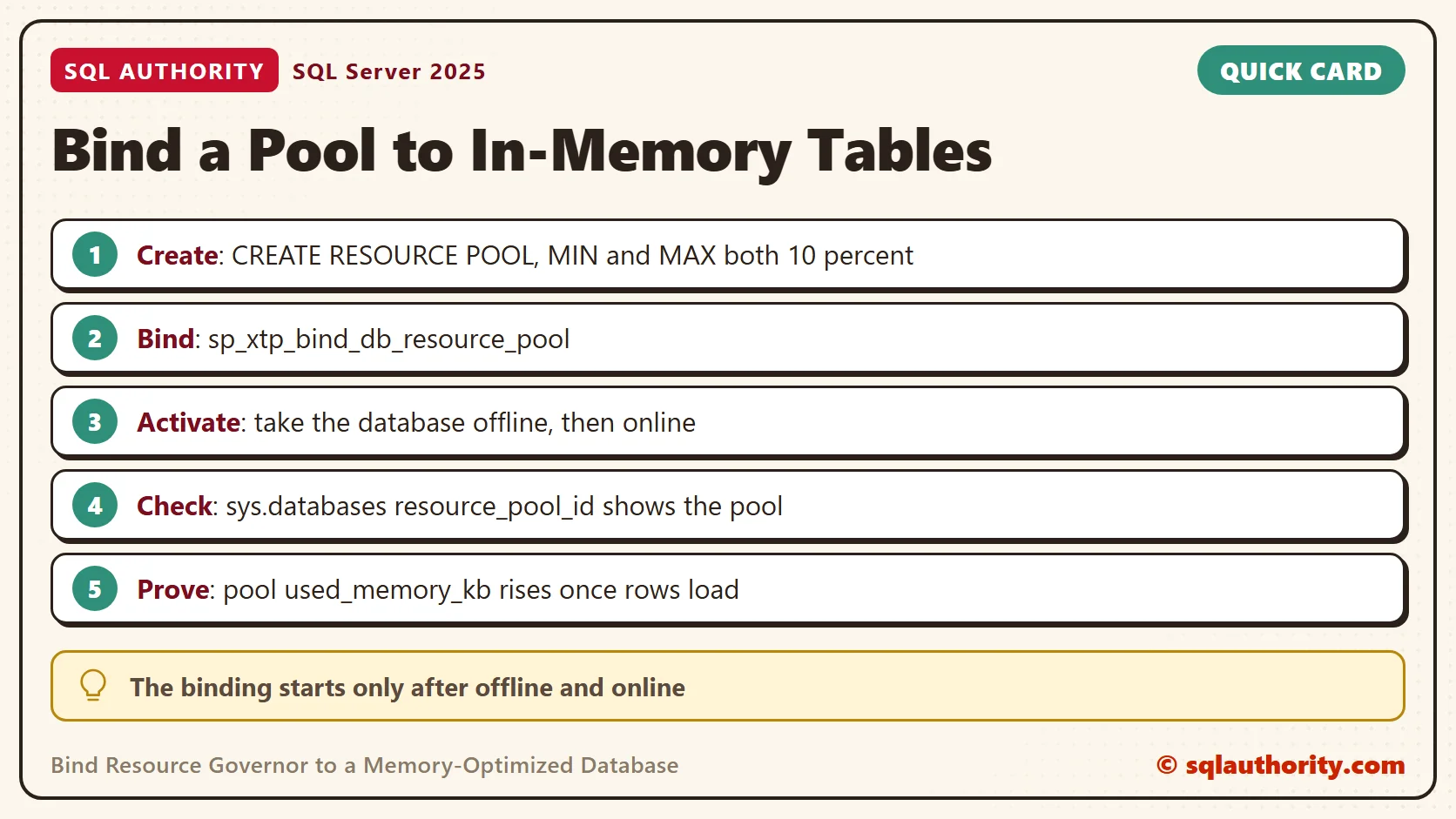
To bind Resource Governor to a memory-optimized database, create a pool and call one stored procedure. The binding starts to work only after the database goes offline and comes back online. I ran every step on SQL Server 2025 and checked each one with a query.

Why Give the Tables Their Own Pool
Memory-optimized tables live entirely in memory. Their rows are charged to a resource pool. That is the default pool unless you bind the database to another one. The default pool also serves every query and cache on the instance.
A dedicated pool lets you watch these tables on their own and give them a share of memory. Resource Governor splits memory between pools by percent. The binding belongs to the database, not to a session, so no classifier function is involved.
The feature is off by default, and creating a pool does not turn it on. The reconfigure step that applies your pool does. A careful test records the state first and puts it back at the end.
The binding places the table data in the pool. Queries on those tables still run in the workload group of their own session. Their CPU time and their query memory come from that group’s pool, not from the bound one.
Step 1: Record the State
The first query copies the setting into a temporary table. Keep the same query window open until the cleanup, because the temporary table lives only in that session.
SELECT is_enabled INTO #rg_before FROM sys.resource_governor_configuration;
SELECT is_enabled AS RgEnabledBefore FROM #rg_before;
On my instance the value was 0, so Resource Governor was off. The cleanup at the end puts it back to off.
Step 2: Create the Pool
Microsoft advises equal minimum and maximum percentages for a pool that serves memory-optimized tables. I used 10 percent for both. The minimum reserves the memory for this pool, and the maximum limits it.
With equal values, the pool has a known size. The reserved memory is no longer available to the other pools, so do not reserve more than the data needs. A small test database does not need 10 percent of a production server. Size the percent from the data you plan to load.
CREATE RESOURCE POOL MemTablePool WITH (MIN_MEMORY_PERCENT = 10, MAX_MEMORY_PERCENT = 10);
ALTER RESOURCE GOVERNOR RECONFIGURE;
SELECT is_enabled AS RgEnabledNow FROM sys.resource_governor_configuration;
SELECT name, min_memory_percent, max_memory_percent, target_memory_kb FROM sys.dm_resource_governor_resource_pools WHERE name = N'MemTablePool';
The first query returned 1. The reconfigure turned Resource Governor on, which is why Step 1 mattered. The second shows the pool as SQL Server sees it. Its target was 243,512 KB, the share of memory the pool can use at that moment.
Step 3: Create the Database
A database with memory-optimized tables needs a special filegroup with a container folder. The script reads the default data folder of the instance, so it runs on any server without edits.
IF DB_ID(N'MemPoolDemo') IS NULL
BEGIN
    DECLARE @path nvarchar(260) = CONVERT(nvarchar(260), SERVERPROPERTY('InstanceDefaultDataPath'));
    DECLARE @sql nvarchar(max) = N'CREATE DATABASE MemPoolDemo
ON PRIMARY (NAME = MemPoolDemo_data, FILENAME = N''' + @path + N'MemPoolDemo.mdf''),
FILEGROUP MemPoolDemo_mod CONTAINS MEMORY_OPTIMIZED_DATA (NAME = MemPoolDemo_mod, FILENAME = N''' + @path + N'MemPoolDemo_mod'')
LOG ON (NAME = MemPoolDemo_log, FILENAME = N''' + @path + N'MemPoolDemo.ldf'')';
    EXEC (@sql);
END
Step 4: Bind the Pool
To bind Resource Governor to the database, one system procedure is enough. The second query reads the result from sys.databases. The third shows how much memory the pool holds right now.
EXEC sys.sp_xtp_bind_db_resource_pool @database_name = N'MemPoolDemo', @pool_name = N'MemTablePool';
SELECT d.name, d.resource_pool_id, p.name AS pool_name FROM sys.databases AS d LEFT JOIN sys.resource_governor_resource_pools AS p ON p.pool_id = d.resource_pool_id WHERE d.name = N'MemPoolDemo';
SELECT name, used_memory_kb FROM sys.dm_resource_governor_resource_pools WHERE name = N'MemTablePool';
The procedure replies with a message. It is output, not code to run.
A binding has been created. Take database 'MemPoolDemo' offline and then bring it back online to begin using resource pool 'MemTablePool'.
| name | resource_pool_id | pool_name | used_memory_kb |
|---|---|---|---|
| MemPoolDemo | 281 | MemTablePool | 0 |
The binding is recorded, but the pool holds 0 KB. Nothing is charged to it yet. The pool id is chosen by the server, so yours will differ.
Step 5: Take the Database Offline and Online
The ROLLBACK IMMEDIATE option disconnects other sessions and rolls back their open transactions. On a busy database, plan this step for a quiet window.
USE master;
ALTER DATABASE MemPoolDemo SET OFFLINE WITH ROLLBACK IMMEDIATE;
ALTER DATABASE MemPoolDemo SET ONLINE;
The database is online again and the binding is active. The pool is still empty, because the database holds no memory-optimized object yet. The next step fills it.
Step 6: Prove It With Rows
The table below is schema only. Its rows vanish when the database restarts, and it needs no checkpoint files on disk. A durable table keeps its rows and writes those files. The insert adds 50,000 rows of 1,000 bytes each. The pool counter lags the insert by a second or two. The script therefore waits three seconds before the second read.
USE MemPoolDemo;
GO
CREATE TABLE dbo.Staging (Id int NOT NULL PRIMARY KEY NONCLUSTERED HASH WITH (BUCKET_COUNT = 65536), Payload char(1000) NOT NULL) WITH (MEMORY_OPTIMIZED = ON, DURABILITY = SCHEMA_ONLY);
GO
SELECT name, target_memory_kb, max_memory_kb, used_memory_kb FROM sys.dm_resource_governor_resource_pools WHERE name IN (N'MemTablePool', N'default');
INSERT INTO dbo.Staging (Id, Payload) SELECT value, 'x' FROM GENERATE_SERIES(1, 50000);
WAITFOR DELAY '00:00:03';
SELECT name, target_memory_kb, max_memory_kb, used_memory_kb FROM sys.dm_resource_governor_resource_pools WHERE name IN (N'MemTablePool', N'default');
SELECT memory_used_by_table_kb FROM sys.dm_db_xtp_table_memory_stats WHERE object_id = OBJECT_ID(N'dbo.Staging');
| Pool | Used before (KB) | Used after (KB) |
|---|---|---|
| MemTablePool | 12,376 | 65,600 |
| default | 190,216 | 198,016 |
The table pool grew by 53,224 KB, close to the 51,562 KB the table reports. The default pool moved by 7,800 KB of ordinary activity. The rows landed in the new pool.
Read the Ceiling Before You Trust It
You could say the percent is the limit, so the pool needs no watching. Fair point, but the percent is only an input. The ceiling in force is the max_memory_kb column. The target moves with the memory the server has.
In the run above, both columns read 270,832 KB for the pool. In an earlier run, a 5 percent pool showed a target of 54,840 KB. Its ceiling was 1,149,744 KB. The same setting later showed 107,024 KB for both.
I did not chase the cause. I read both columns before every load test, and so should you.
In my reviews, I add the used share of the pool to the monitoring list: used_memory_kb against max_memory_kb. The number shows the trend long before an insert fails. A rising line gives you time to add memory or move data. A failed insert gives you a bad afternoon.
Find Every Binding
Months later, you will want to know which databases use a pool. This query lists them. A database with no binding shows NULL and is not listed.
SELECT d.name AS database_name, p.name AS pool_name FROM sys.databases AS d JOIN sys.resource_governor_resource_pools AS p ON p.pool_id = d.resource_pool_id;
| database_name | pool_name |
|---|---|
| MemPoolDemo | MemTablePool |
Undo the Binding
To remove the binding, call the unbind procedure. Like the bind, it takes effect when the database goes offline and online again.
EXEC sys.sp_xtp_unbind_db_resource_pool @database_name = N'MemPoolDemo';
SELECT name, resource_pool_id FROM sys.databases WHERE name = N'MemPoolDemo';
The pool id reads NULL again, so the database goes back to the default pool.
A Short Checklist
To bind Resource Governor safely, keep these five habits. They cost a minute and save a lot of guessing later.
- Record whether Resource Governor is enabled before you touch it.
- Set the minimum and maximum percent to the same value for the pool.
- Bind, then take the database offline and online.
- Check sys.databases and the pool memory, not only the message.
- Put Resource Governor back to the state you recorded.
The cleanup drops the database and the pool. It applies the change. It then switches Resource Governor off again, but only if it was off at the start.
USE master;
GO
DROP DATABASE MemPoolDemo;
DROP RESOURCE POOL MemTablePool;
ALTER RESOURCE GOVERNOR RECONFIGURE;
IF (SELECT is_enabled FROM #rg_before) = 0 ALTER RESOURCE GOVERNOR DISABLE;
A resource pool is not a wall around your tables, it is a meter for their memory.
Published by Pinal Dave on SQLAuthority. More of my work at pinaldave.com.
Discover more from SQL Authority with Pinal Dave
Subscribe to get the latest posts sent to your email.


1 Comment. Leave new
Hi, do you know how to bring the database offline/online when the database is part of an availability group?
thx