The default filegroup decides where a new table goes when its CREATE TABLE has no ON clause. Change it, and new tables land in a different place. Tables that already exist stay exactly where they are.

The junk drawer called PRIMARY
Every database starts with one filegroup, PRIMARY. It is also the default. So unless someone says otherwise, every new table goes into it, right next to the system objects.
That is fine on day one. By year three, it is a junk drawer. You cannot put user data on faster storage, and you cannot back it up on its own schedule. Let me show how to change the rule on a small demo database.
The demo creates a database called SqlAuthorityDemo and drops it at the end. First, look at the filegroups it starts with.
USE master;
DROP DATABASE IF EXISTS SqlAuthorityDemo;
GO
CREATE DATABASE SqlAuthorityDemo;
GO
USE SqlAuthorityDemo;
GO
SELECT name, type_desc, is_default FROM sys.filegroups ORDER BY data_space_id;
You get one row: PRIMARY, with is_default set to 1. That is the first result in the picture below.
Add a filegroup and make it the default
I create one table first, while PRIMARY is still the default. Then I add a filegroup called ApplicationData with one 8 MB file, and make it the default. The file goes in the instance’s default data folder.
CREATE TABLE dbo.PlacementBefore (ProbeId int NOT NULL);

ALTER DATABASE SqlAuthorityDemo ADD FILEGROUP ApplicationData;

DECLARE @Path nvarchar(260) =
    CONVERT(nvarchar(260), SERVERPROPERTY('InstanceDefaultDataPath')) + N'SqlAuthorityDemo_app.ndf';
DECLARE @Sql nvarchar(max) =
    N'ALTER DATABASE SqlAuthorityDemo ADD FILE (NAME = SqlAuthorityDemo_app, FILENAME = N'''
    + @Path + N''', SIZE = 8MB, FILEGROWTH = 8MB) TO FILEGROUP ApplicationData;';
EXEC (@Sql);

ALTER DATABASE SqlAuthorityDemo MODIFY FILEGROUP ApplicationData DEFAULT;
Create a table and see where it landed
Now create a second table the usual way, with no ON clause. Then ask the catalog where each table lives. The join to sys.data_spaces turns the placement number into a name.
CREATE TABLE dbo.PlacementProbe (ProbeId int NOT NULL);

SELECT OBJECT_SCHEMA_NAME(i.object_id) AS schema_name,
       OBJECT_NAME(i.object_id) AS table_name, i.index_id, ds.name AS data_space
FROM sys.indexes AS i
JOIN sys.data_spaces AS ds ON ds.data_space_id = i.data_space_id
WHERE i.object_id IN (OBJECT_ID(N'dbo.PlacementProbe'), OBJECT_ID(N'dbo.PlacementBefore'))
ORDER BY i.object_id, i.index_id;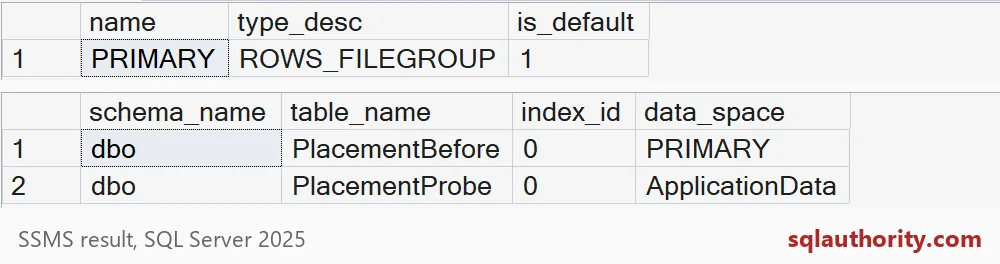
PlacementBefore is still on PRIMARY. PlacementProbe is on ApplicationData. The default changed the future, not the past. Index 0 means the table is a heap, so its data space is the table’s own.
Watch for scripts that say ON PRIMARY
Here is where deployments go wrong. A script that names a filegroup ignores the default. Scripts generated from an old database often carry an explicit ON [PRIMARY] on every table.
So you change the default, deploy, and wonder why new tables still land in PRIMARY. The block below creates one table with an explicit ON and lists all three tables.
CREATE TABLE dbo.PlacementExplicit (ProbeId int NOT NULL) ON [PRIMARY];

SELECT OBJECT_NAME(i.object_id) AS table_name, ds.name AS data_space
FROM sys.indexes AS i
JOIN sys.data_spaces AS ds ON ds.data_space_id = i.data_space_id
WHERE i.object_id IN (OBJECT_ID(N'dbo.PlacementBefore'), OBJECT_ID(N'dbo.PlacementProbe'),
                      OBJECT_ID(N'dbo.PlacementExplicit'))
ORDER BY table_name;
PlacementExplicit lands in PRIMARY, even though the default is ApplicationData. Search your real deployment scripts for ON [PRIMARY] before you trust the new rule.

Moving an existing table
Changing the default never moves data. To move a table, rebuild it somewhere else. One simple way is to create a clustered index on the new filegroup. The table follows its clustered index.
CREATE CLUSTERED INDEX IX_PlacementBefore ON dbo.PlacementBefore (ProbeId) ON ApplicationData;

SELECT OBJECT_NAME(i.object_id) AS table_name, i.index_id, ds.name AS data_space
FROM sys.indexes AS i
JOIN sys.data_spaces AS ds ON ds.data_space_id = i.data_space_id
WHERE i.object_id = OBJECT_ID(N'dbo.PlacementBefore');
PlacementBefore now reports index_id 1 on ApplicationData. On a big table this rebuild takes time and log space, so plan it. Large objects and partitioned tables need extra care.
Last, drop the demo database. This also removes the extra file.
USE master;
DROP DATABASE IF EXISTS SqlAuthorityDemo;
Before you rely on the new default, read your deployment scripts for explicit placement.
A default filegroup is not a table mover, it is a rule for new tables.
Published by Pinal Dave on SQLAuthority. More of my work at pinaldave.com.
Discover more from SQL Authority with Pinal Dave
Subscribe to get the latest posts sent to your email.