You can explain a SQL Server index in about a minute: what it is, what it saves and what it costs. Then you can prove every word with one table and one query. This post gives you both, with numbers measured on SQL Server 2025.

The Sixty-Second Answer
If an interviewer asks what an index is, this is the answer I’d want to hear. Say it in your own words.
An index is a sorted copy of one or more columns, with a pointer back to the full row. SQL Server uses it to jump to the rows it needs instead of reading the whole table. The clustered index is the table itself, stored in key order, so a table gets only one. A nonclustered index is a separate structure, and a table can have many. Indexes speed up searches, joins and sorting. They cost disk space, and every insert, update and delete has to maintain them. The optimizer decides whether to use one, so an index helps only the queries that can use it.
That’s the whole idea. The rest of this post shows each sentence happening on a real table.
Prove It: The Same Query Three Ways
The test table holds 200,000 orders for 5,000 customers. Customer 42 has 40 orders. Run this on a test server only.
CREATE DATABASE IndexMinuteLab;
ALTER DATABASE IndexMinuteLab SET RECOVERY SIMPLE;
GO
USE IndexMinuteLab;
CREATE TABLE dbo.CustomerOrder
(
    OrderID    int           NOT NULL CONSTRAINT PK_CustomerOrder PRIMARY KEY CLUSTERED,
    CustomerID int           NOT NULL,
    OrderDate  date          NOT NULL,
    Amount     decimal(10,2) NOT NULL,
    Notes      char(200)     NOT NULL
);
WITH n AS (SELECT TOP (200000) ROW_NUMBER() OVER (ORDER BY (SELECT NULL)) AS i
           FROM sys.all_columns AS a CROSS JOIN sys.all_columns AS b)
INSERT dbo.CustomerOrder (OrderID, CustomerID, OrderDate, Amount, Notes)
SELECT i, i % 5000 + 1, DATEADD(DAY, -(i % 1000), '2026-10-01'), (i % 9000) / 10.0 + 5, 'note'
FROM n;
Here’s the query. Turn on the actual execution plan in Management Studio with Ctrl+M, and run it with the reads counter on.
SET STATISTICS IO ON;
SELECT OrderID, OrderDate, Amount FROM dbo.CustomerOrder WHERE CustomerID = 42;
SET STATISTICS IO OFF;
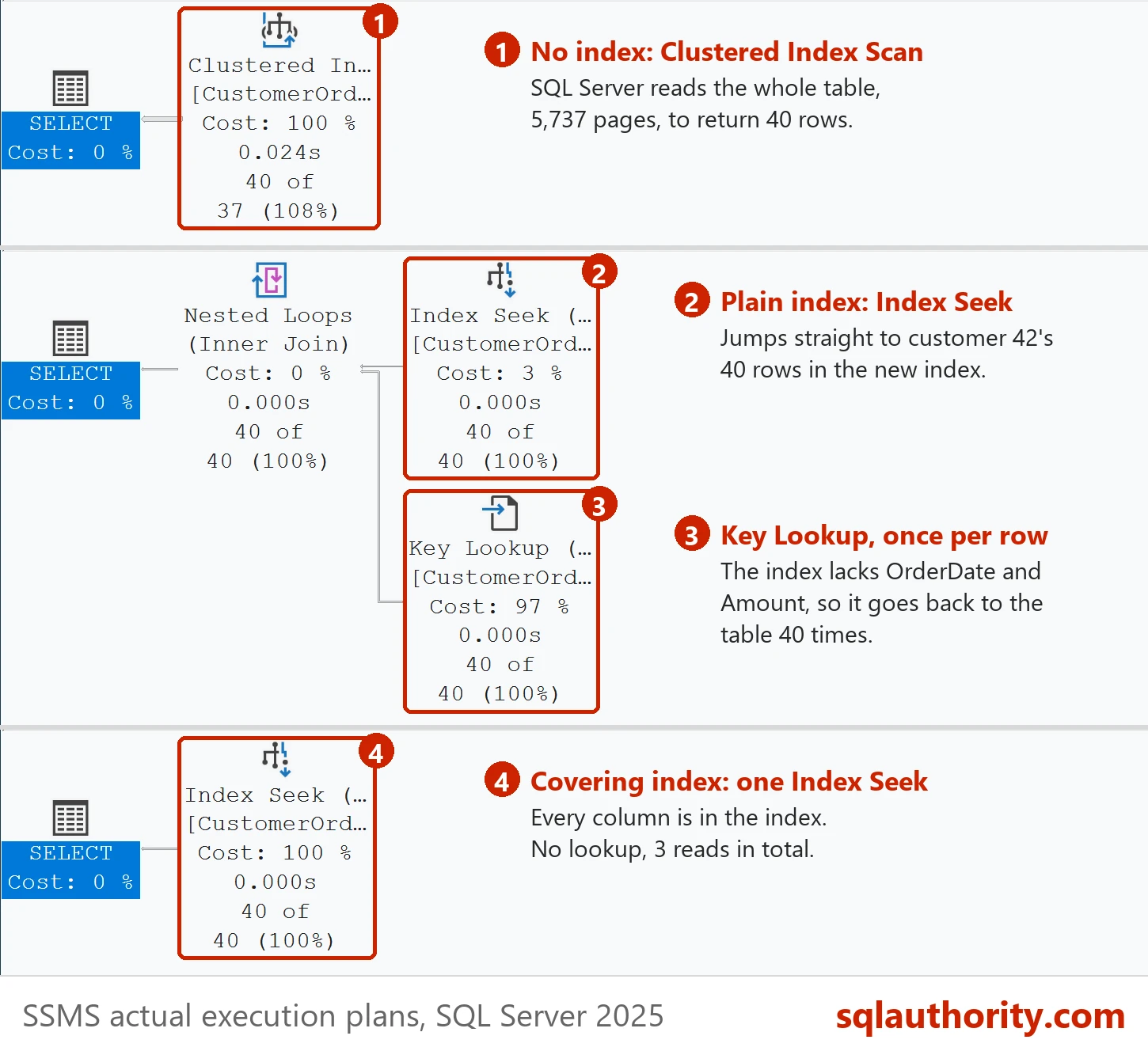
With only the clustered primary key, the plan shows a Clustered Index Scan. SQL Server read 5,737 pages to return 40 rows. It had no faster way to find customer 42, so it read the whole table.
Now add a nonclustered index on CustomerID and run the same query.
CREATE INDEX IX_CustomerOrder_CustomerID ON dbo.CustomerOrder (CustomerID);
The reads dropped to 133. The plan now shows an Index Seek on the new index. Next to it is a Key Lookup for each of the 40 rows. The index knows where customer 42’s orders are. It doesn’t hold OrderDate or Amount, so SQL Server goes back to the table 40 times to fetch them.
Last, make the index carry those two columns, so the query never needs the table.
DROP INDEX IX_CustomerOrder_CustomerID ON dbo.CustomerOrder;
CREATE INDEX IX_CustomerOrder_CustomerID ON dbo.CustomerOrder (CustomerID) INCLUDE (OrderDate, Amount);
Three reads. The plan is a single Index Seek, with no lookup. This is a covering index: it holds every column the query asks for. It took 5.1 MB of space next to a 45 MB table.
The Cost the Interviewer Asks About Next
A good interviewer follows up with one question: why not index every column? The answer is in the write path. Every index is another structure SQL Server has to update on every change. This test inserts 20,000 rows one at a time, the way an application does. The rows go into two empty copies of the table. One copy has only its primary key. The other also has three nonclustered indexes.
SELECT * INTO dbo.Lean FROM dbo.CustomerOrder WHERE 1 = 0;
ALTER TABLE dbo.Lean ADD CONSTRAINT PK_Lean PRIMARY KEY (OrderID);
SELECT * INTO dbo.Heavy FROM dbo.CustomerOrder WHERE 1 = 0;
ALTER TABLE dbo.Heavy ADD CONSTRAINT PK_Heavy PRIMARY KEY (OrderID);
CREATE INDEX IX_Heavy_CustomerID ON dbo.Heavy (CustomerID);
CREATE INDEX IX_Heavy_OrderDate ON dbo.Heavy (OrderDate);
CREATE INDEX IX_Heavy_Amount ON dbo.Heavy (Amount);
The insert loop runs inside one transaction and reports the log it wrote before committing. Run it for dbo.Lean, then change the table name to dbo.Heavy and run it again.
DECLARE @i int = 1, @start datetime2 = SYSDATETIME();
BEGIN TRAN;
WHILE @i <= 20000
BEGIN
    INSERT dbo.Lean (OrderID, CustomerID, OrderDate, Amount, Notes)
    VALUES (@i, @i % 5000 + 1, DATEADD(DAY, -(@i % 1000), '2026-10-01'), (@i % 9000) / 10.0 + 5, 'note');
    SET @i += 1;
END;
SELECT CAST(database_transaction_log_bytes_used / 1048576.0 AS decimal(9,1)) AS log_mb,
       DATEDIFF(MILLISECOND, @start, SYSDATETIME()) AS elapsed_ms
FROM sys.dm_tran_database_transactions
WHERE database_id = DB_ID() AND transaction_id = CURRENT_TRANSACTION_ID();
COMMIT;
I ran each one four times, three of them in turns. With only the primary key, the inserts wrote 6.8 MB of log in 199 to 244 milliseconds. With three extra indexes, they wrote 14.0 to 14.3 MB in 535 to 583 milliseconds. Three indexes doubled the log and more than doubled the time.
So an index is a trade. The covering index turned 5,737 reads into 3 for one query. Every index you add also makes every write a little heavier. Add the ones your important queries use, and drop the ones nothing reads.
Three Follow-Up Questions to Expect
What’s the difference between clustered and nonclustered? The clustered index is the table, stored in key order, so there’s only one. A nonclustered index is a separate sorted copy of some columns that points back to the row.
What is a Key Lookup? It’s the trip back to the table for columns the index doesn’t hold. A few are cheap. Thousands of them can cost more than a scan.
Why didn’t SQL Server use my index? The optimizer picks the cheapest plan it can find. When a query returns a large share of the table, a scan can be cheaper than many seeks and lookups.
When you’re done, remove the lab database.
USE master;
ALTER DATABASE IndexMinuteLab SET SINGLE_USER WITH ROLLBACK IMMEDIATE;
DROP DATABASE IndexMinuteLab;
For a longer, plain-language tour of indexes, read What Is an Index in SQL Server?.
An index is not a speed button, it is a trade between faster reads and heavier writes.
Published by Pinal Dave on SQLAuthority. More of my work at pinaldave.com.
Discover more from SQL Authority with Pinal Dave
Subscribe to get the latest posts sent to your email.