GROUPING SETS lets me choose independent subtotal combinations instead of assuming one hierarchy. I list the groups the report needs explicitly. That can exclude detail rows while retaining summaries across different dimensions.
A report may need region totals and channel totals without every region-channel detail. Neither dimension has to be treated as the parent of the other. The grouping-set list expresses those independent summaries directly.

Request three specific grouping sets
The source has four populated region-channel combinations and a total amount of forty. North contributes thirty and South contributes ten. Online contributes thirteen and Store contributes twenty-seven.
The first query requests Region alone, Channel alone and the empty grouping set. The empty set requests the grand total. The query does not request the two-column detail grouping.
GROUPING_ID is included only to identify the output level. The central decision is which combinations appear in GROUPING SETS. An explicit order keeps each subtotal family together in the displayed result.
WITH Sales AS
(
    SELECT Region, Channel, Amount
    FROM (VALUES (CAST('North' AS varchar(10)), CAST('Online' AS varchar(10)), 10),
                 ('North', 'Store', 20), ('South', 'Online', 3), ('South', 'Store', 7)) AS v(Region, Channel, Amount)
)
SELECT Region, Channel, SUM(Amount) AS SalesAmount,
       GROUPING_ID(Region, Channel) AS GroupingId
FROM Sales
GROUP BY GROUPING SETS ((Region), (Channel), ())
ORDER BY GroupingId, Region, Channel;

WITH Sales AS
(
    SELECT Region, Channel, Amount
    FROM (VALUES (CAST('North' AS varchar(10)), CAST('Online' AS varchar(10)), 10),
                 ('North', 'Store', 20), ('South', 'Online', 3), ('South', 'Store', 7)) AS v(Region, Channel, Amount)
)
SELECT SUM(Amount) AS GrandTotal
FROM Sales
GROUP BY GROUPING SETS ((), ());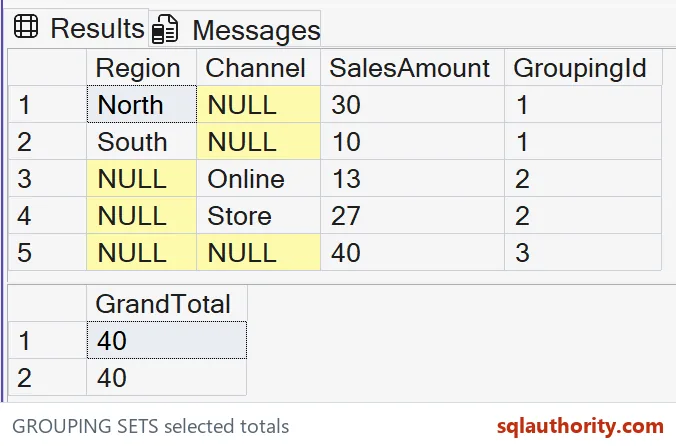
Read the five expected summaries
The first result should contain five rows. Two are region subtotals, two are channel subtotals, and one is the grand total. There are no region-channel detail rows in that requested population.
The region rows have GroupingId one because Channel is aggregated away. Their expected amounts are thirty for North and ten for South. The channel rows have GroupingId two and amounts thirteen and twenty-seven.
The grand total has GroupingId three and amount forty. Both dimension columns are aggregation placeholders there. The source values in this example are populated, so no source-NULL group needs an additional display label.
Each subtotal family covers the same underlying source amount. Adding all five output amounts together would count that source repeatedly. A report must keep levels separate rather than treating every row as an additive detail.
The grouping-set list is part of the contract
ROLLUP creates a hierarchy following its argument order. CUBE requests every grouping combination. GROUPING SETS is useful when the required selection is neither of those complete patterns.
Adding the two-column set would introduce detail groups. Removing the empty set would remove the grand total. Those are deliberate population changes, not cosmetic modifications to the report.
The second query repeats the empty grouping set twice. Its expected output contains two grand-total rows, each forty. SQL Server does not consolidate duplicate grouping sets into a single requested group.
I don’t add duplicate sets accidentally when combining report requirements. Review the complete list, especially when several fragments request their own totals. A correct amount repeated twice can still be an incorrect report shape.

Keep the example focused on chosen combinations
The grouping bits describe the dimensions used for each row. They do not identify a source sales record. Preserve the level identifier when another tool needs to separate the subtotal families.
The example uses one additive measure with a clear source definition. Different measures can have different aggregation rules. A subtotal query cannot establish that averages, rates or balances should be added in the same way.
This pure SELECT batch creates no tables and changes no settings. It makes no performance comparison against several separate queries. The demonstrated benefit is an explicit list of grouping combinations and complete expected results.
When adapting the query, check both the amounts and the number of output groups. A sample containing only one region or channel can hide an omitted grouping family. Keep several values in both dimensions so each requested set is visible.
List the combinations the report needs, and check that each set appears only as intended.
A subtotal is not a detail row, it is a summary level you chose on purpose.
Published by Pinal Dave on SQLAuthority. More of my work at pinaldave.com.
Discover more from SQL Authority with Pinal Dave
Subscribe to get the latest posts sent to your email.