Unambiguous date literals mean the same day on every server, whatever its language or date format. The dashed string 2026-04-03 looks safe, but one old data type can read it as March 4. The fix is small: pick the right literal, or better, pass a typed date.

The script that worked on my laptop
Here is a story that has happened to many of us. You write a script with a date in it, test it, and it behaves. A colleague runs the same script on a server set up for a different language. Nothing fails. The rows just land on the wrong day.
The date format is a session setting, and it decides how numeric dates are read. To see the problem without a second server, I switch my own session to day-month-year order with SET DATEFORMAT dmy. The demo restores the old setting at the end of the block.
One string, three data types
The first result converts the same text three ways. Legacy datetime reads 2026-04-03 as March 4. The newer date and datetime2 types keep April 3. So you cannot learn one type’s rules and apply them to another.
The second result shows safer forms. The legacy type rejects 2026-04-13 under dmy, because there is no month 13, so TRY_CONVERT gives NULL instead of an error. The compact form 20260403 and the full ISO form with a T both give April 3, whatever the session says.
DECLARE @OldFormat varchar(3) =
    (SELECT date_format FROM sys.dm_exec_sessions WHERE session_id = @@SPID);

SET DATEFORMAT dmy;

SELECT CONVERT(varchar(30), TRY_CONVERT(datetime, '2026-04-03'), 126) AS LegacyValue,
       TRY_CONVERT(date, '2026-04-03') AS DateValue,
       CONVERT(varchar(30), TRY_CONVERT(datetime2, '2026-04-03'), 126) AS DateTime2Value;

SELECT TRY_CONVERT(datetime, '2026-04-13') AS RejectedLegacy,
       CONVERT(char(10), CONVERT(datetime, '20260403', 112), 23) AS CompactDate,
       CONVERT(varchar(30), CONVERT(datetime2, '2026-04-03T14:30:00', 126), 126) AS IsoTimestamp;

SET DATEFORMAT @OldFormat;
Notice that I print with style 126. That keeps the display itself from adding a second ambiguity.

Better: pass a typed date
If an application already knows the day, never send it as text. Pass a date parameter. There is nothing to parse, so no session setting can change its meaning. The third result shows the date arriving as April 3.
DECLARE @Day date = DATEFROMPARTS(2026, 4, 3);

EXEC sys.sp_executesql N'SELECT @Day AS RequestedDay;', N'@Day date', @Day = @Day;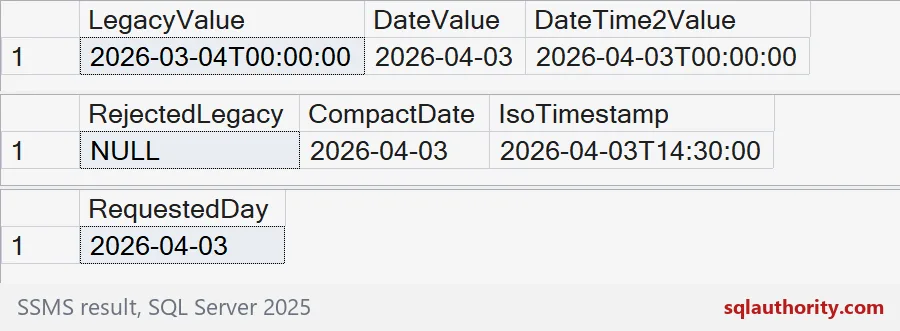
Four settings, side by side
Now the fuller picture. The loop below tries four date formats and converts the same dashed text with the legacy type and the date type. It also converts the compact form 20260403 with the legacy type. The date column never changes. The legacy column changes twice.
DROP TABLE IF EXISTS #Seen;
CREATE TABLE #Seen (n int PRIMARY KEY, DateFormat varchar(3),
                    LegacyDatetime varchar(30), DateValue varchar(30), CompactDatetime varchar(30));

DECLARE @OldFormat varchar(3) =
    (SELECT date_format FROM sys.dm_exec_sessions WHERE session_id = @@SPID);
DECLARE @Text varchar(10) = '2026-04-03', @Compact varchar(8) = '20260403';
DECLARE @Formats table (n int PRIMARY KEY, Name varchar(3));
INSERT @Formats VALUES (1, 'mdy'), (2, 'dmy'), (3, 'ymd'), (4, 'ydm');

DECLARE @i int = 1, @Format varchar(3);
WHILE @i <= 4
BEGIN
    SELECT @Format = Name FROM @Formats WHERE n = @i;
    SET DATEFORMAT @Format;
    INSERT #Seen
    SELECT @i, @Format,
           CONVERT(varchar(30), TRY_CONVERT(datetime, @Text), 126),
           CONVERT(varchar(30), TRY_CONVERT(date, @Text), 126),
           CONVERT(varchar(30), TRY_CONVERT(datetime, @Compact), 126);
    SET @i += 1;
END;

SET DATEFORMAT @OldFormat;
SELECT DateFormat, LegacyDatetime, DateValue, CompactDatetime FROM #Seen ORDER BY n;
DROP TABLE #Seen;
Under mdy and ymd the legacy value is April 3. Under dmy and ydm it is March 4. The date type and the compact form give April 3 in every row.
What to write in your scripts
Use YYYYMMDD for a date and YYYY-MM-DDThh:mm:ss for a timestamp. Prefer date and datetime2 for new columns. Never write a regional form such as 04/03/2026 in a script that will run somewhere else. In application code, send a typed parameter and skip the text.
Run the four-format check on your own server before the next deployment. It takes a minute.
When the date matters, let the data type carry it.
A dashed date is not a safe literal, it is text until you say what type it is.
Published by Pinal Dave on SQLAuthority. More of my work at pinaldave.com.
Discover more from SQL Authority with Pinal Dave
Subscribe to get the latest posts sent to your email.