NCHAR constructs a Unicode character from an integer code rather than formatting the integer as text. I retain the supplied code beside the character. A code outside the supported range is not automatically a printable replacement character.

Separate construction from number formatting
The query supplies integer codes explicitly. Sixty-five is expected to construct A, while 233 constructs an accented letter. The integer digits themselves are not the desired output text.
The third present code, 30028, is expected to construct a basic-plane Chinese character. Its two-byte Unicode storage size matches the other two present characters. A different-looking glyph does not imply a different byte width in these samples.
Every constructed value is cast to nvarchar(2) for a consistent displayed output type. That cast does not select the code point. It supplies enough capacity for the function result within this query’s contract.
I keep CodeValue in the output so a display-font problem does not erase the source information. A missing glyph on a client is different from the function returning NULL. The companion byte and code-point columns help separate those observations.
WITH Codes AS
(
    SELECT CaseId,CodeValue
    FROM (VALUES (1,CAST(-1 AS int)),(2,65),(3,233),(4,30028),(5,1114112),
        (6,CAST(NULL AS int))) AS v(CaseId,CodeValue)
), Built AS
(
    SELECT *,CAST(NCHAR(CodeValue) AS nvarchar(2)) AS CharacterValue
    FROM Codes
)
SELECT CaseId,CodeValue,CharacterValue,DATALENGTH(CharacterValue) AS CharacterBytes,
    UNICODE(CharacterValue) AS ReturnedCodePoint
FROM Built
ORDER BY CaseId;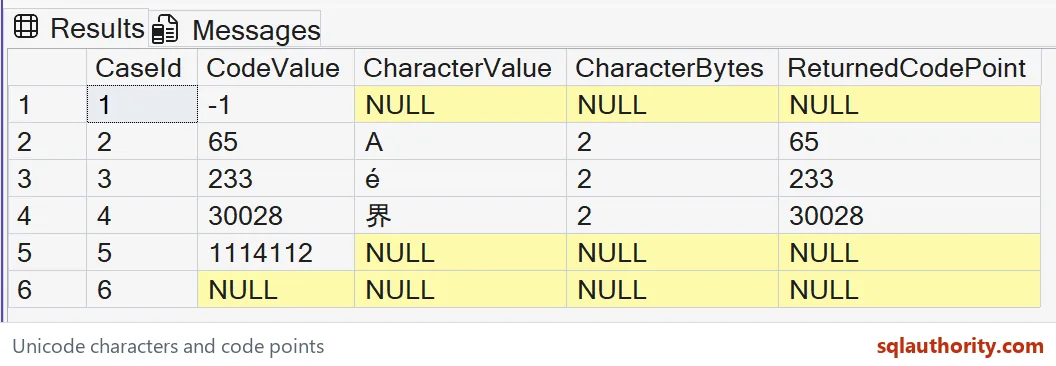
Check the ordinary round trip
UNICODE reads the first code point of each constructed present character. The expected returned values are sixty-five, 233 and 30028. They match the source codes in these basic-plane cases.
The three corresponding byte counts are two. Those counts concern the nvarchar values rather than UTF-8 exports. Exporting the same characters under another encoding would be a separate operation.
I wouldn’t compare only how the glyphs look. Different characters can appear similar in a chosen font. The returned code points make the narrow construction model explicit.
The query does not build a complete word or language label. It returns one constructed character per supplied code. Combining characters into meaningful text requires a separate source and ordering contract.

Keep invalid codes and missing codes visible
Negative one lies outside both code ranges: 0 to 65535, or 0 to 1114111 with a supplementary-character collation. The value 1114112 also exceeds the supported Unicode maximum. Their expected constructed values, byte counts and returned code points are NULL.
The final row supplies no code at all. Its expected output is also NULL. The original code column still distinguishes an unsuitable supplied number from missing input.
An application may reject invalid codes with a separate status label. That is different from changing every invalid number into a question mark. A replacement policy changes the output and should be named explicitly.
I deliberately avoid a surrogate-half construction example. Independently concatenating surrogate halves is not the preferred way to build such a character. An integer source should identify the intended code point under a supported database collation.
Review the database collation before supplementary codes
The database’s supplementary-character support affects NCHAR’s permitted range and natural return type. Applying COLLATE to a finished result does not retroactively change which character the constructor accepted. That distinction matters before using supplementary codes.
This example keeps its successful codes in the basic plane. They fit within either range. Its invalid examples are outside both ranges, so these particular outcomes do not require a different database collation.
A supplementary character can require more than one UTF-16 storage unit. Its supported construction depends on the database’s character environment. Keep that separate from the basic-plane examples shown here.
I’d validate the source code range before using constructed text in an identifier or display. A valid character can still be unsuitable for a particular field. Character construction alone does not supply an application-level acceptance rule.
Keep the code, constructed value and returned code point when adapting this demonstration. Test a valid ordinary character, a non-Latin character and an invalid code. That makes the intended constructor behavior reviewable without relying on a font alone.
A few test codes will tell you more than any font ever will.
A code point is not an acceptance rule, it is just a character’s address.
Published by Pinal Dave on SQLAuthority. More of my work at pinaldave.com.
Discover more from SQL Authority with Pinal Dave
Subscribe to get the latest posts sent to your email.