Sizing nvarchar columns starts with real input, not with the number you always use. A name that fits the form can still fail when it reaches the table. Measure your longest values in characters and in bytes, then leave generous room.

The signup that fails after the form says yes
A new customer types a long name. The web form accepts it, because the form has its own limit. The insert fails with a truncation error, and the customer sees a vague “something went wrong”. Support asks you why.
Most of the time the answer is a column that someone sized years ago from habit. The usual fix is to look at what really arrives. The demo starts with four sample values and measures them two ways.
Characters and bytes are different questions
LEN counts characters and ignores trailing spaces. DATALENGTH counts bytes and keeps every space. Each nvarchar character normally takes two bytes. Look at the first result below.
Row 1, “Ana”, has 3 characters and 6 bytes. Row 2 is 120 letters and uses 240 bytes. Row 3 is “Ana” with two trailing spaces. LEN still says 3, but the bytes are 10. Row 4 is a single emoji. It shows LEN 2 and 4 bytes, because it is stored as two UTF-16 code units.
DROP TABLE IF EXISTS #Names;
CREATE TABLE #Names (Id int PRIMARY KEY, Value nvarchar(400) NOT NULL);

INSERT #Names VALUES
    (1, N'Ana'),
    (2, REPLICATE(N'X', 120)),
    (3, N'Ana  '),
    (4, NCHAR(0xD83D) + NCHAR(0xDE00));

SELECT Id,
       LEN(Value) AS LengthWithoutTrailingSpaces,
       DATALENGTH(Value) AS BytesUsed
FROM #Names
ORDER BY Id;

SELECT MAX(LEN(Value)) AS MaximumLength,
       MAX(DATALENGTH(Value)) AS MaximumBytes
FROM #Names;
The second result is the number you actually need. The longest sample is 120 characters and 240 bytes. Notice that I measured it on a wide staging column. If you measure on a narrow one, the truncated values hide the real maximum.
What n really means in nvarchar(n)
The n in nvarchar(n) counts byte pairs, not visible characters. So nvarchar(10) holds 10 pairs, which is 20 bytes. An emoji uses two pairs by itself. A column declared for ten characters can run out sooner than you expect.
The block below makes a column of nvarchar(10) and tries to insert 11 letters. It fails with error 2628, the truncation error. The last result confirms the declared size is 20 bytes. Nothing was stored.
DROP TABLE IF EXISTS #ShortNames;
CREATE TABLE #ShortNames (Value nvarchar(10));

BEGIN TRY
    INSERT #ShortNames VALUES (REPLICATE(N'X', 11));
END TRY
BEGIN CATCH
    SELECT ERROR_NUMBER() AS ErrorNumber;
END CATCH;

SELECT max_length AS DeclaredMaximumBytes
FROM tempdb.sys.columns
WHERE object_id = OBJECT_ID('tempdb..#ShortNames') AND name = N'Value';

DROP TABLE #ShortNames;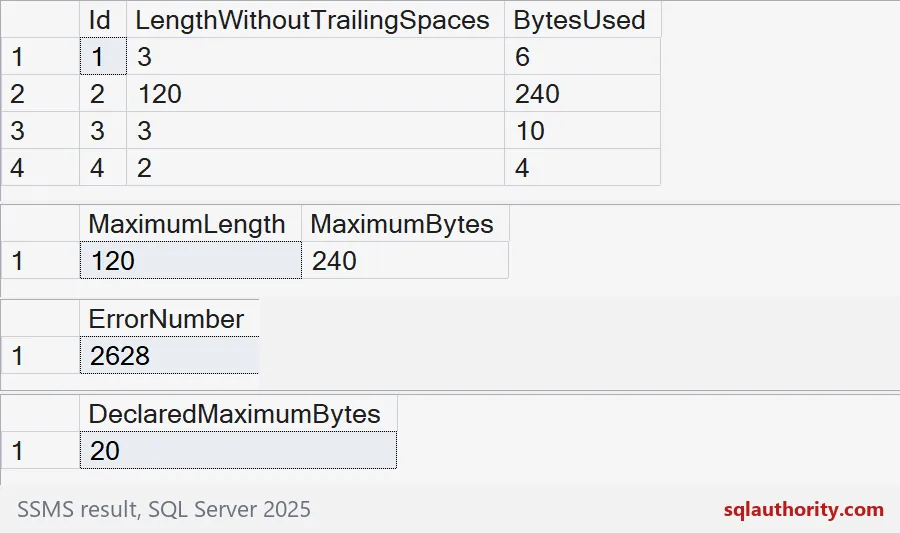

Look at the whole distribution
One maximum is not enough. You also want to know how many values are long. A histogram shows whether the long names are a rare tail or a real pattern. This staging table holds made-up names, so no real person is involved.
The first result groups names into buckets of 20 characters. The second asks the question a designer actually has: how many would break a limit of 50?
DROP TABLE IF EXISTS #Staging;
CREATE TABLE #Staging (Id int PRIMARY KEY, FullName nvarchar(400) NOT NULL);

INSERT #Staging VALUES
    (1, N'Li Wei'),
    (2, N'Ana Souza'),
    (3, N'Maria Fernanda Gonzalez Rodriguez'),
    (4, N'Hans-Joachim Schneider-Weber'),
    (5, N'Priya Raghunathan Venkataraghavan Subramaniam Iyer Sundaram'),
    (6, REPLICATE(N'Z', 120));

SELECT (LEN(FullName) / 20) * 20 AS FromLength,
       COUNT(*) AS Names
FROM #Staging
GROUP BY (LEN(FullName) / 20) * 20
ORDER BY FromLength;

SELECT COUNT(*) AS Names,
       SUM(CASE WHEN LEN(FullName) > 50 THEN 1 ELSE 0 END) AS LongerThan50
FROM #Staging;

DROP TABLE #Staging;
Look at the histogram. Four of six names sit under 40 characters. One is in the 40 bucket, and one is at 120. The second result says a limit of 50 would reject two of the six.
Leave room, then enforce real rules
Choose generous storage and then use CHECK constraints for business rules you can defend. Do not turn one culture’s naming habit into a universal limit. Also check the whole path. A parameter, a staging table and the final table all need enough room. A wide destination cannot bring back text that an earlier step already cut.
Before you pick a length, run the measuring query on your own data.
A name limit is not a cultural rule, it is a storage choice you make on purpose.
Published by Pinal Dave on SQLAuthority. More of my work at pinaldave.com.
Discover more from SQL Authority with Pinal Dave
Subscribe to get the latest posts sent to your email.