I choose DATEDIFF_BIG when an interval’s boundary count can exceed int. The larger return type protects a long calculation. It doesn’t change what a datepart boundary means or make the result an elapsed-time stopwatch.

Use a long interval deliberately
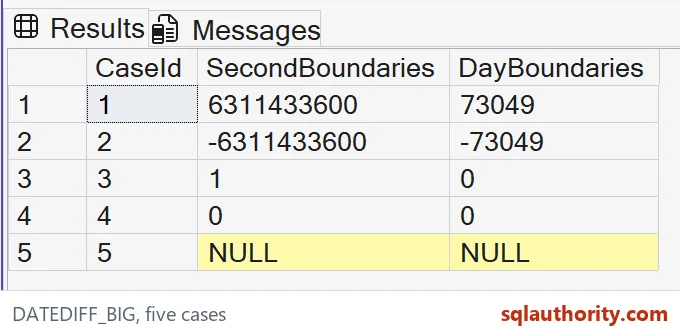
The first example spans two hundred years between midnight endpoints. Its seconds count exceeds the positive int limit. The day count is much smaller, even though both columns describe the same pair of timestamps.
I use datetime2 inputs and an explicit second datepart. There is no failing DATEDIFF call in this read-only example. A cast around an already overflowing int result wouldn’t rescue that earlier calculation. The function must produce the wider result itself.
WITH Inputs AS
(
 SELECT CaseId, CAST(StartText AS datetime2(7)) AS StartAt,
        CAST(EndText AS datetime2(7)) AS EndAt
 FROM (VALUES
  (1,N'1900-01-01T00:00:00',N'2100-01-01T00:00:00'),
  (2,N'2100-01-01T00:00:00',N'1900-01-01T00:00:00'),
  (3,N'2026-01-01T00:00:00.9999999',N'2026-01-01T00:00:01.0000000'),
  (4,N'2026-01-01T00:00:00',N'2026-01-01T00:00:00'),
  (5,CAST(NULL AS nvarchar(40)),N'2026-01-01T00:00:00')
 ) v(CaseId,StartText,EndText)
)
SELECT CaseId, DATEDIFF_BIG(second,StartAt,EndAt) AS SecondBoundaries,
       DATEDIFF_BIG(day,StartAt,EndAt) AS DayBoundaries
FROM Inputs
ORDER BY CaseId;
Keep direction visible
The second case reverses the endpoints. Its expected counts are the negatives of the first row’s counts. That sign is useful information when the ordering of source timestamps hasn’t been guaranteed.
I’d retain signed results during validation instead of applying an absolute value immediately. A negative interval may identify reversed inputs or a legitimate retrospective comparison. The application needs to decide which interpretation fits. Changing the sign can hide that evidence.
Separate width from boundary meaning
The third case crosses a second boundary by only one hundred nanoseconds. Its second count is one, while its day count is zero. The fourth case repeats one timestamp and expects both counts to be zero.
These rows explain a different question from long-range overflow. A larger integer doesn’t turn boundary counting into fractional elapsed seconds. I’d name the output SecondBoundaries rather than DurationSeconds when that distinction matters to the consumer.
Keep missing inputs missing
The last row supplies a typed NULL start time. Both expected counts remain NULL. I don’t invent an anchor date to turn that missing endpoint into a number.
A reporting rule can exclude incomplete intervals or display a separate missing-data state. That policy belongs beside the calculation. Treating an unknown start as midnight on an arbitrary day changes the question. It can create a plausible count without a defensible interval.
Choose a datepart that fits the range
DATEDIFF_BIG is available in SQL Server 2016 and later. It returns bigint, but bigint still has a finite range. A nanosecond count across a very long span can overflow this wider type too.
I’d check the expected span and required unit together. Seconds may fit a long retention interval where nanoseconds don’t. The extra digits also shouldn’t imply precision that the stored timestamps never had. Keep source precision and output range as separate design decisions.
Validate the complete contract
The query creates no tables and changes no session settings. All five cases are inline, and CaseId fixes their display order. Both count columns belong in the result comparison.
For a production adaptation, I’d also review time-zone handling and source types. This example uses plain datetime2 values with no offsets. Its expected arithmetic doesn’t establish a calendar policy for mixed regional timestamps. The caller must supply that policy before interpreting the count.
Pick the datepart for the range you need, and the count stays honest.
DATEDIFF_BIG is not a stopwatch, it is a wider counter of datepart boundaries.
Published by Pinal Dave on SQLAuthority. More of my work at pinaldave.com.
Discover more from SQL Authority with Pinal Dave
Subscribe to get the latest posts sent to your email.