Amortization schedules need a rounding rule, or the last payment leaves a few cents behind. A recursive CTE is a natural fit. Each month rounds its own interest and hands the rounded balance to the next month.

Why the last payment is never quite right
Imagine a finance team opening your schedule at month end. Every payment says 111.02. After the last one, the balance reads 0.02, or minus 0.03. Nobody can ship that. It is only a few cents, but it makes people stop trusting the rest of the report.
The cause is plain. The exact payment has more digits than a cent, but money lives in cents. Each month rounds the interest, and the small differences pile up. You need a policy: round the interest each month, and let the final payment absorb whatever is left.
The sample loan is 10000 at a monthly rate of 0.005 for 120 months. It assumes equal periods and no fees. A real lender may count days differently, so treat this as a calculation, not a contract.
Compute the fixed payment first
The rate is already monthly. The payment is the principal times the rate, divided by one minus the discount factor, rounded to cents. A zero rate would divide by zero, so it gets its own branch. Use decimal for money, never float. I use float only inside POWER and convert back at once.
DROP TABLE IF EXISTS #Loan;
CREATE TABLE #Loan (
    Principal   decimal(19,2),
    MonthlyRate decimal(19,10),
    Months      int,
    Payment     decimal(19,2));

INSERT #Loan (Principal, MonthlyRate, Months) VALUES (10000, 0.005, 120);

UPDATE #Loan
SET Payment = CONVERT(decimal(19,2), ROUND(
    CASE WHEN MonthlyRate = 0 THEN Principal / Months
         ELSE Principal * MonthlyRate / (1 - POWER(CAST(1 + MonthlyRate AS float), -Months))
    END, 2));

SELECT Payment AS ScheduledPayment FROM #Loan;
The scheduled payment is 111.02.
Carry the rounded balance with a recursive CTE
The anchor row is month 1 with the full principal as the opening balance. Each recursive step rounds the interest to cents, subtracts the principal part of the payment, and passes the new balance on. The final month is special. It pays the opening balance plus its interest, so the balance lands exactly on zero.
MAXRECURSION 0 is needed because the default limit is 100 levels and this schedule has 120.
DROP TABLE IF EXISTS #Schedule;
CREATE TABLE #Schedule (
    Period int PRIMARY KEY, Opening decimal(19,2), Payment decimal(19,2),
    Interest decimal(19,2), Principal decimal(19,2), Balance decimal(19,2));

DECLARE @Principal decimal(19,2), @Rate decimal(19,10), @Months int, @Payment decimal(19,2);
SELECT @Principal = Principal, @Rate = MonthlyRate, @Months = Months, @Payment = Payment FROM #Loan;

WITH Schedule AS (
    SELECT 1 AS Period, @Principal AS Opening
    UNION ALL
    SELECT Period + 1,
           CAST(Opening - (@Payment - ROUND(Opening * @Rate, 2)) AS decimal(19,2))
    FROM Schedule
    WHERE Period < @Months)
INSERT #Schedule
SELECT Period, Opening,
       CASE WHEN Period = @Months THEN Opening + i.Interest ELSE @Payment END,
       i.Interest,
       CASE WHEN Period = @Months THEN Opening ELSE @Payment - i.Interest END,
       CASE WHEN Period = @Months THEN 0 ELSE Opening - (@Payment - i.Interest) END
FROM Schedule
CROSS APPLY (SELECT CAST(ROUND(Opening * @Rate, 2) AS decimal(19,2)) AS Interest) AS i
OPTION (MAXRECURSION 0);

SELECT Period, Opening, Payment, Interest, Principal, Balance
FROM #Schedule
ORDER BY Period;
The result has 120 rows. The first row opens at 10000.00, charges 50.00 of interest, and repays 61.02 of principal, leaving 9938.98. Interest shrinks each month and principal grows. That is amortization in one glance.

The zero-interest edge case
Now a tiny loan: 100 over three months with no interest. Dividing gives 33.33, and three of those repay only 99.99. So the last payment takes the remainder and becomes 33.34. GENERATE_SERIES needs SQL Server 2022 or later.
DECLARE @Principal decimal(19,2) = 100, @Months int = 3;
DECLARE @Payment decimal(19,2) = ROUND(@Principal / @Months, 2);

SELECT value AS Period,
       CASE WHEN value = @Months THEN @Principal - @Payment * (@Months - 1) ELSE @Payment END AS ZeroRatePayment
FROM GENERATE_SERIES(1, @Months)
ORDER BY value;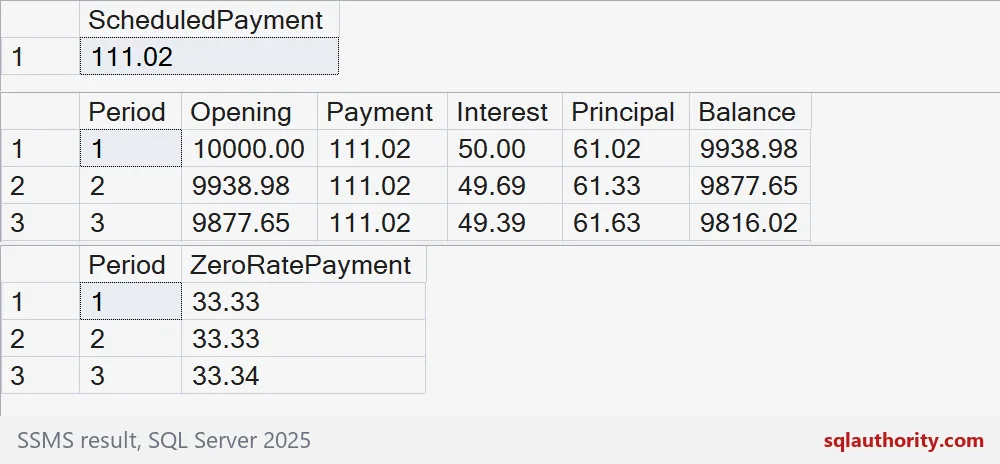
Reconcile before you trust it
Never ship a schedule without a reconciliation. The principal column must add up to the amount borrowed. The last row must end at zero. Look at the last row too. It pays 111.04, not 111.02, because it settles the rounding leftovers.
SELECT COUNT(*) AS Payments,
       SUM(Principal) AS TotalPrincipal,
       SUM(Interest) AS TotalInterest,
       SUM(Payment) AS TotalPaid
FROM #Schedule;

SELECT TOP (2) Period, Opening, Payment, Interest, Principal, Balance
FROM #Schedule
ORDER BY Period DESC;

DROP TABLE #Schedule;
DROP TABLE #Loan;
The principal total equals the loan amount, so nothing went missing. Then test the edges yourself: one period, a very long term, and a zero rate.
Check the final balance as carefully as the monthly payment.
An amortization schedule is not repeated subtraction, it is interest and principal ending at zero.
Published by Pinal Dave on SQLAuthority. More of my work at pinaldave.com.
Discover more from SQL Authority with Pinal Dave
Subscribe to get the latest posts sent to your email.