MySQL developers and DBA often face a very simple challenge when they have to retrieve the time zone of the session which they are connected to. If you look at MySQL documentation and search engine there are many different ways to do the same. In this blog post, I will demonstrate the simple method which I use to detect Timezone of the server I am connected with the current session. All it takes is one line to read the current time zone name.
Run following script in against your MySQL server:
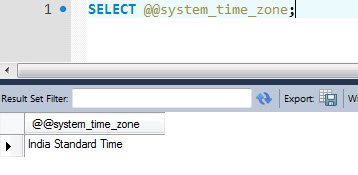
SELECT @@system_time_zone;
It will return the result set with the name of your Timezone. For example, I am in India and the time zone of my machine is India Standard Time hence the result will contain the same.
Let me know if you use any other method to retrieve the Timezone of the server where MySQL is installed.
Published by Pinal Dave on SQLAuthority. More of my work at pinaldave.com.
Discover more from SQL Authority with Pinal Dave
Subscribe to get the latest posts sent to your email.