When storing hash values, keep the digest as binary(32), not as a 64-character hex string. The hex form is only a way to print the bytes. It takes twice the space, and it brings case and collation trouble with it.

Why the hash ends up as text
A developer hashes every uploaded file with SHA2_256 so duplicates are easy to spot. In the first test the result grid shows a long 0x string, and it looks like text. So the column becomes char(64). It prints nicely, copies into emails and works with every tool.
Months later the table is big, the index on that column is bigger, and a partner system sends the same hashes in lowercase. Nothing matches. None of this is a bug. It is the cost of storing a display format instead of the data.
Binary, hex and the round trip
HASHBYTES with SHA2_256 returns exactly 32 bytes. CONVERT with style 2 turns them into 64 hex characters, with no 0x prefix. The same style turns the text back into bytes.
The block below returns three grids, and the picture shows them. The first grid holds the digest, its hex text, and the sizes. DATALENGTH says 32 bytes for the binary form and 64 for the text. RoundTripEqual is 1, so nothing is lost when you convert there and back. The two wide hash columns are cut from my picture to keep it readable.
The second grid compares aa with AA, the way a hex digit might arrive in lowercase. Under a binary collation the answer is 0. Under a case-insensitive collation it is 1. A text column gives you either answer depending on its collation. A binary column gives you one answer, always.
The third grid is the subtle one. It hashes the word Sample as Unicode and then as plain varchar. The two digests are not equal, so UnicodeAndNonUnicodeEqual is 0. Decide once whether your application hashes nvarchar or varchar, and write that down.
DECLARE @Hash varbinary(32) = HASHBYTES('SHA2_256', N'Sample');

SELECT @Hash AS BinaryHash,
       CONVERT(char(64), @Hash, 2) AS HexHash,
       DATALENGTH(@Hash) AS BinaryBytes,
       DATALENGTH(CONVERT(char(64), @Hash, 2)) AS HexBytes,
       CASE WHEN @Hash = CONVERT(binary(32), CONVERT(char(64), @Hash, 2), 2)
            THEN 1 ELSE 0 END AS RoundTripEqual;

SELECT CASE WHEN 'aa' COLLATE Latin1_General_100_BIN2 = 'AA' THEN 1 ELSE 0 END AS BinaryTextEqual,
       CASE WHEN 'aa' COLLATE Latin1_General_100_CI_AS = 'AA' THEN 1 ELSE 0 END AS InsensitiveTextEqual;

DECLARE @Different varbinary(32) = HASHBYTES('SHA2_256', CONVERT(varchar(6), 'Sample'));
SELECT CASE WHEN @Hash = @Different THEN 1 ELSE 0 END AS UnicodeAndNonUnicodeEqual;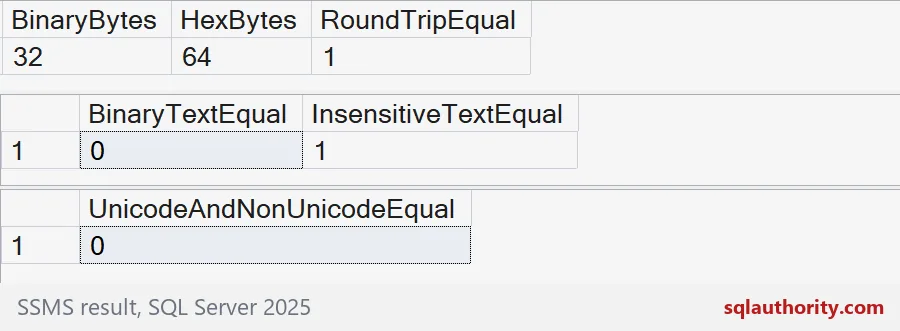
What it costs in an index
Now let us measure instead of guess. The demo builds two tables with the same 100,000 hashes. One stores them as binary(32), the other as char(64). Each has an index on the hash column. The demo creates both tables and drops them at the end.
The result lists the pages used by each index. On my run the index on binary(32) uses 521 pages and the hex index uses 918. The tables themselves use 559 and 953. That is roughly four pages in ten saved. The exact counts depend on your row shape, so measure your own index before you promise anyone a saving.
DROP TABLE IF EXISTS dbo.HashAsBinary;
DROP TABLE IF EXISTS dbo.HashAsHex;

CREATE TABLE dbo.HashAsBinary (Id int IDENTITY PRIMARY KEY, DocHash binary(32) NOT NULL);
CREATE TABLE dbo.HashAsHex (Id int IDENTITY PRIMARY KEY, DocHash char(64) NOT NULL);
CREATE INDEX IX_HashAsBinary ON dbo.HashAsBinary (DocHash);
CREATE INDEX IX_HashAsHex ON dbo.HashAsHex (DocHash);

INSERT dbo.HashAsBinary (DocHash)
SELECT HASHBYTES('SHA2_256', CONVERT(nvarchar(20), value))
FROM GENERATE_SERIES(1, 100000);

INSERT dbo.HashAsHex (DocHash)
SELECT CONVERT(char(64), DocHash, 2)
FROM dbo.HashAsBinary
ORDER BY Id;

SELECT OBJECT_NAME(ps.object_id) AS table_name, i.name AS index_name, ps.in_row_data_page_count AS pages
FROM sys.dm_db_partition_stats AS ps
JOIN sys.indexes AS i ON i.object_id = ps.object_id AND i.index_id = ps.index_id
WHERE ps.object_id IN (OBJECT_ID(N'dbo.HashAsBinary'), OBJECT_ID(N'dbo.HashAsHex'))
ORDER BY table_name, i.index_id;
Short hex strings get padded
If you do keep hex somewhere, for example in a file from another system, validate its length before converting. A hex string that is too short does not raise an error. It is quietly padded with zeros on the right.
The query below converts the four characters ABCD into binary(32). The result is ABCD followed by sixty zeros, and it looks like a perfectly good hash. It will never match a real one. Check that the text is 64 characters first.
SELECT CONVERT(char(64), CONVERT(binary(32), 'ABCD', 2), 2) AS ShortHexAsBinary32;A hash is not a secret
One last warning. A digest is not encryption, and it is not a password design. Collisions are possible in theory. If exact identity matters, compare the original values too, and use the hash only to find candidates quickly. The last block drops the demo tables.
DROP TABLE IF EXISTS dbo.HashAsHex;
DROP TABLE IF EXISTS dbo.HashAsBinary;
Store the bytes, show the hex, and keep those two jobs apart.
A hex string is not a smaller hash, it is a larger way to print one.
Published by Pinal Dave on SQLAuthority. More of my work at pinaldave.com.
Discover more from SQL Authority with Pinal Dave
Subscribe to get the latest posts sent to your email.