Regex flags decide case, line anchors and newline handling in SQL Server 2025. Your column collation does not decide them. That is why a pattern can pass your test string and still miss rows in the table.

Why the pattern passed the test and failed on real data
Here is a common story. You write a regex, test it on one clean string, and it works. You run it on the notes table and a pile of rows are missing. Nobody changed the pattern. The data is just messier than your test string.
Two things usually hide behind it. The column ignores case, so you expect the regex to ignore case too. And the notes were pasted from Windows, so every line ends with two characters, not one. Let me show both, plus a trap before them.
Check the compatibility level first
REGEXP_LIKE needs database compatibility level 170. At level 160 it fails with error 195, which says the name is not a recognized built-in function. The demo makes a database named SqlAuthorityDemo, tries level 160, then puts it back to 170. The last block drops it.
USE master;
DROP DATABASE IF EXISTS SqlAuthorityDemo;
CREATE DATABASE SqlAuthorityDemo;
GO
USE SqlAuthorityDemo;
ALTER DATABASE SqlAuthorityDemo SET COMPATIBILITY_LEVEL = 160;
GO
SELECT CASE WHEN REGEXP_LIKE('Alpha', '^alpha$', 'i') THEN 1 ELSE 0 END AS InsensitiveMatch;
GO
ALTER DATABASE SqlAuthorityDemo SET COMPATIBILITY_LEVEL = 170;
Read the four flag results
Now the main block. It returns four small grids, and the picture below shows them. The first grid shows the build and the compatibility level, 170. Your build number will differ from the one in my picture.
The second grid is about case. The i flag matches Alpha against alpha and returns 1. The c flag returns 0. The third grid has three values. With i and m, the pattern finds SECOND as a whole line. With s, the dot reaches across the newline in first and SECOND. The last one replaces that line with changed. In the picture, the newline shows up as a space.
The fourth grid is a warning. Flags i and c contradict each other. The last one wins, so ic behaves as c and returns 0. Never write both. Whoever reads your script will not know which one won.
SELECT CONVERT(varchar(30), SERVERPROPERTY('ProductVersion')) AS TestedBuild,
       compatibility_level
FROM sys.databases
WHERE database_id = DB_ID();

SELECT CASE WHEN REGEXP_LIKE('Alpha', '^alpha$', 'i') THEN 1 ELSE 0 END AS InsensitiveMatch,
       CASE WHEN REGEXP_LIKE('Alpha', '^alpha$', 'c') THEN 1 ELSE 0 END AS SensitiveMatch;

DECLARE @Text varchar(100) = 'first' + CHAR(10) + 'SECOND';
SELECT REGEXP_SUBSTR(@Text, '^second$', 1, 1, 'im') AS AnchoredLine,
       REGEXP_SUBSTR(@Text, 'first.SECOND', 1, 1, 's') AS AcrossNewline,
       REGEXP_REPLACE(@Text, '^second$', 'changed', 1, 0, 'im') AS ReplacedLine;

SELECT CASE WHEN REGEXP_LIKE('Alpha', '^alpha$', 'ic') THEN 1 ELSE 0 END AS LastFlagWins;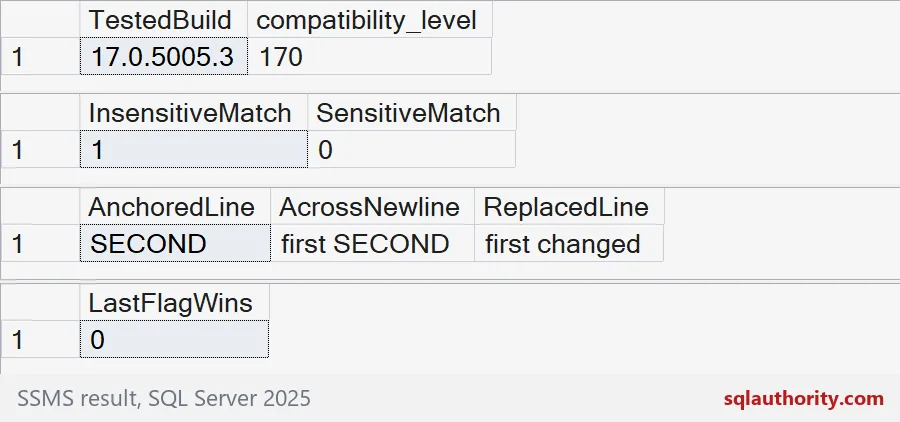
The column ignores case, the regex does not
This table uses a case-insensitive collation. A LIKE search finds ERROR and error alike, so all three rows behave as you would expect. REGEXP_LIKE with no flag is case-sensitive. It misses the first note, which says ERROR in capitals.
Read the columns. Note 1 gives 1, 0, 1. Note 2 gives 1, 1, 1. Note 3 gives zeros. Adding the i flag brings the regex back in line with the column.
DROP TABLE IF EXISTS #Notes;
CREATE TABLE #Notes (NoteId int PRIMARY KEY, Note varchar(200) COLLATE SQL_Latin1_General_CP1_CI_AS);

INSERT #Notes VALUES (1, 'Disk ERROR on drive D'), (2, 'disk error cleared'), (3, 'All good');

SELECT NoteId,
       CASE WHEN Note LIKE '%error%' THEN 1 ELSE 0 END AS like_match,
       CASE WHEN REGEXP_LIKE(Note, 'error') THEN 1 ELSE 0 END AS regex_default,
       CASE WHEN REGEXP_LIKE(Note, 'error', 'i') THEN 1 ELSE 0 END AS regex_i
FROM #Notes
ORDER BY NoteId;
Windows line endings change the answer
Now two log texts with the same three lines. The first uses a line feed, CHAR(10), between lines. The second uses a carriage return plus line feed, CHAR(13) + CHAR(10), like text pasted from Windows.
Without the m flag, ^ERROR$ matches neither text. With m, it matches the line feed text but not the Windows text. The reason is that $ stops before the line feed, so the carriage return is still sitting at the end of the line. Adding \r? to the pattern fixes it. The dot has the same problem. With the s flag, start.ERROR works for the first text and fails for the second, because the dot covers only one of the two characters.
The second grid counts whole-word lines. The first text gives 3 with a plain pattern. The Windows text gives 1, and 3 again once the pattern allows \r.
DROP TABLE IF EXISTS #Logs;
CREATE TABLE #Logs (LogId int PRIMARY KEY, LineEnding varchar(4), LogText varchar(200));

INSERT #Logs VALUES
    (1, 'LF',   'start' + CHAR(10) + 'ERROR' + CHAR(10) + 'done'),
    (2, 'CRLF', 'start' + CHAR(13) + CHAR(10) + 'ERROR' + CHAR(13) + CHAR(10) + 'done');

SELECT LogId, LineEnding,
       CASE WHEN REGEXP_LIKE(LogText, '^ERROR$') THEN 1 ELSE 0 END AS no_m_flag,
       CASE WHEN REGEXP_LIKE(LogText, '^ERROR$', 'm') THEN 1 ELSE 0 END AS m_flag,
       CASE WHEN REGEXP_LIKE(LogText, '^ERROR\r?$', 'm') THEN 1 ELSE 0 END AS m_flag_cr,
       CASE WHEN REGEXP_LIKE(LogText, 'start.ERROR', 's') THEN 1 ELSE 0 END AS dot_with_s
FROM #Logs
ORDER BY LogId;

SELECT LogId,
       REGEXP_COUNT(LogText, '^\w+$', 1, 'm') AS lines_plain,
       REGEXP_COUNT(LogText, '^\w+\r?$', 1, 'm') AS lines_allowing_cr
FROM #Logs
ORDER BY LogId;
How to test on your own data
Do not trust a pattern that has only seen clean strings. Build a test table with the ugly cases: capitals, line feeds, carriage returns, empty text. Write down the flags next to the pattern, and use one case flag only. Then run the pattern against the table and count the matches. The last block cleans up the demo.
DROP TABLE IF EXISTS #Logs;
DROP TABLE IF EXISTS #Notes;
USE master;
DROP DATABASE IF EXISTS SqlAuthorityDemo;
Keep the flags beside the pattern, and the pattern beside its ugly test strings.
A regex match is not a collation comparison, it is a pattern read under explicit flags.
Published by Pinal Dave on SQLAuthority. More of my work at pinaldave.com.
Discover more from SQL Authority with Pinal Dave
Subscribe to get the latest posts sent to your email.