Data Governance is how you know what data you have, where it came from and whether it’s right. It sounds like paperwork, but it comes down to four plain questions. Without those answers, every number in a report is a guess.

Four Questions Around One Dataset
Pick one dataset, such as a customer table. Governance asks four things about it. The first is what it is and who owns it. The second is where it came from and where it goes. The third is who can see it. The fourth is whether it’s right.
Those four questions have names. They’re the catalog, the lineage, access control and data quality. You need all four. A well-documented table with bad values is a trap, and a clean table nobody can find is wasted.
The Catalog: What It Is and Who Owns It
A catalog is an index card for each dataset. It holds the name, a plain description, the owner, how fresh the data is and whether it contains personal details. Search tools can then answer questions like “where do we keep customer emails?” without anyone asking around.
The owner matters most. When a value looks wrong, someone has to be able to say whether it’s an error. In SQL Server, you can store a description and an owner right on the table, as the demo below shows. Larger platforms use a catalog tool, but the content is the same.
Lineage: Where It Came From
Lineage is the path data takes. A customer row starts in a web shop. It lands in a raw layer, gets cleaned and ends up in a report. Each hop is a place where something can go wrong.
Lineage works in two directions. When a number looks wrong, you trace backward to find the step that changed it. When you plan to rename a column, you trace forward to find every report that will break.
Even a simple note helps. Keep a list of sources and a list of reports next to the table description. For a small team, that answers most lineage questions. Bigger platforms record the same facts automatically.
Access: Who Can See It
Not everyone should see everything. Email addresses, ages and payment details need limits. The rule is least privilege: give each person or system only what the job needs.
SQL Server offers dynamic data masking, which hides part of a value, and row-level security, which filters rows by user. Both are access control. Masking isn’t a wall, though. A user who can run ad hoc queries can still work out masked values, so use permissions for real limits. Both work best when the catalog already marks which columns are sensitive.
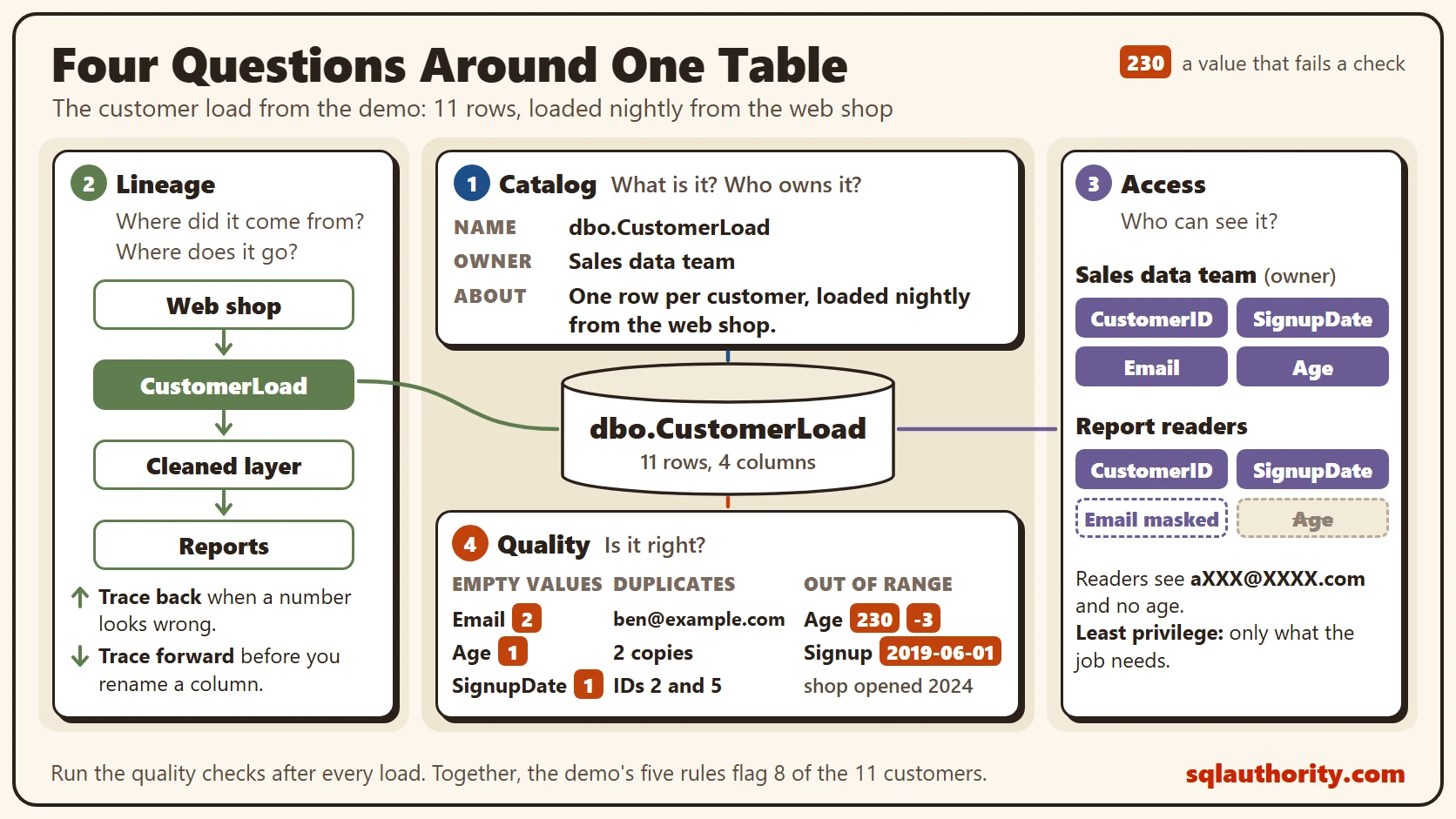
The diagram puts one dataset in the center. Catalog is at the top, with the name, owner and description. Lineage is on the left, with the sources before it and the reports after it. Access is on the right, showing who can see each column. Quality is at the bottom, with the three checks we’re about to run: empty values, duplicates and out-of-range values.
Data Quality Checks in T-SQL
Quality is the question you can test with a query, so it’s the best place to start. Run the checks right after data lands, before anyone builds on it. A failing row can be fixed, held back for review or reported to its owner. It shouldn’t pass silently into a report.
The script creates a database called SqlBigDataQuality, used only for this example, so run it on a test server. The table is a customer load with problems planted in it.
IF DB_ID(N'SqlBigDataQuality') IS NULL CREATE DATABASE SqlBigDataQuality;
GO
USE SqlBigDataQuality;
GO
DROP TABLE IF EXISTS dbo.CustomerLoad;
CREATE TABLE dbo.CustomerLoad
(
    CustomerID int NOT NULL PRIMARY KEY,
    Email nvarchar(100) NULL,
    Age int NULL,
    SignupDate date NULL
);
INSERT INTO dbo.CustomerLoad (CustomerID, Email, Age, SignupDate)
VALUES (1, N'ana@example.com', 34, '2026-01-12'), (2, N'ben@example.com', 29, '2026-01-15'),
       (3, NULL, 41, '2026-02-01'), (4, N'dee@example.com', 230, '2026-02-03'),
       (5, N'ben@example.com', 29, '2026-01-15'), (6, N'eli@example.com', -3, '2026-03-09'),
       (7, N'fay@example.com', 52, NULL), (8, N'gus@example.com', 38, '2019-06-01'),
       (9, N'hal@example.com', NULL, '2026-03-20'), (10, NULL, 27, '2026-04-02'),
       (11, N'not-an-email', 45, '2026-04-11');
Check one is empty values. Each column gets its own count.
SELECT COUNT(*) AS TotalRows,
       SUM(CASE WHEN Email IS NULL THEN 1 ELSE 0 END) AS NullEmail,
       SUM(CASE WHEN Age IS NULL THEN 1 ELSE 0 END) AS NullAge,
       SUM(CASE WHEN SignupDate IS NULL THEN 1 ELSE 0 END) AS NullSignupDate
FROM dbo.CustomerLoad;| TotalRows | NullEmail | NullAge | NullSignupDate |
|---|---|---|---|
| 11 | 2 | 1 | 1 |
Check two is duplicates. Grouping by email and keeping groups with more than one row finds them. Empty emails are left out, because two empty values aren’t the same customer.
SELECT Email, COUNT(*) AS Copies, MIN(CustomerID) AS FirstID, MAX(CustomerID) AS LastID
FROM dbo.CustomerLoad
WHERE Email IS NOT NULL
GROUP BY Email
HAVING COUNT(*) > 1;
| Copies | FirstID | LastID | |
|---|---|---|---|
| ben@example.com | 2 | 2 | 5 |
Check three is out-of-range values. An age must sit between 0 and 120, and nobody signed up before the shop opened on January 1, 2024.
SELECT CustomerID, Age, SignupDate
FROM dbo.CustomerLoad
WHERE Age NOT BETWEEN 0 AND 120 OR SignupDate < '2024-01-01'
ORDER BY CustomerID;
| CustomerID | Age | SignupDate |
|---|---|---|
| 4 | 230 | 2026-02-03 |
| 6 | -3 | 2026-03-09 |
| 8 | 38 | 2019-06-01 |
Customer 9 has no age, and it isn’t in the list. A range check can’t judge a missing value, which is why the empty-value check comes first.
The last query puts every rule in one result, with the share of bad rows. SQL Server 2025 supports REGEXP_LIKE, so the format check is one line. It’s a basic shape check: it catches text like not-an-email, but it doesn’t prove that an address exists. Stronger verification belongs outside this query. The ‘i’ flag ignores case. The function needs database compatibility level 170, which a new database has by default here. Run this summary after each load, and keep the numbers over time.
WITH Rules AS
(
    SELECT N'Missing email' AS CheckName, COUNT(*) AS BadRows FROM dbo.CustomerLoad WHERE Email IS NULL
    UNION ALL
    SELECT N'Email not an address', COUNT(*) FROM dbo.CustomerLoad
    WHERE Email IS NOT NULL AND NOT REGEXP_LIKE(Email, N'^[^@ ]+@[^@ ]+\.[a-z]{2,}$', 'i')
    UNION ALL
    SELECT N'Duplicate email', COUNT(*) FROM dbo.CustomerLoad AS c
    WHERE Email IS NOT NULL AND EXISTS (SELECT 1 FROM dbo.CustomerLoad AS o WHERE o.Email = c.Email AND o.CustomerID <> c.CustomerID)
    UNION ALL
    SELECT N'Age out of range', COUNT(*) FROM dbo.CustomerLoad WHERE Age NOT BETWEEN 0 AND 120
    UNION ALL
    SELECT N'Signup before opening day', COUNT(*) FROM dbo.CustomerLoad WHERE SignupDate < '2024-01-01'
)
SELECT CheckName, BadRows, CAST(100.0 * BadRows / (SELECT COUNT(*) FROM dbo.CustomerLoad) AS decimal(5,1)) AS PercentOfRows
FROM Rules
ORDER BY BadRows DESC, CheckName;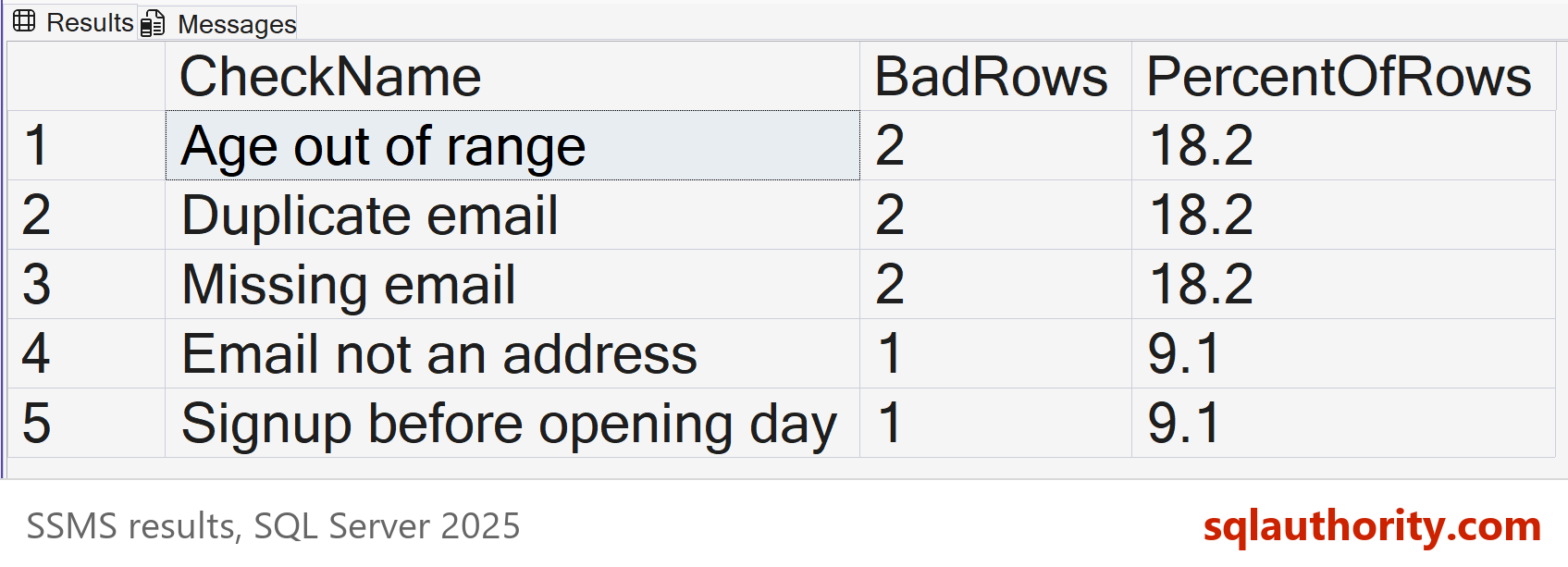
Three rules fail on two rows each, and two fail on one row. Together the five rules flag eight different customers, so no single fix cleans the table. Now the catalog. This script stores a description and an owner on the table, then reads them back.
EXEC sys.sp_addextendedproperty @name = N'Description', @value = N'One row per customer, loaded nightly from the web shop.',
     @level0type = N'SCHEMA', @level0name = N'dbo', @level1type = N'TABLE', @level1name = N'CustomerLoad';
EXEC sys.sp_addextendedproperty @name = N'Owner', @value = N'Sales data team',
     @level0type = N'SCHEMA', @level0name = N'dbo', @level1type = N'TABLE', @level1name = N'CustomerLoad';

SELECT OBJECT_NAME(major_id) AS TableName, name AS Property, CAST(value AS nvarchar(200)) AS PropertyValue
FROM sys.extended_properties
WHERE class = 1 AND minor_id = 0 AND major_id = OBJECT_ID(N'dbo.CustomerLoad')
ORDER BY name;| TableName | Property | PropertyValue |
|---|---|---|
| CustomerLoad | Description | One row per customer, loaded nightly from the web shop. |
| CustomerLoad | Owner | Sales data team |
A common complaint is that governance slows teams down, and that a quick query beats a catalog. For one table that’s true. The cost shows up later, when two reports disagree and nobody knows which table feeds which, or who owns it. A wrong number that reaches a decision costs more than the checks that would have caught it.
What to Remember
Data governance works best when it starts with one important dataset, not the whole company. Give it an owner and a description. Write down where it comes from. Limit who sees the sensitive columns, and run quality checks after every load.
Ask for the owner of each table first. A table with no owner has no one to fix it. When you finish testing, remove the example database.
USE master;
GO
ALTER DATABASE SqlBigDataQuality SET SINGLE_USER WITH ROLLBACK IMMEDIATE;
DROP DATABASE SqlBigDataQuality;
Data governance is not paperwork, it is the answer to who owns this number and whether it is right.
Published by Pinal Dave on SQLAuthority. More of my work at pinaldave.com.
Discover more from SQL Authority with Pinal Dave
Subscribe to get the latest posts sent to your email.