Overlapping chunks cut a long text into pieces that share a few characters with their neighbors. The shared part keeps a sentence from being sliced in half with no context on either side. GENERATE_SERIES gives you the start positions in one short query.
Why chunks overlap at all
Say you want to search a pile of long documents. Each document is too big to search or embed in one piece, so you cut it. A hard cut has a problem. The answer to a question may sit right across the cut, and neither piece has the whole answer.
An overlap fixes that. Piece two starts a little before piece one ends. The seam is covered twice. I keep each piece’s start position, so I can always find where it came from.
Cut with GENERATE_SERIES
The demo text is the alphabet plus two trailing spaces. Each chunk is 10 characters long, and a new chunk starts every 6 positions. So neighbors share 4 characters. GENERATE_SERIES produces the starts, and SUBSTRING cuts the text.
DECLARE @text nvarchar(max) = N'abcdefghijklmnopqrstuvwxyz  ';
DECLARE @length int = 10, @step int = 6;

SELECT ROW_NUMBER() OVER (ORDER BY value) AS ChunkNumber,
       value AS StartPosition,
       SUBSTRING(@text, value, @length) AS ChunkText,
       LEN(SUBSTRING(@text, value, @length) + N'#') - 1 AS CharacterCount
FROM GENERATE_SERIES(1, CONVERT(int, LEN(@text + N'#') - 1), @step)
ORDER BY value;
The starts are 1, 7, 13, 19 and 25. The last chunk has only four characters: y, z and the two spaces. The last chunk is shorter, and that is normal.
Notice the odd # in the length expression. LEN ignores trailing spaces. Adding a # and subtracting 1 makes LEN count them, so the final chunk reports 4 and not 2.
Empty, missing and bad input
An empty string should produce no chunks, and it does. Look at the second grid in the screenshot below: EmptyChunkCount is 0.
DECLARE @empty nvarchar(max) = N'';

SELECT COUNT(*) AS EmptyChunkCount
FROM GENERATE_SERIES(1, CONVERT(int, LEN(@empty + N'#') - 1), 6);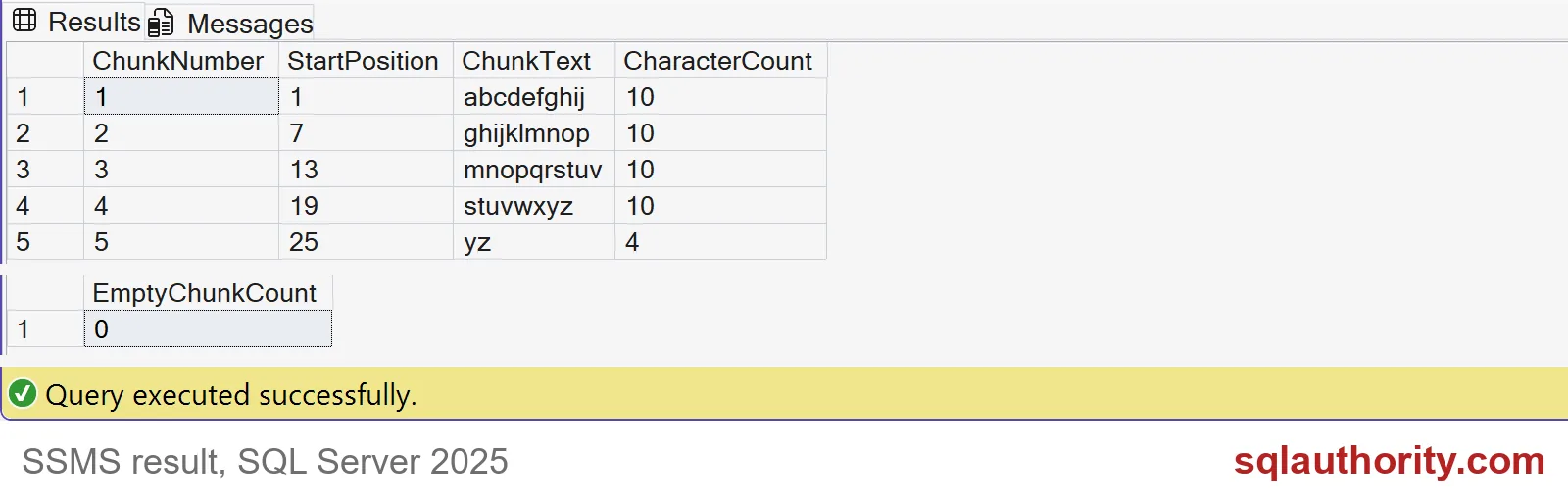
Now the quiet failures. Try NULL text, a negative step and a zero step.
DECLARE @missing nvarchar(max) = NULL;
SELECT COUNT(*) AS NullTextChunks
FROM GENERATE_SERIES(1, CONVERT(int, LEN(@missing + N'#') - 1), 6);

DECLARE @step int = -6;
SELECT COUNT(*) AS NegativeStepChunks FROM GENERATE_SERIES(1, 28, @step);

SET @step = 0;
BEGIN TRY
    SELECT COUNT(*) AS ZeroStepChunks FROM GENERATE_SERIES(1, 28, @step);
END TRY
BEGIN CATCH
    SELECT ERROR_NUMBER() AS ErrorNumber, ERROR_MESSAGE() AS ErrorMessage;
END CATCH;
NULL text returns 0 chunks and no error. A negative step also returns 0 chunks with no error. Only a zero step fails, with error 4199. So a document that is NULL by mistake just vanishes from your index. Check for NULL before you chunk.
Check the overlap, not just the count
If the step is bigger than the chunk length, the chunks do not touch, and text falls into the gaps. Nothing warns you. This query measures the overlap with the previous chunk. A negative number means characters were skipped.
DECLARE @text nvarchar(max) = N'abcdefghijklmnopqrstuvwxyz  ';
DECLARE @length int = 10;

SELECT s.StepSize,
       g.value AS StartPosition,
       LAG(g.value + @length - 1, 1, 0)
           OVER (PARTITION BY s.StepSize ORDER BY g.value) - g.value + 1 AS OverlapWithPrevious
FROM (VALUES (6), (12)) AS s(StepSize)
CROSS APPLY GENERATE_SERIES(1, CONVERT(int, LEN(@text + N'#') - 1), s.StepSize) AS g
ORDER BY s.StepSize, g.value;
With a step of 6, every chunk after the first overlaps by 4. With a step of 12, the overlap is -2. Two characters are lost at every seam. Keep the step smaller than the length.

Real text does not cut on word boundaries
Here are two small documents, chunked 20 characters at a time with a step of 12. Store the document ID with every chunk.
DROP TABLE IF EXISTS #Documents;
CREATE TABLE #Documents (DocumentId int PRIMARY KEY, Body nvarchar(max) NOT NULL);
INSERT #Documents VALUES (1, N'SQL Server stores data in pages of 8 KB.'), (2, N'Short note.');

DECLARE @length int = 20, @step int = 12;
SELECT d.DocumentId,
       ROW_NUMBER() OVER (PARTITION BY d.DocumentId ORDER BY g.value) AS ChunkNumber,
       g.value AS StartPosition,
       SUBSTRING(d.Body, g.value, @length) AS ChunkText
FROM #Documents AS d
CROSS APPLY GENERATE_SERIES(1, CONVERT(int, LEN(d.Body + N'#') - 1), @step) AS g
ORDER BY d.DocumentId, g.value;

DROP TABLE #Documents;
The first document gives four chunks, and the second fits in one. Look at the cuts: “SQL Server stores da” and “tores data in pages “. Words get chopped. A character limit is also not a token limit for an embedding model. Test with your real tokenizer before you pick the sizes.
Keep enough source information to explain every chunk you return.
A chunk boundary is not a word boundary, it is a character cut to validate.
Published by Pinal Dave on SQLAuthority. More of my work at pinaldave.com.
Discover more from SQL Authority with Pinal Dave
Subscribe to get the latest posts sent to your email.