Adding system versioning to a table that already has rows starts the history on the day you switch it on. It does not rebuild the past. The rows you have today become the first version, and every change after that is recorded.

Start with a table that already has rows
Picture a manager who asks, “Can you show me what this customer record looked like in March?” You turned on temporal tables last week. The honest answer is no. Nothing before last week was captured, and nothing can bring it back.
Let me build a tiny version of that table. It has a primary key, which temporal tables require, and one row.
DROP TABLE IF EXISTS dbo.TemporalContacts;
DROP TABLE IF EXISTS dbo.TemporalContactsHistory;

CREATE TABLE dbo.TemporalContacts (
    Id int PRIMARY KEY,
    DisplayName nvarchar(80)
);
INSERT dbo.TemporalContacts VALUES (1, N'Original');
The first mistake: period columns without defaults
A temporal table needs two period columns, a start and an end. On an empty table you can add them as they are. On a table with rows, the new columns cannot be NULL, so SQL Server needs a value for the existing rows.
BEGIN TRY
    ALTER TABLE dbo.TemporalContacts ADD
        ValidFrom datetime2 GENERATED ALWAYS AS ROW START HIDDEN,
        ValidTo   datetime2 GENERATED ALWAYS AS ROW END HIDDEN,
        PERIOD FOR SYSTEM_TIME (ValidFrom, ValidTo);
END TRY
BEGIN CATCH
    SELECT ERROR_NUMBER() AS ErrorNumber, ERROR_MESSAGE() AS ErrorMessage;
END CATCH;
You get error 4901. The message says the column cannot be added to a non-empty table without a default. The statement failed as a whole, so the table is unchanged. Defaults fix it.
Add the period columns and switch versioning on
The start default is SYSUTCDATETIME(), the moment of conversion. The end default is the largest datetime2 value, which means “still current”. HIDDEN keeps both columns out of a plain SELECT star, so old queries and applications keep working. I also name the history table, instead of letting SQL Server invent a name.
ALTER TABLE dbo.TemporalContacts ADD
    ValidFrom datetime2 GENERATED ALWAYS AS ROW START HIDDEN
        CONSTRAINT DF_TemporalContacts_From DEFAULT SYSUTCDATETIME(),
    ValidTo datetime2 GENERATED ALWAYS AS ROW END HIDDEN
        CONSTRAINT DF_TemporalContacts_To
        DEFAULT CONVERT(datetime2, '9999-12-31T23:59:59.9999999'),
    PERIOD FOR SYSTEM_TIME (ValidFrom, ValidTo);

ALTER TABLE dbo.TemporalContacts SET (SYSTEM_VERSIONING = ON
    (HISTORY_TABLE = dbo.TemporalContactsHistory, DATA_CONSISTENCY_CHECK = ON));

SELECT Id, DisplayName FROM dbo.TemporalContacts;
SELECT COUNT(*) AS HistoryBeforeUpdate FROM dbo.TemporalContactsHistory;
The Original row is still there, and the history table has zero rows. Switching versioning on created no old versions. It could not.
Change a row and read both versions
Now update the row. The short delay only keeps the timestamps visibly apart. FOR SYSTEM_TIME ALL returns the current row and the history together.
WAITFOR DELAY '00:00:00.050';
UPDATE dbo.TemporalContacts SET DisplayName = N'Changed' WHERE Id = 1;

SELECT Id, DisplayName, ValidFrom, ValidTo
FROM dbo.TemporalContacts
FOR SYSTEM_TIME ALL
ORDER BY ValidFrom, ValidTo, Id;

SELECT COUNT(*) AS HistoryAfterUpdate FROM dbo.TemporalContactsHistory;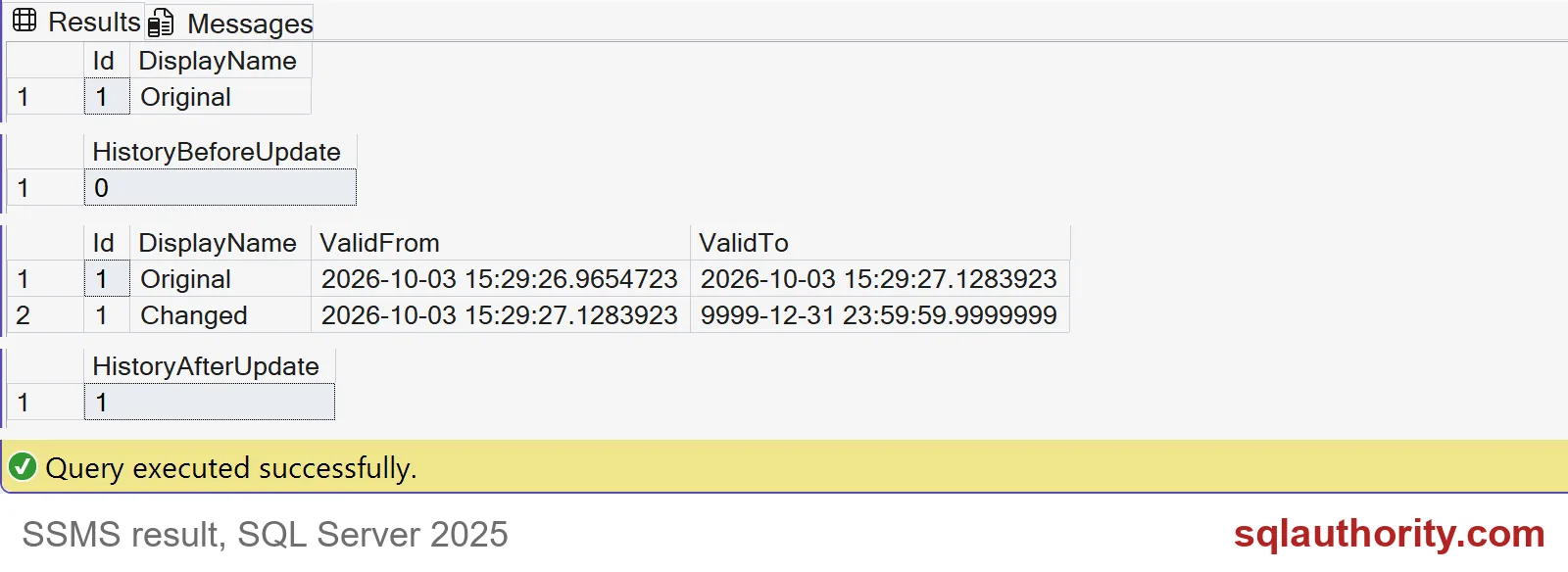
Read the third grid in the screenshot. Original ends at the exact moment Changed begins. Changed ends at 9999-12-31, which means it is the current version. HistoryAfterUpdate is 1.
Look at the ValidFrom of Original. It shows the conversion time, not the day the row was really created. SQL Server cannot know that day. If it matters, keep your own CreatedDate column.

Hidden columns and the off window
A plain SELECT star shows only Id and DisplayName. You must name the period columns to see them.
SELECT * FROM dbo.TemporalContacts;
SELECT Id, DisplayName, ValidFrom, ValidTo FROM dbo.TemporalContacts;
Some schema changes need versioning switched off for a while. Here is the catch. Anything you write during that window gets no history.
ALTER TABLE dbo.TemporalContacts SET (SYSTEM_VERSIONING = OFF);
UPDATE dbo.TemporalContacts SET DisplayName = N'Changed while off' WHERE Id = 1;
ALTER TABLE dbo.TemporalContacts SET (SYSTEM_VERSIONING = ON
    (HISTORY_TABLE = dbo.TemporalContactsHistory, DATA_CONSISTENCY_CHECK = ON));

SELECT COUNT(*) AS HistoryAfterOffWindow FROM dbo.TemporalContactsHistory;
SELECT DisplayName FROM dbo.TemporalContactsHistory ORDER BY ValidFrom;
The count is still 1, and the only history row is Original. The version “Changed” was overwritten and no one will ever see it again. If you must switch versioning off, keep writers away, and turn it back on with the same history table.
Finally, remove the demo tables. Versioning must be off before the drop.
ALTER TABLE dbo.TemporalContacts SET (SYSTEM_VERSIONING = OFF);
DROP TABLE IF EXISTS dbo.TemporalContacts;
DROP TABLE IF EXISTS dbo.TemporalContactsHistory;
On a real system also plan for retention and storage. History grows with every change.
Write down the day you switched versioning on, and share it with whoever asks about the past.
Temporal history is not a time machine, it is a record from enablement onward.
Published by Pinal Dave on SQLAuthority. More of my work at pinaldave.com.
Discover more from SQL Authority with Pinal Dave
Subscribe to get the latest posts sent to your email.