When the CSV columns do not match the table, load the file as it is into a staging table first, then map it to the real table by column name. Never let the position of a column in the file decide where its data lands. It works until the day the supplier adds a column.

The file you have to work with
A supplier sends you a price list. It has three columns: Name, Unused and ItemId. Your table needs only ItemId and Name. The extra column is noise, and the order is not the one you would choose. Some names contain commas, so those are wrapped in quotes.
Create the folder C:\Temp, then save these three lines as C:\Temp\products.csv, as UTF-8. The SQL Server service account needs permission to read that folder.
Name,Unused,ItemId
Widget,ignore,10
"Gadget, premium",skip,20
How a blind load goes wrong
The scary case is not an error. It is a load that works. Here is a target table whose three columns are all text, so any file with three columns fits. Watch where the data lands.
DROP TABLE IF EXISTS #TargetText;
CREATE TABLE #TargetText (Name varchar(100), Description varchar(100), Code varchar(30));

BULK INSERT #TargetText FROM 'C:\Temp\products.csv'
WITH (FORMAT = 'CSV', FIRSTROW = 2, CODEPAGE = '65001');

SELECT Name, Description, Code FROM #TargetText ORDER BY Code;
No error. The words “ignore” and “skip” now sit in a column called Description, and the item numbers sit in Code. Nobody would notice until a report prints “ignore” next to a product.
Check the header before you trust the file
The cheapest safeguard is to read the first line of the file and compare it with the layout you expect. I compare the length too, so a stray trailing space gets caught. The second half of the block pretends the supplier swapped two columns.
DECLARE @file nvarchar(260) = N'C:\Temp\products.csv';
DECLARE @expected varchar(200) = 'Name,Unused,ItemId';
DECLARE @text varchar(max);
DECLARE @sql nvarchar(max) = N'SELECT @t = BulkColumn FROM OPENROWSET(BULK ''' + @file + N''', SINGLE_CLOB) AS f;';
EXEC sys.sp_executesql @sql, N'@t varchar(max) OUTPUT', @t = @text OUTPUT;

DECLARE @header varchar(200) = REPLACE(LEFT(@text, CHARINDEX(CHAR(10), @text + CHAR(10)) - 1), CHAR(13), '');
IF @header <> @expected OR DATALENGTH(@header) <> DATALENGTH(@expected)
    THROW 50000, N'The CSV header does not match the expected layout.', 1;
SELECT @header AS HeaderInFile;

SET @header = 'Name,ItemId,Unused';
BEGIN TRY
    IF @header <> @expected OR DATALENGTH(@header) <> DATALENGTH(@expected)
        THROW 50000, N'The CSV header does not match the expected layout.', 1;
END TRY
BEGIN CATCH
    SELECT ERROR_NUMBER() AS ErrorNumber, ERROR_MESSAGE() AS ErrorMessage;
END CATCH;
The real header passes. The swapped one stops with error 50000 and a clear message. A header check turns a silent mix-up into a failed job that someone can read.
Stage the file exactly as it arrives
The staging table mirrors the file, column for column, with every value as text. I call the key ItemIdText on purpose. The file gives me text, and I convert it later, when I can check it.
DROP TABLE IF EXISTS #CsvRaw;
CREATE TABLE #CsvRaw (Name varchar(100), Unused varchar(100), ItemIdText varchar(30));

DECLARE @sql nvarchar(max) = N'BULK INSERT #CsvRaw FROM ''C:\Temp\products.csv''
    WITH (FORMAT = ''CSV'', FIRSTROW = 2, CODEPAGE = ''65001'');';
EXEC (@sql);

SELECT Name, Unused, ItemIdText FROM #CsvRaw ORDER BY ItemIdText, Name;
Validate, then map by name
Now the real table gets only what you name. The checks come first: no bad IDs, no blank names, no duplicates. The duplicate check runs after conversion, because 10 and 010 are the same integer.
DROP TABLE IF EXISTS #CsvTarget;
CREATE TABLE #CsvTarget (ItemId int PRIMARY KEY, Name varchar(100) NOT NULL);

IF EXISTS (SELECT 1 FROM #CsvRaw
           WHERE TRY_CONVERT(int, ItemIdText) IS NULL OR NULLIF(TRIM(Name), '') IS NULL)
    THROW 50000, N'The CSV has an invalid item ID or a missing name.', 1;

IF EXISTS (SELECT 1 FROM #CsvRaw GROUP BY CONVERT(int, ItemIdText) HAVING COUNT(*) > 1)
    THROW 50000, N'The CSV has duplicate item IDs.', 1;

INSERT #CsvTarget (ItemId, Name)
SELECT CONVERT(int, ItemIdText), Name FROM #CsvRaw;

SELECT ItemId, Name FROM #CsvTarget ORDER BY ItemId;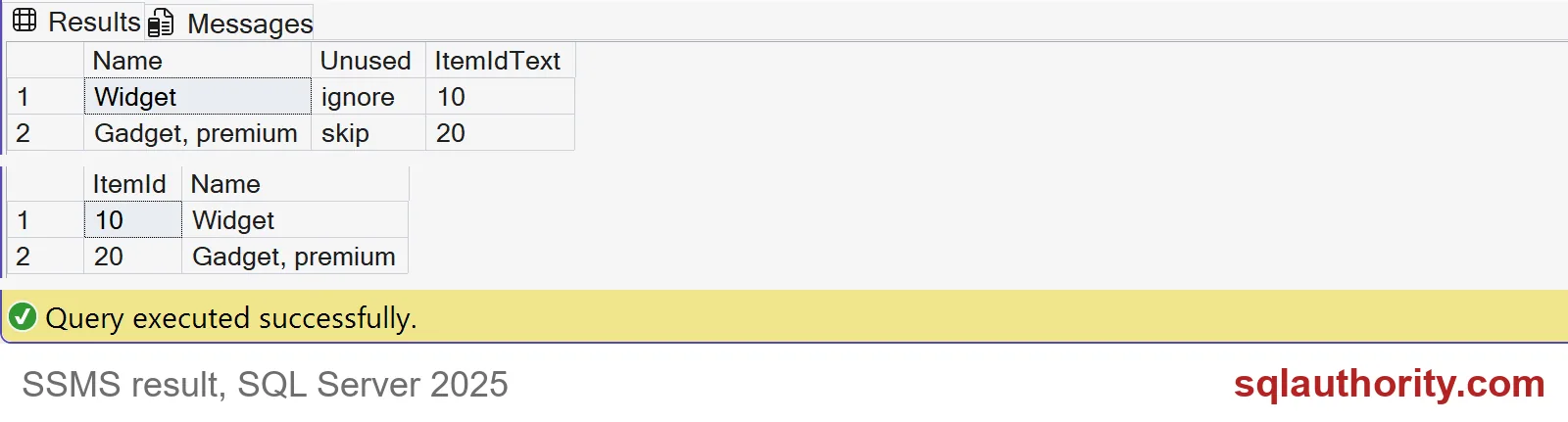
The screenshot shows the staging result from the previous block and the target result from this one. Item 10 is Widget and item 20 is Gadget, premium. The comma stayed inside the name, and the Unused column never reached the target.

See the duplicate check work
Let me add a bad row to staging: a second copy of item 10, written as 010. Then run the same check.
INSERT #CsvRaw (Name, Unused, ItemIdText) VALUES ('Widget copy', 'x', '010');

BEGIN TRY
    IF EXISTS (SELECT 1 FROM #CsvRaw GROUP BY CONVERT(int, ItemIdText) HAVING COUNT(*) > 1)
        THROW 50000, N'The CSV has duplicate item IDs.', 1;
END TRY
BEGIN CATCH
    SELECT ERROR_NUMBER() AS ErrorNumber, ERROR_MESSAGE() AS ErrorMessage;
END CATCH;
The check stops the load with error 50000. As text, 010 and 10 look different. As integers they collide. Because the target insert never ran, the real table stays clean. Last, remove the temp tables.
DROP TABLE IF EXISTS #CsvTarget;
DROP TABLE IF EXISTS #CsvRaw;
DROP TABLE IF EXISTS #TargetText;
In your own loader, keep the rejected file and the reason. Test a quoted line break and the supplier’s encoding before you promise anything. Put the final insert inside the transaction your job already uses.
Stage first, check the layout, and map every column by name.
A column position is not a contract, it is a layout to map.
Published by Pinal Dave on SQLAuthority. More of my work at pinaldave.com.
Discover more from SQL Authority with Pinal Dave
Subscribe to get the latest posts sent to your email.