To take a database backup in SSMS, right-click the database, choose Tasks, then Back Up, and pick the backup type. The dialog has three pages and a dozen options. Most of them have a default that works, and a few of them decide whether the file is worth keeping.

Choose the Backup Type First
SQL Server offers three kinds of backup, and the type decides everything else. A full backup copies the whole database. A differential backup copies only the pages that changed since the last full backup. A log backup copies the transaction log since the last log backup. That lets you restore to a point in time.
Log backups need the FULL or BULK_LOGGED recovery model. A database in SIMPLE recovery has no log backups at all. The dialog shows the recovery model at the top of the General page, so read it before you choose.
| Type | What it holds | Needs |
|---|---|---|
| Full | The whole database | Nothing else |
| Differential | Pages changed since the last full backup | A full backup first |
| Log | Log records since the last log backup | FULL recovery and a full backup first |
A Small Database to Practice On
The first script creates a database named SsmsBackupDemo. It uses FULL recovery and holds one table with three bookings. Run it on a test server, never on a database you care about.
IF DB_ID(N'SsmsBackupDemo') IS NULL CREATE DATABASE SsmsBackupDemo;
GO
ALTER DATABASE SsmsBackupDemo SET RECOVERY FULL;
GO
USE SsmsBackupDemo;
GO
DROP TABLE IF EXISTS dbo.Bookings;
CREATE TABLE dbo.Bookings (BookingID int NOT NULL PRIMARY KEY, GuestName nvarchar(60) NOT NULL);
INSERT INTO dbo.Bookings (BookingID, GuestName) VALUES (1, N'Maya Collins'), (2, N'Leo Brennan'), (3, N'Priya Shah');
Why a Log Backup Needs a Full Backup First
Before the first full backup, try a log backup. SQL Server stops it with an error.
BACKUP LOG SsmsBackupDemo TO DISK = N'SsmsBackupDemo_early.trn';
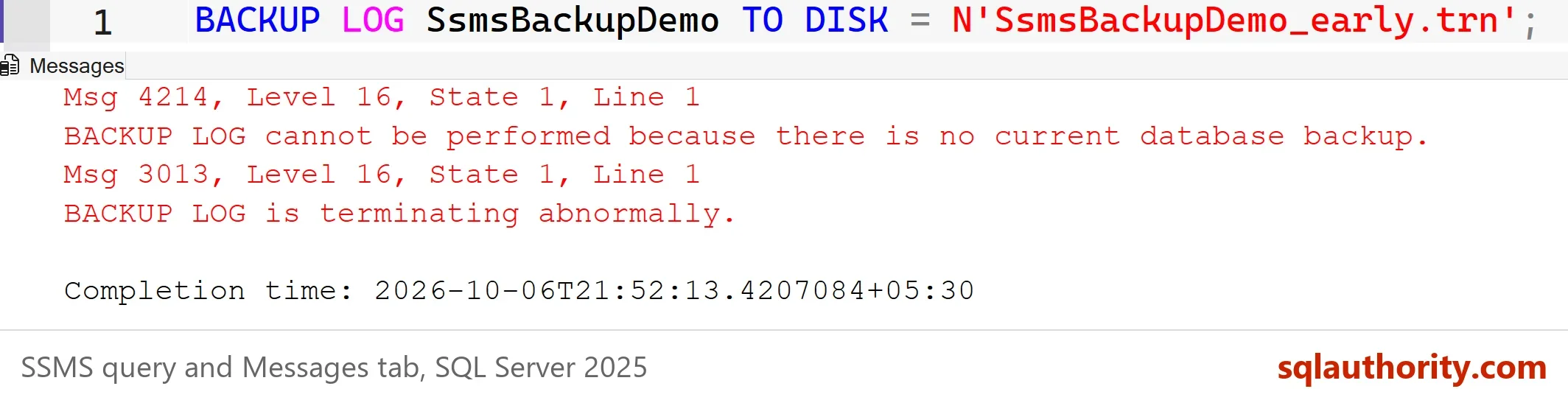
Msg 4214, Level 16, State 1, Line 1
BACKUP LOG cannot be performed because there is no current database backup.
Msg 3013, Level 16, State 1, Line 1
BACKUP LOG is terminating abnormally.
A log backup builds on a full backup. SQL Server has nothing to build on, so it stops. That’s the first rule of backup chains: the full backup comes first, and everything after it hangs from it.
Take the Full Backup in the Dialog
To take a database backup in SSMS 22, expand Databases in Object Explorer and right-click SsmsBackupDemo. Choose Tasks, Back Up. On the General page, leave the backup type on Full and the component on Database. Give the backup set a name you will recognize later. Under Destination, choose Disk, click Add, and pick a folder that the SQL Server service account can write to.
Open the Media Options page next. Tick Perform checksum before writing to media, and tick Verify backup when finished. Choose whether to append to the existing backup set or overwrite it. Appending keeps every earlier backup in one file, so the file grows. Overwriting keeps one backup per file, which is easier to manage.
The Backup Options page holds compression. Choose Compress backup if your edition supports it. Click OK. A message box reports that the backup of the database completed successfully.
Each option has a T-SQL twin. Click the Script button before OK, and SSMS writes the statement for the current settings. The next script is a hand written equivalent. A file name with no folder goes to the instance’s default backup folder. CHECKSUM validates pages as they are read, and INIT overwrites the file.
BACKUP DATABASE SsmsBackupDemo TO DISK = N'SsmsBackupDemo_full.bak' WITH CHECKSUM, INIT, NAME = N'SsmsBackupDemo full', STATS = 50;
Differential and Log Backups
You take them from the same dialog. Change the Backup type to Differential or Transaction Log, and choose a new file name or append to the set. The next script adds a booking, takes a differential backup, adds another booking and takes a log backup. The log backup works now, because a full backup exists.
INSERT INTO dbo.Bookings (BookingID, GuestName) VALUES (4, N'Noah Kim');
BACKUP DATABASE SsmsBackupDemo TO DISK = N'SsmsBackupDemo_diff.bak' WITH DIFFERENTIAL, CHECKSUM, INIT, NAME = N'SsmsBackupDemo differential';
INSERT INTO dbo.Bookings (BookingID, GuestName) VALUES (5, N'Sam Rivera');
BACKUP LOG SsmsBackupDemo TO DISK = N'SsmsBackupDemo_log.trn' WITH CHECKSUM, INIT, NAME = N'SsmsBackupDemo log';
SQL Server records every backup in the msdb database. One query lists them for the demo database, in the order they finished.
SELECT bs.type AS BackupType, bs.name AS BackupName, bs.is_copy_only AS IsCopyOnly, bs.has_backup_checksums AS HasChecksums
FROM msdb.dbo.backupset AS bs
WHERE bs.database_name = N'SsmsBackupDemo'
ORDER BY bs.backup_finish_date;
| BackupType | BackupName | IsCopyOnly | HasChecksums |
|---|---|---|---|
| D | SsmsBackupDemo full | 0 | 1 |
| I | SsmsBackupDemo differential | 0 | 1 |
| L | SsmsBackupDemo log | 0 | 1 |
The letters are D for a full backup, I for a differential and L for a log. The copy-only box in the dialog is for a special case. A copy-only backup doesn’t become the base of later differentials. Use it for a one-off copy that must not disturb your schedule.
Check the File Before You Trust It
A file on disk isn’t a backup until you have read it back. This command checks that the file is readable and that its checksums match.
RESTORE VERIFYONLY FROM DISK = N'SsmsBackupDemo_full.bak' WITH CHECKSUM;
It prints a message that the backup set on file 1 is valid. That check doesn’t prove the database restores, so practice a real restore on another server or under another name. You could argue that clicking through the dialog is fine for one backup. It is. For a nightly backup, use a SQL Server Agent job or a maintenance plan. Nobody should rely on remembering a menu.
What to Remember
For every database backup in SSMS, pick the type and read the recovery model. Take a full backup first, and tick the checksum and verify boxes. Store the files on a different disk from the data. A backup on the same disk fails together with the database. Click Script once in a while, so you learn the T-SQL behind the dialog.
When you finish with the demo, run the cleanup script. SQL Server doesn’t delete backup files, so remove the three files from your default backup folder yourself.
USE master;
GO
IF DB_ID(N'SsmsBackupDemo') IS NOT NULL
BEGIN
    ALTER DATABASE SsmsBackupDemo SET SINGLE_USER WITH ROLLBACK IMMEDIATE;
    DROP DATABASE SsmsBackupDemo;
END;
EXEC msdb.dbo.sp_delete_database_backuphistory @database_name = N'SsmsBackupDemo';
A backup is not the file you made, it is the file you have proved you can restore.
Published by Pinal Dave on SQLAuthority. More of my work at pinaldave.com.
Discover more from SQL Authority with Pinal Dave
Subscribe to get the latest posts sent to your email.