
Just a day ago, I was doing small attempt to connect to my local SQL Server using IP 127.0.0.1. The IP is of my local machine and SQL Server is installed on the local box as well. However, whenever I try to connect to the server it gave me following strange error. The message was Error 18452, saying the login is from an untrusted domain.
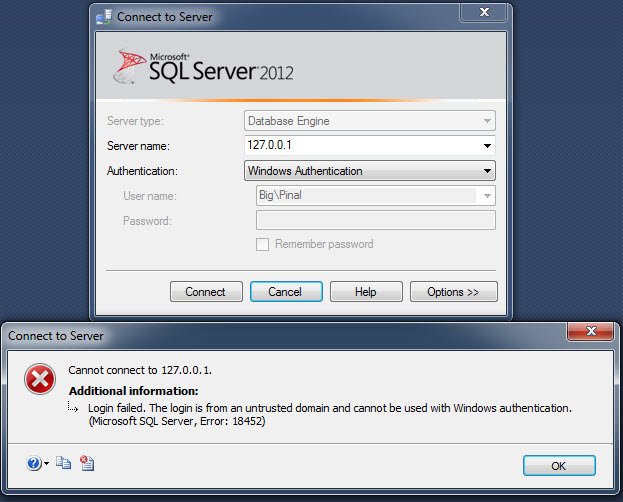
Cannot connect to 127.0.0.1.
Login failed. The login is from an untrusted domain and cannot be used with Windows authentication. (Microsoft SQL Server, Error: 18452)
The reason was indeed strange as I was trying to connect from local box to local box and it said my login was from an untrusted domain. As my system is not part of any domain, this was really confusing to me. Another thing was that I have been always able to connect always using 127.0.0.1 to SQL Server and this was a bit strange to me. I started to think what did I change since it last time I connected to SQL Server. Suddenly I remembered that I had modified my computer’s host file for some other purpose.
Solution:
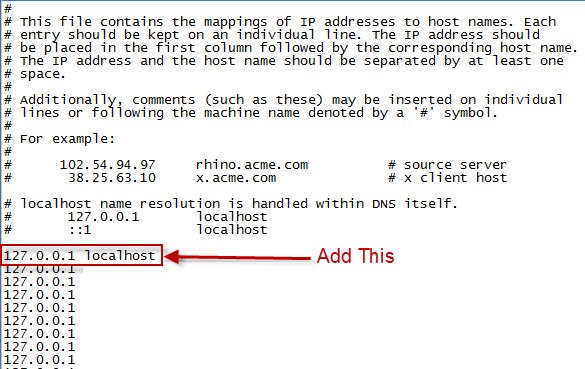
I opened my host file and immediately added entry like 127.0.0.1 localhost. Once I added it I was able to reconnect to SQL Server as usual. The location of the host file is C:\Windows\System32\drivers\etc. You will find file with the name hosts in it, make sure to open it with notepad.
If you are part of a domain and your organization is using active directory, make sure that your account is added properly to active directory as well have proper security permissions to execute the task.
Published by Pinal Dave on SQLAuthority. More of my work at pinaldave.com.
Discover more from SQL Authority with Pinal Dave
Subscribe to get the latest posts sent to your email.



42 Comments. Leave new
run-time error ‘-2147467259(80004005)’: Login failed. The login is from an untrusted domain and cannot be used with Windows authentication.”
It works thank you..:)
tnx bro
ontheray – your welcome sir!
Dear Pinal Sir,
i always uses your help and today i face this problem
i have changed in the host file then also its giving same error.
please give me some help
check if there is an SPN related error in ERROLOG?
check if your DC installed the update KB3002657 tonight. see https://support.microsoft.com/en-us/help/3002657/ms15-027-vulnerability-in-netlogon-could-allow-spoofing-march-10-2015 I had the same issue. Deinstalling this update solved the problem for me.
thanks for sharing.
I had the same problem, trying to refresh a file with a connection to the SQL server in it suddenly gave me this error message. It turned out my Windows login password had expired in the background. After logging out and logging in I was required to change my Windows password and after that I could open and refresh the file again without problems. Perhaps it helps anyone.
Hi Pinal,
after opening the host file in a notepad which file format should i use after making the changes in the host file. Is it notepad that i should use ?
Yes!
copy hosts file to e.g. Desktop, edit the file, then move it back to etc folder and replace the old one.
True. Thanks!
Entering the wrong password could also generate this error as it was in my case.
really? never heard of that. Thanks for sharing.
Probably just me be very unlucky, but since logging onto the server and trying to make a connection to SQL on a different server, my domain account password had actually expired. Once I changed my password (as prompted on the next logon), the issue went away.
Hi Pinal,
In my case, I can connect to my sql server.
But sometimes, i get this error like above. And then without doing anything, i can connect sql server again.
can you explain my problem, whats wrong ?
Thanks Pinal.. It worked for me.. you are awesome
Hi
I am trying to set up a transactional replication on my SQL Server 2017, we have 2 server in the same domain and when we try to set up a replication, we are not able to configure the database for windows authentication. Can you suggest. Your time is highly appreciated
Hi,
I have resolved a similar issue with the same solution. I found this post searching for a better explanation. Is there anybody out there who could answer why after modifying the hosts file it is required to add the localhost entry? It’s disturbing to just add it randomly not based on understanding why…