
This Slowly Changing Dimension Quiz asks you to pick the right type when a customer moves to a new city. The wrong pick rewrites your history, and nobody notices until a report looks odd. Read the setup, pick your answer, and then run the script to check yourself.

The Quiz
A dimension is a lookup table, such as customers, that describes the facts in a report. Its details change now and then, which is why people call it a slowly changing dimension. The way you handle a change decides what your reports can say later.
Avery is a customer who lives in Denver. On March 1, 2026, Avery moves to Austin. Finance has one rule. A sale before March 1 reports under Denver, and a sale on or after March 1 reports under Austin.
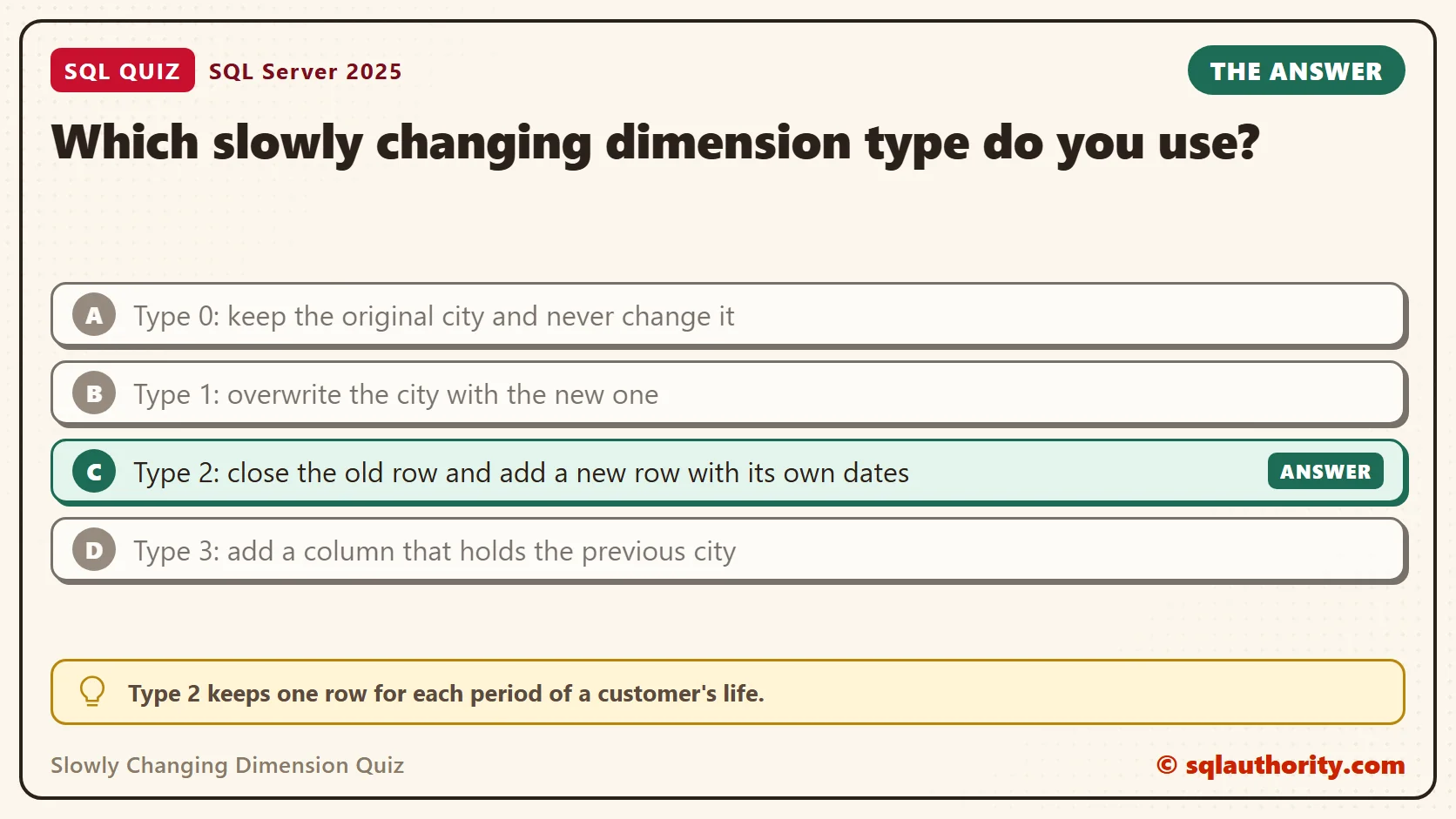
Which slowly changing dimension type do you use?
A. Type 0: keep the original city and never change it
B. Type 1: overwrite the city with the new one
C. Type 2: close the old row and add a new row with its own dates
D. Type 3: add a column that holds the previous city
Take a moment and pick one before you read on.
The Answer
The answer is C. Type 2 keeps one row for each period of a customer’s life. Avery gets a Denver row that ends on March 1, 2026 and an Austin row that starts that day.
Each sale joins to the row that was valid on the day of the sale. A February sale lands on the Denver row, and a sale on March 1 lands on the Austin row. The history stays in the table, so the report can tell both stories.
Prove It
Here is the quiz as a script. It creates a small database called SqlQuizSlowlyChangingDimension, used only for this example, so run it on a test server. The first part builds two customer tables, one for Type 1 and one for Type 2. It also loads eight sales, including one from February and one on the move date.
IF DB_ID(N'SqlQuizSlowlyChangingDimension') IS NULL CREATE DATABASE SqlQuizSlowlyChangingDimension;
GO
USE SqlQuizSlowlyChangingDimension;
GO
DROP TABLE IF EXISTS dbo.QuizSale, dbo.QuizCustomerType1, dbo.QuizCustomerType2;
CREATE TABLE dbo.QuizCustomerType1
(
    CustomerID int PRIMARY KEY,
    CustomerName nvarchar(30) NOT NULL,
    City nvarchar(30) NOT NULL
);
CREATE TABLE dbo.QuizCustomerType2
(
    CustomerKey int IDENTITY(1,1) PRIMARY KEY,
    CustomerID int NOT NULL,
    CustomerName nvarchar(30) NOT NULL,
    City nvarchar(30) NOT NULL,
    ValidFrom date NOT NULL,
    ValidTo date NOT NULL,
    IsCurrent bit NOT NULL
);
CREATE TABLE dbo.QuizSale
(
    SaleID int IDENTITY(1,1) PRIMARY KEY,
    CustomerID int NOT NULL,
    SaleDate date NOT NULL,
    Amount decimal(10,2) NOT NULL
);
INSERT INTO dbo.QuizCustomerType1 (CustomerID, CustomerName, City)
VALUES (1, N'Avery', N'Denver'), (2, N'Jordan', N'Boston');
INSERT INTO dbo.QuizCustomerType2 (CustomerID, CustomerName, City, ValidFrom, ValidTo, IsCurrent)
VALUES (1, N'Avery', N'Denver', '2020-01-01', '9999-12-31', 1), (2, N'Jordan', N'Boston', '2020-01-01', '9999-12-31', 1);
INSERT INTO dbo.QuizSale (CustomerID, SaleDate, Amount)
VALUES (1, '2025-06-10', 100.00), (1, '2025-11-05', 150.00), (2, '2025-07-01', 300.00),
       (1, '2026-02-14', 75.00), (1, '2026-03-01', 60.00), (1, '2026-04-12', 200.00),
       (1, '2026-08-20', 50.00), (2, '2026-05-05', 40.00);
Now Avery moves. Start with Type 1, which overwrites the city, and total the sales by year and city.
UPDATE dbo.QuizCustomerType1 SET City = N'Austin' WHERE CustomerID = 1;
SELECT YEAR(s.SaleDate) AS SaleYear, c.City, SUM(s.Amount) AS Total
FROM dbo.QuizSale AS s
JOIN dbo.QuizCustomerType1 AS c ON c.CustomerID = s.CustomerID
GROUP BY YEAR(s.SaleDate), c.City
ORDER BY SaleYear, c.City;
On SQL Server 2025, the 2025 sales of 250.00 now sit under Austin. So does the February sale of 75.00. Avery never lived in Austin before March 1, so this report is wrong.
| SaleYear | City | Total |
|---|---|---|
| 2025 | Austin | 250.00 |
| 2025 | Boston | 300.00 |
| 2026 | Austin | 385.00 |
| 2026 | Boston | 40.00 |
Now do the same move with Type 2. The script closes the old row on the move date and adds a new row. Then it joins each sale to the row that was valid on its date. The open row ends on 9999-12-31, so the join needs no special case for NULL.
BEGIN TRANSACTION;
UPDATE dbo.QuizCustomerType2
SET ValidTo = '2026-03-01', IsCurrent = 0
WHERE CustomerID = 1 AND IsCurrent = 1;
INSERT INTO dbo.QuizCustomerType2 (CustomerID, CustomerName, City, ValidFrom, ValidTo, IsCurrent)
VALUES (1, N'Avery', N'Austin', '2026-03-01', '9999-12-31', 1);
COMMIT TRANSACTION;
SELECT YEAR(s.SaleDate) AS SaleYear, c.City, SUM(s.Amount) AS Total
FROM dbo.QuizSale AS s
JOIN dbo.QuizCustomerType2 AS c
  ON c.CustomerID = s.CustomerID AND s.SaleDate >= c.ValidFrom AND s.SaleDate < c.ValidTo
GROUP BY YEAR(s.SaleDate), c.City
ORDER BY SaleYear, c.City;
SELECT CustomerKey, CustomerID, City, ValidFrom, ValidTo, IsCurrent FROM dbo.QuizCustomerType2 ORDER BY CustomerKey;
This time the 2025 sales of 250.00 stay under Denver. In 2026, the February sale of 75.00 stays under Denver, and the 310.00 from March 1 on goes to Austin.
| SaleYear | City | Total |
|---|---|---|
| 2025 | Boston | 300.00 |
| 2025 | Denver | 250.00 |
| 2026 | Austin | 310.00 |
| 2026 | Boston | 40.00 |
| 2026 | Denver | 75.00 |
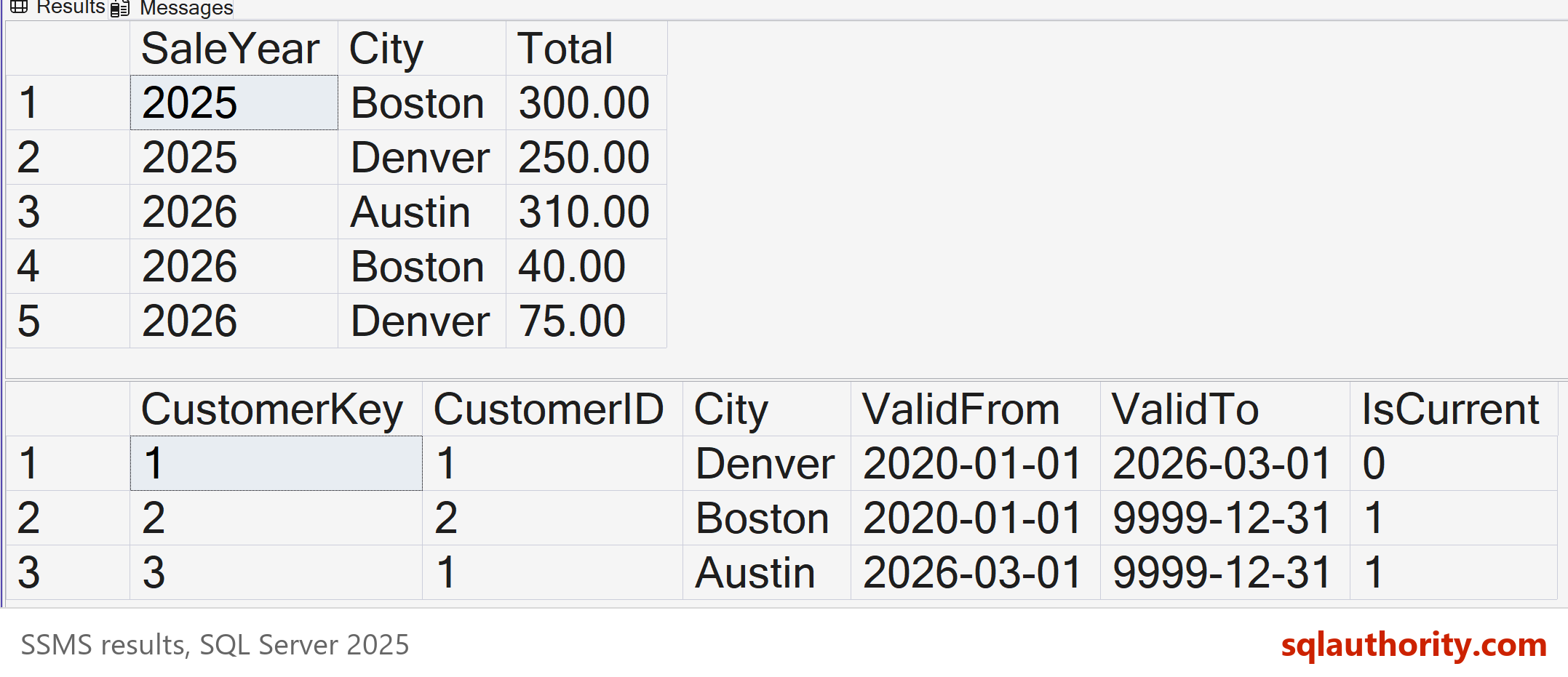
The second query shows the table itself. Avery now has two rows, one closed and one current.
| CustomerKey | CustomerID | City | ValidFrom | ValidTo | IsCurrent |
|---|---|---|---|---|---|
| 1 | 1 | Denver | 2020-01-01 | 2026-03-01 | 0 |
| 2 | 2 | Boston | 2020-01-01 | 9999-12-31 | 1 |
| 3 | 1 | Austin | 2026-03-01 | 9999-12-31 | 1 |
Why the Other Answers Are Wrong
A, Type 0, keeps the first value forever. Every sale after March 1 would stay under Denver, which breaks the second half of the rule. Type 0 fits facts that never change, such as a date of birth or a signup date.
B, Type 1, is the report you saw above. It is simple, and it is the right choice when the old value has no meaning. A fixed typo in a name is a good case. It is the wrong choice here, because it moves old sales to a city Avery had not reached yet.
D, Type 3, adds a PreviousCity column. It looks close, but it remembers only one earlier value and has no dates. Move Avery twice, and the first city is lost. Here is a small test.
DROP TABLE IF EXISTS dbo.QuizCustomerType3;
CREATE TABLE dbo.QuizCustomerType3
(
    CustomerID int PRIMARY KEY,
    City nvarchar(30) NOT NULL,
    PreviousCity nvarchar(30) NULL
);
INSERT INTO dbo.QuizCustomerType3 (CustomerID, City) VALUES (1, N'Denver');
UPDATE dbo.QuizCustomerType3 SET PreviousCity = City, City = N'Austin' WHERE CustomerID = 1;
UPDATE dbo.QuizCustomerType3 SET PreviousCity = City, City = N'Dallas' WHERE CustomerID = 1;
SELECT CustomerID, City, PreviousCity FROM dbo.QuizCustomerType3;
The row came back with City set to Dallas and PreviousCity set to Austin. Denver is gone, and nothing says when any move happened. A report by date can’t be built from that.
Watch the Boundary Date
The Type 2 join has one detail that is easy to get wrong. A row is valid from its ValidFrom date up to, but not including, its ValidTo date. The Denver row ends on March 1, and the Austin row starts on March 1. The sale on March 1 belongs to Austin only.
A BETWEEN join breaks that rule, because BETWEEN includes both ends. The sale on March 1 then matches two rows and is counted twice. This query compares the joined total with the real total.
SELECT SUM(s.Amount) AS JoinedTotal, (SELECT SUM(Amount) FROM dbo.QuizSale) AS RealTotal
FROM dbo.QuizSale AS s
JOIN dbo.QuizCustomerType2 AS c
  ON c.CustomerID = s.CustomerID AND s.SaleDate BETWEEN c.ValidFrom AND c.ValidTo;
| JoinedTotal | RealTotal |
|---|---|
| 1035.00 | 975.00 |
The joined total is 60.00 too high, which is exactly the sale on the boundary. The report shows a larger number and no error, so only a check like this one catches it. When I build a Type 2 join, I compare the joined total with the source total every time.
Store the Key on the Sale
The range join suits this small demo. A warehouse usually does the date work once, while it loads the sales. The load finds the customer row that was valid on the sale date and stores its CustomerKey on the sale. Reports then join on the key and need no date logic.
ALTER TABLE dbo.QuizSale ADD CustomerKey int NULL;
GO
UPDATE s SET CustomerKey = c.CustomerKey
FROM dbo.QuizSale AS s
JOIN dbo.QuizCustomerType2 AS c
  ON c.CustomerID = s.CustomerID AND s.SaleDate >= c.ValidFrom AND s.SaleDate < c.ValidTo;
SELECT YEAR(s.SaleDate) AS SaleYear, c.City, SUM(s.Amount) AS Total
FROM dbo.QuizSale AS s
JOIN dbo.QuizCustomerType2 AS c ON c.CustomerKey = s.CustomerKey
GROUP BY YEAR(s.SaleDate), c.City
ORDER BY SaleYear, c.City;
| SaleYear | City | Total |
|---|---|---|
| 2025 | Boston | 300.00 |
| 2025 | Denver | 250.00 |
| 2026 | Austin | 310.00 |
| 2026 | Boston | 40.00 |
| 2026 | Denver | 75.00 |
The numbers match the range join. The report is simpler, and it can’t count a boundary sale twice. The cost moves to the load, which has to pick the right customer row for every new sale.
The Price of Type 2
Type 2 isn’t free. The table grows with every change, and a report on today’s city needs the IsCurrent flag. Your load process also has to tie each sale to the right customer row, and that is extra work.
That price is small next to wrong history. Use Type 2 for the columns people slice reports by, such as city, region or sales team. Use Type 1 for the columns where only the latest value matters.
What to Remember
Ask one question about each column in a dimension. If a report needs the old value, use Type 2. If it doesn’t, Type 1 is enough. You can mix the two in the same table, one column at a time.
When I review a warehouse design, I ask this question first. Changing the answer later means rebuilding history. If you want the load code, read Slowly Changing Dimensions in Plain T-SQL. When you finish testing, remove the example database.
USE master;
GO
ALTER DATABASE SqlQuizSlowlyChangingDimension SET SINGLE_USER WITH ROLLBACK IMMEDIATE;
DROP DATABASE SqlQuizSlowlyChangingDimension;
A dimension is not a list of current facts, it is a record of what was true on each date.
Published by Pinal Dave on SQLAuthority. More of my work at pinaldave.com.
Discover more from SQL Authority with Pinal Dave
Subscribe to get the latest posts sent to your email.




2 Comments. Leave new
Hi Pinal,
On what column SCD is implemented and What is business key..