EXISTS vs COUNT is not a speed contest, it is a question of what you are asking. If you only need to know whether a row is there, ask EXISTS. If you need the number, ask COUNT.

The question decides the query
A junior DBA once asked me in a code review why I changed IF (SELECT COUNT(*) ...) > 0 to IF EXISTS. The original worked. Mine also worked. So why bother?
Because the code should say what you mean. EXISTS says “is there at least one row?” COUNT says “how many rows are there?” When you only need a yes or no, counting is a bigger question than the one you asked. It also invites a bug, and I will show you that bug in a minute.
First, a small orders table. It has 5,000 rows, all for customer 1, and every ReferenceCode is NULL on purpose.
DROP TABLE IF EXISTS #Orders;

CREATE TABLE #Orders (
    OrderId       int PRIMARY KEY,
    CustomerId    int NOT NULL,
    ReferenceCode int NULL
);

INSERT #Orders (OrderId, CustomerId, ReferenceCode)
SELECT value, 1, NULL
FROM GENERATE_SERIES(1, 5000);

CREATE INDEX IX_Orders_Customer ON #Orders (CustomerId);
Run both and compare
Now ask the same yes or no question both ways. I turn on STATISTICS IO so you can see how many pages each one reads. The last two queries ask for totals and ask about a customer who has no orders.
SET STATISTICS IO ON;

SELECT CASE WHEN EXISTS (SELECT 1 FROM #Orders WHERE CustomerId = 1)
            THEN 1 ELSE 0 END AS HasOrders;

SELECT CASE WHEN (SELECT COUNT_BIG(*) FROM #Orders WHERE CustomerId = 1) > 0
            THEN 1 ELSE 0 END AS HasOrders;

SET STATISTICS IO OFF;

SELECT COUNT_BIG(*) AS TotalRows,
       COUNT_BIG(ReferenceCode) AS NonNullReferenceCount
FROM #Orders;

SELECT CASE WHEN EXISTS (SELECT 1 FROM #Orders WHERE CustomerId = 99)
            THEN 1 ELSE 0 END AS MissingCustomerHasOrders;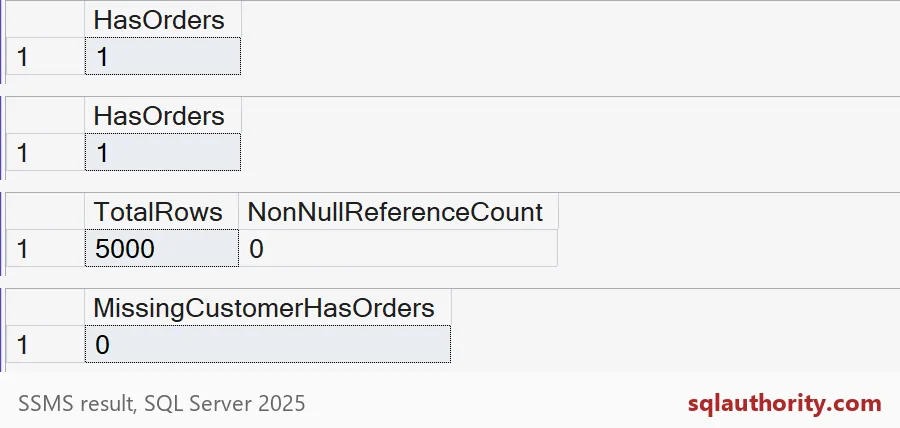
What the numbers say
Both existence queries return 1. Look at the Messages tab as well. Each one reports 2 logical reads, even though 5,000 rows match. So SQL Server stopped early for both, and the COUNT version got no penalty here.
That is the honest answer to “which is faster?” Here the optimizer treated the simple COUNT test much like EXISTS. That is common, but not guaranteed. A bigger table, a different index or a more complex query can change that. I never promise a speedup from the spelling alone.
The third grid shows a different story. TotalRows is 5000, but NonNullReferenceCount is 0. COUNT_BIG(*) counts rows. COUNT_BIG(ReferenceCode) counts only non-NULL values. The fourth grid shows that a customer with no orders returns 0.

The NULL trap
Here is the bug I mentioned. Someone counts a nullable column and then compares the count with zero.
SELECT CASE WHEN (SELECT COUNT_BIG(ReferenceCode) FROM #Orders WHERE CustomerId = 1) > 0
            THEN 1 ELSE 0 END AS HasOrders_WrongWay;
It returns 0, even though customer 1 has 5,000 orders. Every ReferenceCode is NULL, so the count skips them all. The query is not wrong about the count. It is wrong about the question.
EXISTS never has this problem. It does not look at the value in the select list. It only asks whether a qualifying row is there. That is why SELECT 1 is fine inside it.
Check it on your own server
Take a real existence check from your code. Run it both ways with STATISTICS IO on and compare the reads. Then look at the actual execution plan.
Do not swap a needed total for EXISTS and call it tuning. You would lose the number. The opposite mistake is just as common: counting a million rows to answer a yes or no that nobody needed counted. Name the answer first, then pick the query. Here is the cleanup, and the full script is below.
DROP TABLE IF EXISTS #Orders;The next time a check says “greater than zero,” ask whether the number was ever needed.
EXISTS is not a smaller COUNT, it is a different question.
Published by Pinal Dave on SQLAuthority. More of my work at pinaldave.com.
Discover more from SQL Authority with Pinal Dave
Subscribe to get the latest posts sent to your email.