Foreign keys across databases do not exist in SQL Server, so you have to pick a different way to protect the relationship. A report can find broken rows, but only a real foreign key can stop them.

The design meeting that ends in “just add a foreign key”
Two teams, two databases. Orders live in one, customers live in the other. Someone says, “Just add a foreign key from orders to customers.” Everyone nods. Then you try to type it.
SQL Server refuses. A foreign key can only point at a table in the same database. Writing a three-part name does not change that. Let me prove it, and then show what works instead.
The demo creates a database named SqlAuthorityDemo to play the other team’s database, and removes it at the end. Run it on a test instance.
Create the other team’s database
The parent table lives in SqlAuthorityDemo and holds one customer, Id 1. The three-part name lets us create it without switching databases.
DROP DATABASE IF EXISTS SqlAuthorityDemo;
CREATE DATABASE SqlAuthorityDemo;
GO
CREATE TABLE SqlAuthorityDemo.dbo.CustomerRows (CustomerId int PRIMARY KEY);
INSERT SqlAuthorityDemo.dbo.CustomerRows (CustomerId) VALUES (1);
Try the foreign key anyway
Now try to create a child table in your current database with a foreign key to that parent. The attempt is wrapped in TRY and CATCH so the script can carry on. The second query asks whether the table got created.
BEGIN TRY
    CREATE TABLE dbo.RejectedOrders
    (
        OrderId    int,
        CustomerId int REFERENCES SqlAuthorityDemo.dbo.CustomerRows (CustomerId)
    );
END TRY
BEGIN CATCH
    SELECT ERROR_NUMBER() AS CrossDatabaseError;
END CATCH;

SELECT OBJECT_ID(N'dbo.RejectedOrders') AS RejectedTableId;
The catch block reports error 1750, and RejectedTableId is NULL. The whole table was rolled back, not just the constraint. Error 1750 is a vague message, though. I will show you the real reason in a minute.
Detect an orphan with a report
Since the real key is off the table, many teams write a report. To see what a report can and cannot do, build the same shape locally, in one database. Order 2 points to customer 99, who does not exist. The query looks for rows with no parent.
DROP TABLE IF EXISTS dbo.OrderRows;
DROP TABLE IF EXISTS dbo.CustomerRows;

CREATE TABLE dbo.CustomerRows (CustomerId int PRIMARY KEY);
CREATE TABLE dbo.OrderRows (OrderId int PRIMARY KEY, CustomerId int NOT NULL);

INSERT dbo.CustomerRows (CustomerId) VALUES (1);
INSERT dbo.OrderRows (OrderId, CustomerId) VALUES (1, 1), (2, 99);

SELECT o.OrderId, o.CustomerId
FROM dbo.OrderRows AS o
WHERE NOT EXISTS (SELECT 1 FROM dbo.CustomerRows AS c WHERE c.CustomerId = o.CustomerId)
ORDER BY o.OrderId;
The report finds order 2 with customer 99. That is useful. But notice what happened: the bad row was already in the table. The report found it after the damage, and nothing stopped the insert.
Let a real foreign key do the job
Now remove the orphan and add a local foreign key. Then try to delete customer 1, who still has an order.
DELETE dbo.OrderRows WHERE CustomerId = 99;

ALTER TABLE dbo.OrderRows
    ADD CONSTRAINT FK_OrderRows_CustomerRows
    FOREIGN KEY (CustomerId) REFERENCES dbo.CustomerRows (CustomerId);

BEGIN TRY
    DELETE dbo.CustomerRows WHERE CustomerId = 1;
END TRY
BEGIN CATCH
    SELECT ERROR_NUMBER() AS ErrorNumber;
END CATCH;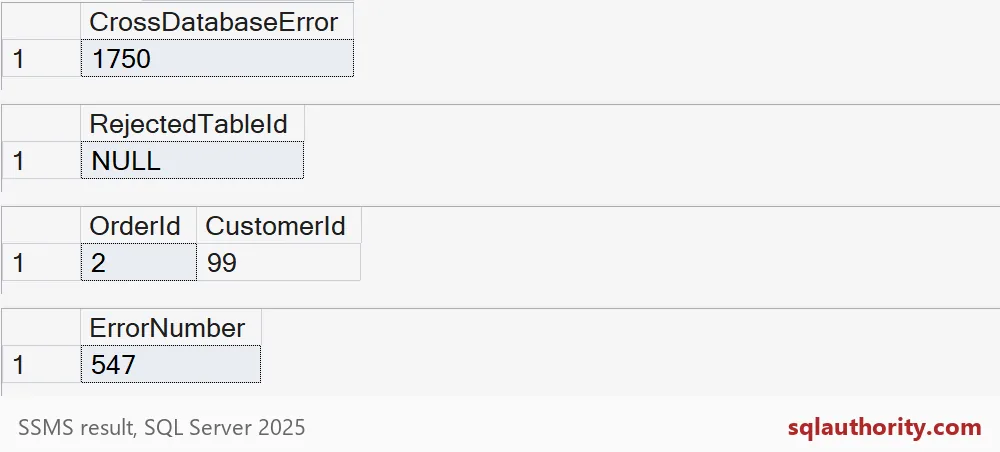
The delete fails with error 547. The key blocks the change before it happens. That is the difference: the report detects, the key enforces.

See the real reason, and the same-database option
Here is the cross-database attempt again, without TRY and CATCH. Now SQL Server shows the message that came before 1750.
CREATE TABLE dbo.RejectedOrders
(
    OrderId    int,
    CustomerId int REFERENCES SqlAuthorityDemo.dbo.CustomerRows (CustomerId)
);
The first message is error 1763, which says cross-database foreign key references are not supported. Error 1750 follows it. TRY and CATCH only showed us the last one.
If the two teams can share a database, there is a clean answer: keep them apart with schemas. The foreign key works across schemas, because the schemas live in one database.
DROP TABLE IF EXISTS dbo.OrderRows;
DROP TABLE IF EXISTS dbo.CustomerRows;
GO
CREATE SCHEMA Crm;
GO
CREATE SCHEMA Sales;
GO
CREATE TABLE Crm.Customer (CustomerId int PRIMARY KEY);
CREATE TABLE Sales.CustomerOrder
(
    OrderId    int PRIMARY KEY,
    CustomerId int NOT NULL REFERENCES Crm.Customer (CustomerId)
);

BEGIN TRY
    INSERT Sales.CustomerOrder (OrderId, CustomerId) VALUES (1, 99);
END TRY
BEGIN CATCH
    SELECT ERROR_NUMBER() AS SchemaFkError;
END CATCH;
The insert of a customer that does not exist fails with 547 again. So different schemas keep the organization and still get native enforcement. If the databases must stay separate, you will need a written write order, tight permissions and a regular orphan report. Be honest about that last piece: it detects, it does not enforce.
DROP TABLE IF EXISTS Sales.CustomerOrder;
DROP TABLE IF EXISTS Crm.Customer;
DROP SCHEMA IF EXISTS Sales;
DROP SCHEMA IF EXISTS Crm;
DROP DATABASE IF EXISTS SqlAuthorityDemo;
Next time someone says “just add the key,” ask which database it lives in.
An orphan report is not a foreign key, it is detection after the bad row exists.
Published by Pinal Dave on SQLAuthority. More of my work at pinaldave.com.
Discover more from SQL Authority with Pinal Dave
Subscribe to get the latest posts sent to your email.