I use SQL_VARIANT_PROPERTY to inspect the base data type inside a sql_variant value. A displayed seven doesn’t identify its stored type. An integer and a string can look similar while carrying different contracts.

Create typed variants explicitly
Each VALUES row converts its source to a specific type before converting it to sql_variant. That sequence retains the intended base type inside the variant. All six rows then share the outer sql_variant column type.
The first source is int, the second is decimal, and the third is date. The fourth uses a Unicode string, while the fifth uses binary bytes. The last row is a typed NULL. These are independent examples rather than conversions of one shared string.
WITH Inputs AS
(
 SELECT CaseId, InputValue
 FROM (VALUES
  (1,CAST(CAST(7 AS int) AS sql_variant)),
  (2,CAST(CAST(7.25 AS decimal(9,2)) AS sql_variant)),
  (3,CAST(CAST('20260102' AS date) AS sql_variant)),
  (4,CAST(CAST(N'7' AS nvarchar(10)) AS sql_variant)),
  (5,CAST(CAST(0x0700 AS varbinary(2)) AS sql_variant)),
  (6,CAST(NULL AS sql_variant))
 ) v(CaseId,InputValue)
)
SELECT CaseId,
       CAST(SQL_VARIANT_PROPERTY(InputValue,'BaseType') AS nvarchar(128)) AS BaseType
FROM Inputs
ORDER BY CaseId;
Read the BaseType property
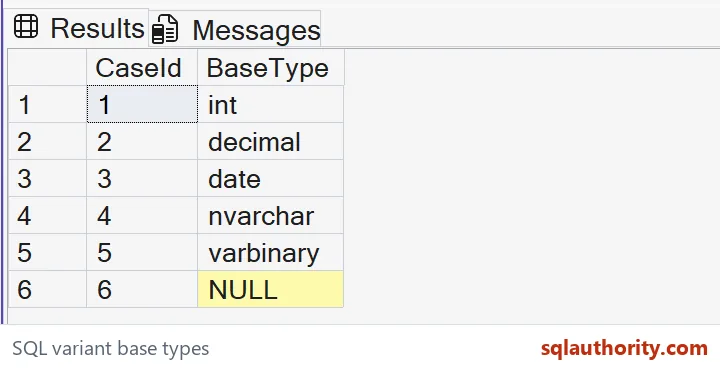
The property name BaseType returns the base data type name. The expected names are int, decimal, date, nvarchar and varbinary. They distinguish inputs whose formatted values alone could be misleading.
SQL_VARIANT_PROPERTY itself returns sql_variant. I cast this property’s result to nvarchar(128) so the output column has an explicit ordinary string type. That outer cast formats the property result. It doesn’t convert or replace the original variant’s stored payload.

Keep inspection separate from inference
Case four contains the text seven. Its expected BaseType remains nvarchar, even though a numeric conversion of that text could succeed. Inspecting a value’s type asks a different question from trying a conversion.
I’d make that distinction clear when reviewing flexible attribute stores. A successful conversion doesn’t prove the original value was numeric. The stored type can affect downstream comparison rules and application handling. The property is evidence about the value supplied to it.
Retain the missing state
The final row has no underlying value to describe. Its expected property result is NULL. I keep that result visible instead of labeling the value as an empty string or an arbitrary type.
A caller can display a friendly missing label outside the inspection column. That preserves the difference between property data and presentation. It also avoids confusing a real nvarchar payload with the text chosen to describe a missing variant.
Respect the container boundaries
A sql_variant is a container with restrictions, not a universal substitute for every SQL Server type. This example chooses supported fixed inputs. It doesn’t suggest that XML or unrestricted large text can always be packed into that container.
I’d inspect the source schema before adapting the pattern. If a conversion already changed the source type, the property describes the resulting value. It cannot recover an earlier type that was discarded. Keep the typed expression close to the property call.
Use the result for a defined decision
The query reads only inline values and orders results by CaseId. There are no tables, updates or session changes. The complete output includes the five expected type names and the missing sixth result.
I’d use BaseType when a consumer needs a type-family distinction. That alone doesn’t establish a value’s acceptable range or business meaning. An integer can still be invalid for an identifier. Inspect the container first, then apply the separate rule that governs its contents.
Inspect the stored base type before assigning meaning to a displayed value.
A displayed seven is not a type, it is a value whose BaseType you must check.
Published by Pinal Dave on SQLAuthority. More of my work at pinaldave.com.
Discover more from SQL Authority with Pinal Dave
Subscribe to get the latest posts sent to your email.