The AT TIME ZONE cost is paid once per row, so convert the two boundaries of your request, not the whole column. Filter the stored UTC values first. Format only the rows that survive for display.

The report that works on day one
A manager asks for all events from “yesterday” in Eastern time. The developer converts the stored UTC column to Eastern and compares it with the local dates. The result is right. It is also slow once the table grows, because every row must be converted before it can be compared.
There is a second trap. A local day is not always 24 hours long. I will use the spring daylight-saving day to show both problems. First, a tiny table with three events and an index on the UTC column.
DROP TABLE IF EXISTS #EventTimes;
CREATE TABLE #EventTimes (Id int PRIMARY KEY, OccurredUtc datetime2 NOT NULL);
INSERT #EventTimes VALUES (1, '2026-03-08T06:30:00'), (2, '2026-03-08T07:30:00'), (3, '2026-03-09T04:30:00');
CREATE INDEX IX_EventTimes_Utc ON #EventTimes (OccurredUtc);
Convert the interval, not the column
Take the local start and end of the day and translate each one into UTC. Then compare the plain UTC column with that interval. Only the selected rows get converted back to local time for display.
DECLARE @localStart datetime2 = '2026-03-08T00:00:00', @localEnd datetime2 = '2026-03-09T00:00:00';
DECLARE @utcStart datetime2 = CAST(@localStart AT TIME ZONE 'Eastern Standard Time' AT TIME ZONE 'UTC' AS datetime2);
DECLARE @utcEnd datetime2 = CAST(@localEnd AT TIME ZONE 'Eastern Standard Time' AT TIME ZONE 'UTC' AS datetime2);
SELECT @utcStart AS UtcStart, @utcEnd AS UtcEnd,
       DATEDIFF(hour, @utcStart, @utcEnd) AS IntervalHours;
SELECT Id, OccurredUtc AT TIME ZONE 'UTC' AT TIME ZONE 'Eastern Standard Time' AS LocalTime
FROM #EventTimes
WHERE OccurredUtc >= @utcStart AND OccurredUtc < @utcEnd
ORDER BY Id;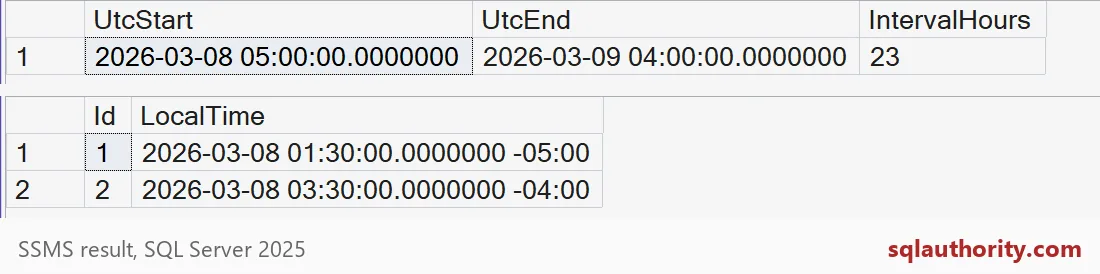
The local day starts at 05:00 UTC and ends at 04:00 UTC the next day. IntervalHours is 23, because the clocks jumped forward. Events 1 and 2 are inside. Event 3 is not. Look at the offsets: event 1 is at -05:00 and event 2 is at -04:00. Same local day, two offsets. If you had added a flat 24 hours to the start, you would have picked the wrong end.
Check the old way gives the same rows
Here is the version that converts the column. It returns the same answer, which is why nobody notices a problem early.
DECLARE @localStart datetime2 = '2026-03-08T00:00:00', @localEnd datetime2 = '2026-03-09T00:00:00';
SELECT Id FROM #EventTimes
WHERE CAST(OccurredUtc AT TIME ZONE 'UTC' AT TIME ZONE 'Eastern Standard Time' AS datetime2) >= @localStart
  AND CAST(OccurredUtc AT TIME ZONE 'UTC' AT TIME ZONE 'Eastern Standard Time' AS datetime2) < @localEnd
ORDER BY Id;
It returns IDs 1 and 2, just like the boundary version. Three rows cannot show a cost, so let me grow the table.
Make the table bigger and measure
The next block adds 100,000 events from early 2025, far from our test day. Then it counts matches both ways with STATISTICS IO and TIME turned on. Read the Messages tab afterward.
INSERT #EventTimes (Id, OccurredUtc)
SELECT 3 + n, DATEADD(minute, n, '2025-01-01T00:00:00')
FROM (SELECT TOP (100000) ROW_NUMBER() OVER (ORDER BY (SELECT NULL)) AS n
      FROM sys.all_objects AS a CROSS JOIN sys.all_objects AS b) AS x;
GO
DECLARE @localStart datetime2 = '2026-03-08T00:00:00', @localEnd datetime2 = '2026-03-09T00:00:00';
DECLARE @utcStart datetime2 = CAST(@localStart AT TIME ZONE 'Eastern Standard Time' AT TIME ZONE 'UTC' AS datetime2);
DECLARE @utcEnd datetime2 = CAST(@localEnd AT TIME ZONE 'Eastern Standard Time' AT TIME ZONE 'UTC' AS datetime2);
SET STATISTICS IO ON;
SET STATISTICS TIME ON;
SELECT COUNT(*) AS ConvertedColumn FROM #EventTimes
WHERE CAST(OccurredUtc AT TIME ZONE 'UTC' AT TIME ZONE 'Eastern Standard Time' AS datetime2) >= @localStart
  AND CAST(OccurredUtc AT TIME ZONE 'UTC' AT TIME ZONE 'Eastern Standard Time' AS datetime2) < @localEnd;
SELECT COUNT(*) AS UtcBoundaries FROM #EventTimes
WHERE OccurredUtc >= @utcStart AND OccurredUtc < @utcEnd;
SET STATISTICS TIME OFF;
SET STATISTICS IO OFF;
Both counts are 2, so the answers still agree. The cost does not. For the converted column, the logical reads run into the hundreds and the CPU time is hundreds of milliseconds. For the boundary version, the reads are single digits and the CPU time is close to zero. Your exact numbers will differ. The gap is what to look for.
The reason is simple. When the column is wrapped in a conversion, SQL Server cannot search the index on OccurredUtc. It has to convert every one of the 100,003 rows before it can compare. With plain UTC boundaries, it can jump straight to the two matching rows.

Keep ambiguous inputs explicit
Store UTC instants, or an offset, whenever the distinction matters. In autumn the same wall-clock time happens twice. Two different UTC instants then show the same local time, and only the offset tells them apart.
SELECT OccurredUtc,
       OccurredUtc AT TIME ZONE 'UTC' AT TIME ZONE 'Eastern Standard Time' AS LocalTime
FROM (VALUES (CAST('2026-11-01T05:30:00' AS datetime2)),
             (CAST('2026-11-01T06:30:00' AS datetime2))) AS v(OccurredUtc)
ORDER BY OccurredUtc;
Both rows show 01:30 local time, with offsets -04:00 and -05:00. If you drop the offset, you cannot tell the two apart. Time zone rules can also change, so a saved local value needs a refresh plan. Finally, test with your own row counts. A small table hides this cost completely. Clean up when you are done.
DROP TABLE IF EXISTS #EventTimes;Keep selection and display conversion separate in your next time zone query.
A local day is not a fixed UTC duration, it is an interval defined by zone rules.
Published by Pinal Dave on SQLAuthority. More of my work at pinaldave.com.
Discover more from SQL Authority with Pinal Dave
Subscribe to get the latest posts sent to your email.