Destructive reads let a worker take a job from a queue table and remove it in one statement. I use DELETE with OUTPUT for that. It closes the gap between picking a job and claiming it.

Start with a small queue
Say you have a table of jobs and several workers that each need the next one. The old way takes two steps. A worker runs a SELECT to find a ready job, then runs a DELETE or UPDATE to claim it. Between those steps, another worker can pick the same job.
Let me build a tiny queue and close that gap. Run these blocks in order in a test database. Status R means ready and T means taken. The QueueId column gives the jobs a clear order. The demo creates dbo.QueueDemo and removes it in the last block.
DROP TABLE IF EXISTS dbo.QueueDemo;

CREATE TABLE dbo.QueueDemo
(
    QueueId    int          NOT NULL PRIMARY KEY,
    Payload    nvarchar(40) NOT NULL,
    WorkStatus char(1)      NOT NULL   -- R = ready, T = taken
);

INSERT dbo.QueueDemo (QueueId, Payload, WorkStatus)
VALUES (1, N'First task',    'R'),
       (2, N'Second task',   'R'),
       (3, N'Already taken', 'T');

SELECT QueueId, Payload, WorkStatus FROM dbo.QueueDemo ORDER BY QueueId;
The result has three jobs. Jobs 1 and 2 are ready. Job 3 is already taken.
Remove and return the first ready job
The CTE picks the ready job with the lowest QueueId. The DELETE removes that row, and OUTPUT hands back the values that were deleted. One statement does both jobs, so there is no gap for another worker to slip into.
WITH NextJob AS
(
    SELECT TOP (1) QueueId, Payload, WorkStatus
    FROM dbo.QueueDemo
    WHERE WorkStatus = 'R'
    ORDER BY QueueId
)
DELETE FROM NextJob
OUTPUT DELETED.QueueId, DELETED.Payload, DELETED.WorkStatus;

SELECT QueueId, Payload, WorkStatus FROM dbo.QueueDemo ORDER BY QueueId;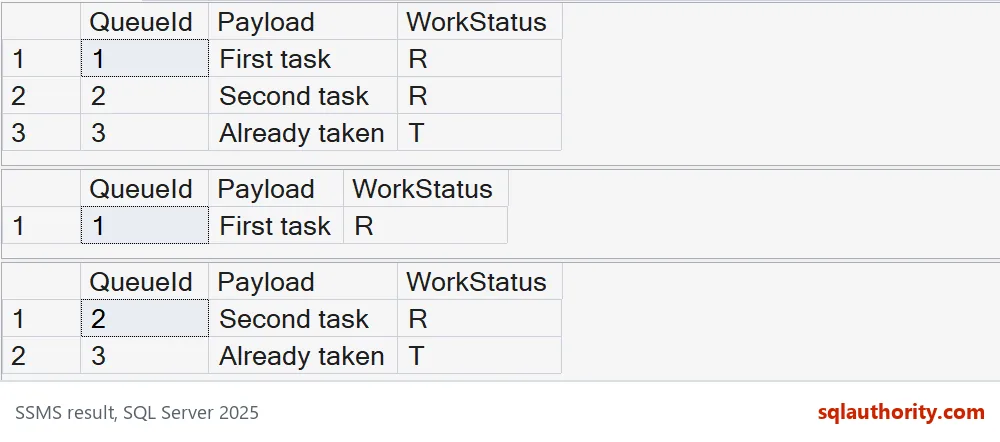
OUTPUT returns job 1 with its old status R. The next SELECT shows jobs 2 and 3 left in the table. Job 3 was never touched, because the WHERE clause only looks at ready jobs.
The ORDER BY inside the CTE decides which row is chosen. OUTPUT does not order anything. With TOP (1) that is fine, because only one row can win.
What happens when the transaction rolls back
Here is the part that surprises people. Seeing a row in the OUTPUT result does not make the delete permanent. The result comes back before the transaction ends. This test rolls back on purpose.
BEGIN TRANSACTION;

WITH NextJob AS
(
    SELECT TOP (1) QueueId, Payload, WorkStatus
    FROM dbo.QueueDemo
    WHERE WorkStatus = 'R'
    ORDER BY QueueId
)
DELETE FROM NextJob
OUTPUT DELETED.QueueId, DELETED.Payload, DELETED.WorkStatus;

ROLLBACK TRANSACTION;

SELECT QueueId, Payload, WorkStatus FROM dbo.QueueDemo ORDER BY QueueId;
The DELETE returns job 2 with status R. After the ROLLBACK, job 2 is back in the table, still ready. A worker that received that payload must treat it as undone if its transaction fails.
Now flip the story. Say the worker commits the delete and then crashes before it does the real work. The job is gone for good, and the queue has no memory of it. If that job sends an email, nobody ever sends the email.
Keep the row with UPDATE and OUTPUT
An UPDATE can claim a job without deleting it. It flips the status to T and returns the new values. The row stays in the table, so a recovery step can find claimed jobs that never finished.
WITH NextJob AS
(
    SELECT TOP (1) QueueId, Payload, WorkStatus
    FROM dbo.QueueDemo
    WHERE WorkStatus = 'R'
    ORDER BY QueueId
)
UPDATE NextJob
SET WorkStatus = 'T'
OUTPUT INSERTED.QueueId, INSERTED.Payload, INSERTED.WorkStatus;

SELECT QueueId, Payload, WorkStatus FROM dbo.QueueDemo ORDER BY QueueId;
The UPDATE returns job 2 with its new status T. The table still holds jobs 2 and 3, both taken. That is the trade: you keep a trail, but you now own the cleanup. The last block drops the demo table.
DROP TABLE IF EXISTS dbo.QueueDemo;Choose what a claim means
Pick the recovery rule before you write the dequeue statement. Deleting at claim time is simple, but it can lose work when a worker crashes after the commit. Keeping a claimed row helps recovery, but retries can repeat the work. SQL Server cannot take back an email that already went out, so the action itself must be safe to run twice.
A status flag alone does not tell you whether a worker is still busy. A real design adds a lease time and a worker name, so a stale claim can be spotted and released. When several workers compete, test them together with locking hints. I wrote about that side in UPDLOCK and READPAST for Queue Tables.
Run your own failure test. Stop a worker in the middle of a job and see what your queue does with the claim.

Test the failure case first, and the happy path will take care of itself.
A queue claim is not finished work, it is a change that needs a recovery rule.
Published by Pinal Dave on SQLAuthority. More of my work at pinaldave.com.
Discover more from SQL Authority with Pinal Dave
Subscribe to get the latest posts sent to your email.