I use OPENJSON default schema to inspect a document before assigning application types. Its key, value and type columns expose the supplied JSON shape. The numeric type code explains how to interpret each value.

Read one property per row
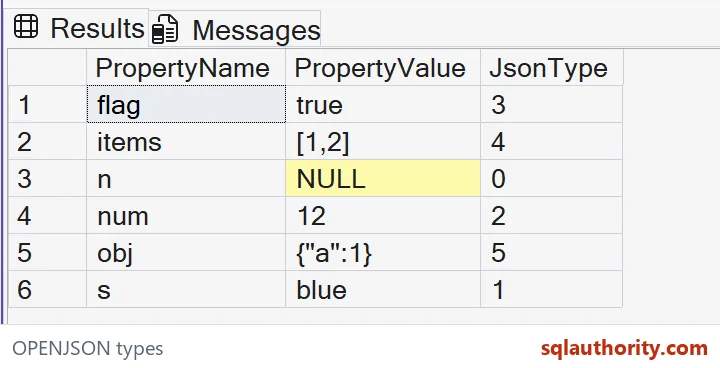
The supplied object contains six properties, covering all six type codes. OPENJSON returns their names and values as rows. The query adds explicit display widths while retaining the original integer type code.
I keep the property name next to its value and code. A detached value such as twelve doesn’t establish whether the source used a number or a string. Those distinctions matter before a later typed projection decides how the application’s fields should be converted.
WITH Documents AS
(
 SELECT CAST(N'{"n":null,"s":"blue","num":12,"flag":true,"items":[1,2],"obj":{"a":1}}'
             AS nvarchar(200)) AS JsonText
)
SELECT CAST(j.[key] AS nvarchar(40)) AS PropertyName,
       CAST(j.[value] AS nvarchar(200)) AS PropertyValue,
       j.[type] AS JsonType
FROM Documents AS d
CROSS APPLY OPENJSON(d.JsonText) AS j
ORDER BY j.[key] COLLATE Latin1_General_100_BIN2;
Map the six codes deliberately
The default type codes identify null, string, number, Boolean, array and object as zero through five. The expected grid contains one example of each. Their names remain readable rather than being replaced by informal numeric categories.
I’d document this mapping wherever the default schema feeds a diagnostic report. A code of three means Boolean here, not an application-specific status. Keeping the JSON type separate from a business classification prevents the same integer from being interpreted under two unrelated rules.

Preserve JSON null in the rowset
Property n appears as a row with type zero and SQL NULL in the displayed value. The property isn’t absent from the object. The default schema retains enough context to distinguish its presence from an omitted key.
I wouldn’t discard this row just because its value is NULL. Filtering it out could make a supplied null property look missing. A caller’s rule for accepted nulls belongs in the next validation step, alongside its requirements for property presence.
Distinguish scalar text from nested fragments
The string value blue is returned without its JSON string quotes. The array and object values remain JSON fragments, including their brackets or braces. Their type codes identify those different representations.
I’d review the code before treating every displayed value as interchangeable text. A nested fragment can need further traversal, while a scalar can need a typed conversion. The common value-column type doesn’t erase the source structure that the accompanying type column describes.
State the environment requirement
OPENJSON requires database compatibility level 130 or higher. Support for another JSON function doesn’t remove that requirement. The query changes no compatibility setting and leaves the target database’s policy to its owner.
I’d check that requirement before sharing the example as a diagnostic helper. A missing feature isn’t a reason to silently change database settings. Retain the intended query and record the environment requirement so the validation can be performed against the correct target.
Compare complete properties instead of counts
The explicit BIN2 ordering makes the six expected rows easy to compare by name. All supplied property names and values fit the displayed widths. The example creates no application object and performs no writes.
I’d retain each full tuple, including the null row and nested fragments, during validation. Six returned rows alone wouldn’t prove the right type mapping. An application’s typed WITH projection needs separate conversion and missing-field rules. This default-schema display doesn’t establish those rules.
Read the code before you trust the text.
A JSON value is not its type, it is text that comes with a type code.
Published by Pinal Dave on SQLAuthority. More of my work at pinaldave.com.
Discover more from SQL Authority with Pinal Dave
Subscribe to get the latest posts sent to your email.