External profiles need a stable identity key before an application stores an email address. A changed address must not create a second account.

The database design starts with identity and purpose. Permission to receive one field does not make that field a reliable account key.
Separate identity from contact information
Keep the provider’s stable identifier together with its scope. That scope might include the issuer, tenant or application. Do not merge accounts because their email addresses happen to match.
Email and preferred username are mutable claims in most identity providers. The subject identifier is usually scoped to an application. Choose an identifier whose lifetime and scope fit your integration, then preserve that distinction in the schema.
Validate the sign-in in the application backend with its supported authentication library. Check signature, issuer, audience, lifetime and nonce as required. Database uniqueness cannot replace authentication or decide whether two external accounts belong to one person.

Use external profiles to demonstrate the key
This SQL Server 2012 or later example uses a temporary table and fictional addresses. Its three rows deliberately share identifiers or emails. Only the combination of provider scope and subject identifies a row.
DROP TABLE IF EXISTS #ExternalProfile;

CREATE TABLE #ExternalProfile
(
    ProviderScope varchar(40) COLLATE Latin1_General_100_BIN2 NOT NULL,
    SubjectId nvarchar(100) COLLATE Latin1_General_100_BIN2 NOT NULL,
    ContactEmail nvarchar(320) NULL,
    PRIMARY KEY (ProviderScope, SubjectId)
);

INSERT #ExternalProfile VALUES
('ProviderA:App1', N'user-42', N'shared@example.invalid'),
('ProviderA:App1', N'user-73', N'shared@example.invalid'),
('ProviderB:App1', N'user-42', NULL);

SELECT ProviderScope, SubjectId, ContactEmail
FROM #ExternalProfile
ORDER BY ProviderScope, SubjectId;
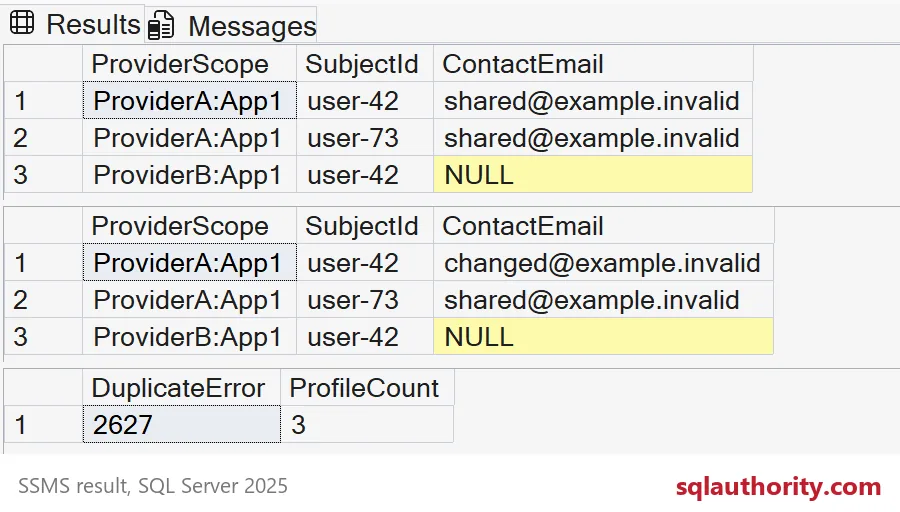
The two ProviderA rows share an email but remain separate profiles. ProviderB can use the same subject text independently. A missing email is allowed because contact information is optional in this example.
ProviderScope is a short configured scope label in this example. It is not a full issuer URL. Production mapping must resolve that label from validated provider and application context, never an arbitrary client-supplied value.
The lengths and binary collation are explicit example choices, not universal provider rules. Size fields for your provider’s actual contract. Validate accepted identifier characters and whitespace before storage, without silently changing an opaque identifier.
Update the profile through its stable key
A contact-address change updates the existing profile through its identity key. The address is a value, not a lookup credential. In application code, bind typed parameters through the database driver instead of concatenating SQL text.
DECLARE @ProviderScope varchar(40) = 'ProviderA:App1';
DECLARE @SubjectId nvarchar(100) = N'user-42';
DECLARE @ContactEmail nvarchar(320) = N'changed@example.invalid';

UPDATE #ExternalProfile
SET ContactEmail = @ContactEmail
WHERE ProviderScope = @ProviderScope
  AND SubjectId = @SubjectId;

SELECT ProviderScope, SubjectId, ContactEmail
FROM #ExternalProfile
ORDER BY ProviderScope, SubjectId;
The changed address belongs only to ProviderA’s user-42. The other two identities remain distinct. This update assumes the identity already exists; it is not a complete concurrent insert-or-update implementation.
Use typed SqlParameter values when using Microsoft.Data.SqlClient. Set parameter types and sizes deliberately. A parameterized command still needs authorization checks before changing a user’s profile.
Reject a duplicate identity deliberately
Repeating an insert must not produce a second copy of the same identity. The final block repeats the insert for user-42 under ProviderA. The primary key rejects it. The block catches only duplicate-key errors, reports the error number and the profile count, and then drops the temporary table.
DECLARE @DuplicateError int = NULL;
BEGIN TRY
    INSERT #ExternalProfile VALUES
    ('ProviderA:App1', N'user-42', N'another@example.invalid');
END TRY
BEGIN CATCH
    IF ERROR_NUMBER() NOT IN (2601, 2627) THROW;
    SET @DuplicateError = ERROR_NUMBER();
END CATCH;

SELECT @DuplicateError AS DuplicateError,
       COUNT(*) AS ProfileCount
FROM #ExternalProfile;

DROP TABLE #ExternalProfile;
Look at the two result columns. DuplicateError shows 2627, a duplicate-key error, and ProfileCount stays at three. That shows the example’s relational key only. It does not demonstrate a real provider login, permission grant or concurrent ingestion workflow.
Production ingestion needs a deliberate concurrency and retry policy. Keep the unique key as the final database guard even when the application handles repeated deliveries.
Keep collected data tied to its purpose
Store only profile fields the feature actually needs. Keep contact preferences separate from the identity mapping. Account linking needs an explicit, authenticated workflow rather than an email-equality shortcut.
Decide what happens when permission is withdrawn or contact information changes. A missing optional field is not necessarily a deletion instruction. Apply the provider’s rules and your product’s retention decisions consistently.
Store the stable key first and the email second, and your future self will thank you.
An email address is not an identity, it is contact information that can change.
Published by Pinal Dave on SQLAuthority. More of my work at pinaldave.com.
Discover more from SQL Authority with Pinal Dave
Subscribe to get the latest posts sent to your email.