geometry STNumPoints counts points in a geometry description, including duplicates. I separate that count from the number of distinct locations or visible corners.

Name the count you actually need
A square has four familiar corners. Its polygon ring description also repeats the first coordinate at the end. Those are different counting questions. Calling both results a vertex count can hide what the expression actually returns.
STNumPoints counts the points in the description of a geometry instance. Duplicate points are included. For a collection, the method adds the counts from its elements. The SQL return type is int.
I wouldn’t infer a distinct-coordinate count from this method’s name. A consumer might need unique locations, stored coordinate occurrences or another topological measure. State the required meaning before choosing the expression. The closing point is an intentional repeated occurrence.
Read five complete spatial descriptions
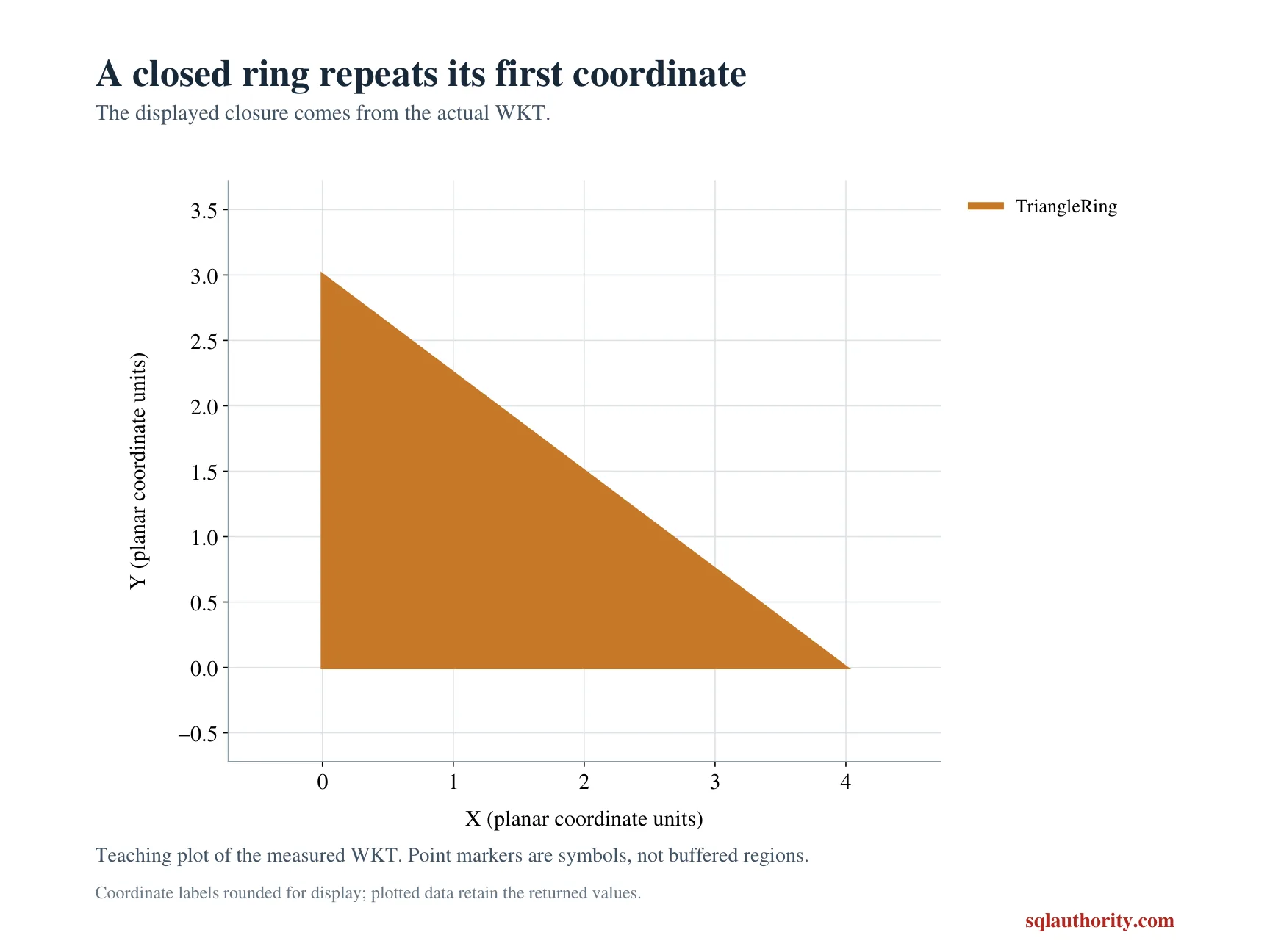
The line contains three coordinate entries. The square polygon contains five, including its closing zero-zero entry. The triangle polygon contains four for the same reason. Those complete WKT descriptions remain visible in the query.
A single point supplies one coordinate occurrence. The empty geometry collection supplies none. Keeping the empty case avoids confusing an initialized empty instance with absent input. The query also returns STIsEmpty beside every count.
All five instances use spatial reference identifier zero. A CTE constructs them from literal text, followed by one ordered SELECT. No objects or connection settings change. Each case keeps its label beside the returned count and empty flag.
WITH Shapes AS
(
    SELECT Id,CAST(CaseLabel AS varchar(20)) AS CaseLabel,
           geometry::STGeomFromText(ShapeText,0) AS Shape
    FROM (VALUES
        (1,'ThreePointLine','LINESTRING(0 0,3 0,3 4)'),
        (2,'SquareRing','POLYGON((0 0,2 0,2 2,0 2,0 0))'),
        (3,'TriangleRing','POLYGON((0 0,4 0,0 3,0 0))'),
        (4,'SinglePoint','POINT(1 1)'),
        (5,'EmptyCollection','GEOMETRYCOLLECTION EMPTY')
    ) AS v(Id,CaseLabel,ShapeText)
)
SELECT Id,CaseLabel,Shape.STNumPoints() AS DescribedPoints,
       Shape.STIsEmpty() AS IsEmpty
FROM Shapes
ORDER BY Id;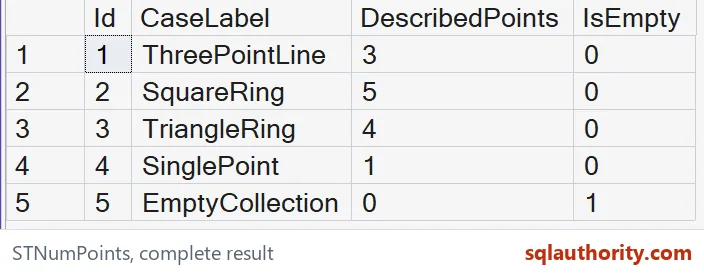
Do not subtract one without naming the shape
It might be tempting to subtract one from every point count. That would remove the square ring’s closing repetition in this example. It would also change the line and point counts incorrectly. A blanket adjustment doesn’t establish a distinct-location contract.
A polygon can also contain more than one ring. A collection can contain several separate instances. A collection adds up the point counts of its elements. One subtraction for an entire complex value doesn’t express all those descriptions.
This demonstration deliberately stops at simple shapes and an empty collection. It doesn’t offer a general coordinate-deduplication query. That wider operation would need an explicit identity and comparison rule. Keep the narrow method result separate from that additional requirement.
Preserve empty values and native types
The empty row is expected to return zero points and a true empty flag. The other rows return positive counts and false flags. These are ordinary typed outputs. The integer zero is not replaced with NULL or a display label.
The point count reports description size, not line length or polygon area. A three-point line can be very short or very long. A polygon with fewer described points can cover a larger area. Those measurements require their own spatial methods.
Likewise, the count doesn’t certify a shape’s suitability for a business operation. Its purpose here is limited to described point occurrences. I keep exact literal inputs available so the expected values can be checked directly. A count alone cannot explain malformed source data.
Keep the closing repetition in the review
Compare every complete label, count and empty bit. The square and triangle rows should retain their closing-coordinate counts. Removing the empty row or relabeling a count would weaken this comparison. A total across all rows isn’t enough.
Keep the native int counts separate from the bit empty flags. Compare the point and empty collection as well as the closed rings. Preserve the original descriptions when extending the query. That makes each additional count explainable rather than merely plausible.
Name the count you need before you pick the method.
A described point count is not a distinct-corner count, it is a count that retains repeated coordinates.
Published by Pinal Dave on SQLAuthority. More of my work at pinaldave.com.
Discover more from SQL Authority with Pinal Dave
Subscribe to get the latest posts sent to your email.