TRY_CAST returns NULL for a failed permitted conversion, but prohibited conversions still raise an error. I separate those outcomes before handling rejected input. A successful conversion also needs its business rule checked.

Choose a target type before classifying input
An intake field can contain a valid integer, missing input or text that won’t fit the integer contract. TRY_CAST offers a convenient way to attempt that conversion. The target type determines the range and conversion rules.
The following query gives every input an explicit nvarchar(40) type. The target is int, rather than a guessed numeric representation. Compare ParsedValue and ParseStatus with their corresponding expected columns.
WITH Cases AS
(
    SELECT CaseId, CaseLabel, InputText, ExpectedValue, ExpectedStatus
    FROM (VALUES
    (1, CAST(N'Positive' AS nvarchar(40)), CAST(N'42' AS nvarchar(40)), CAST(42 AS int), CAST(N'Converted' AS nvarchar(20))),
    (2, CAST(N'Negative' AS nvarchar(40)), CAST(N'-7' AS nvarchar(40)), CAST(-7 AS int), CAST(N'Converted' AS nvarchar(20))),
    (3, CAST(N'Letters' AS nvarchar(40)), CAST(N'abc' AS nvarchar(40)), CAST(NULL AS int), CAST(N'Rejected' AS nvarchar(20))),
    (4, CAST(N'Overflow' AS nvarchar(40)), CAST(N'2147483648' AS nvarchar(40)), CAST(NULL AS int), CAST(N'Rejected' AS nvarchar(20))),
    (5, CAST(N'Missing' AS nvarchar(40)), CAST(NULL AS nvarchar(40)), CAST(NULL AS int), CAST(N'Missing' AS nvarchar(20))),
    (6, CAST(N'Zero' AS nvarchar(40)), CAST(N'0' AS nvarchar(40)), CAST(0 AS int), CAST(N'Converted' AS nvarchar(20))),
    (7, CAST(N'Leading zeros' AS nvarchar(40)), CAST(N'00042' AS nvarchar(40)), CAST(42 AS int), CAST(N'Converted' AS nvarchar(20))),
    (8, CAST(N'Mixed text' AS nvarchar(40)), CAST(N'42x' AS nvarchar(40)), CAST(NULL AS int), CAST(N'Rejected' AS nvarchar(20)))
    ) AS v(CaseId, CaseLabel, InputText, ExpectedValue, ExpectedStatus)
), Results AS
(
    SELECT *, TRY_CAST(InputText AS int) AS ParsedValue FROM Cases
), Classified AS
(
    SELECT *, CAST(CASE WHEN InputText IS NULL THEN N'Missing'
        WHEN ParsedValue IS NULL THEN N'Rejected' ELSE N'Converted' END AS nvarchar(20)) AS ParseStatus
    FROM Results
)
SELECT CaseId, CaseLabel, InputText, ParsedValue, ParseStatus, ExpectedValue, ExpectedStatus,
    CAST(CASE WHEN ParseStatus=ExpectedStatus AND
        (ParsedValue=ExpectedValue OR (ParsedValue IS NULL AND ExpectedValue IS NULL))
        THEN 1 ELSE 0 END AS bit) AS MatchesExpected
FROM Classified
ORDER BY CaseId;
The expected converted values include positive, negative and zero integers. Letters, mixed text and the value above the int maximum expect rejection. The leading-zero text expects the integer forty-two, without preserving its original spelling.
Do not confuse missing input with rejection
Missing input and unsuccessful parsing both produce a NULL value in this model. The status expression checks the input first. That keeps an absent field separate from supplied text that failed conversion.
I retain InputText alongside ParsedValue when investigating intake failures. Otherwise, converting away the source spelling removes useful evidence. A result of forty-two cannot tell me whether the caller supplied 42 or 00042.
Replacing every NULL with zero would combine missing and rejected values with a valid zero. That hides the distinction this query makes explicit. Choose a fallback only when the application has defined what that fallback means.

A prohibited conversion is a different outcome
SQL Server does not permit a direct int-to-xml cast. The TRY prefix does not make that conversion supported. Run the deliberately invalid statement separately when checking its natural error.
SELECT TRY_CAST(4 AS xml) AS ProhibitedConversion;This request needs an error-handling path rather than a test for a returned NULL. TRY_CAST still raises an error for conversions SQL Server does not allow. The successful intake query above does not include that invalid statement.
Success does not promise complete preservation
A narrower character target can return shortened text successfully. The second example asks for nvarchar(1), despite supplying two characters. Its expected result is 4, not a refusal or a preserved two-character string.
SELECT CAST(N'42' AS nvarchar(40)) AS InputText,
    TRY_CAST(CAST(N'42' AS nvarchar(40)) AS nvarchar(1)) AS NarrowText,
    CAST(N'4' AS nvarchar(1)) AS ExpectedText;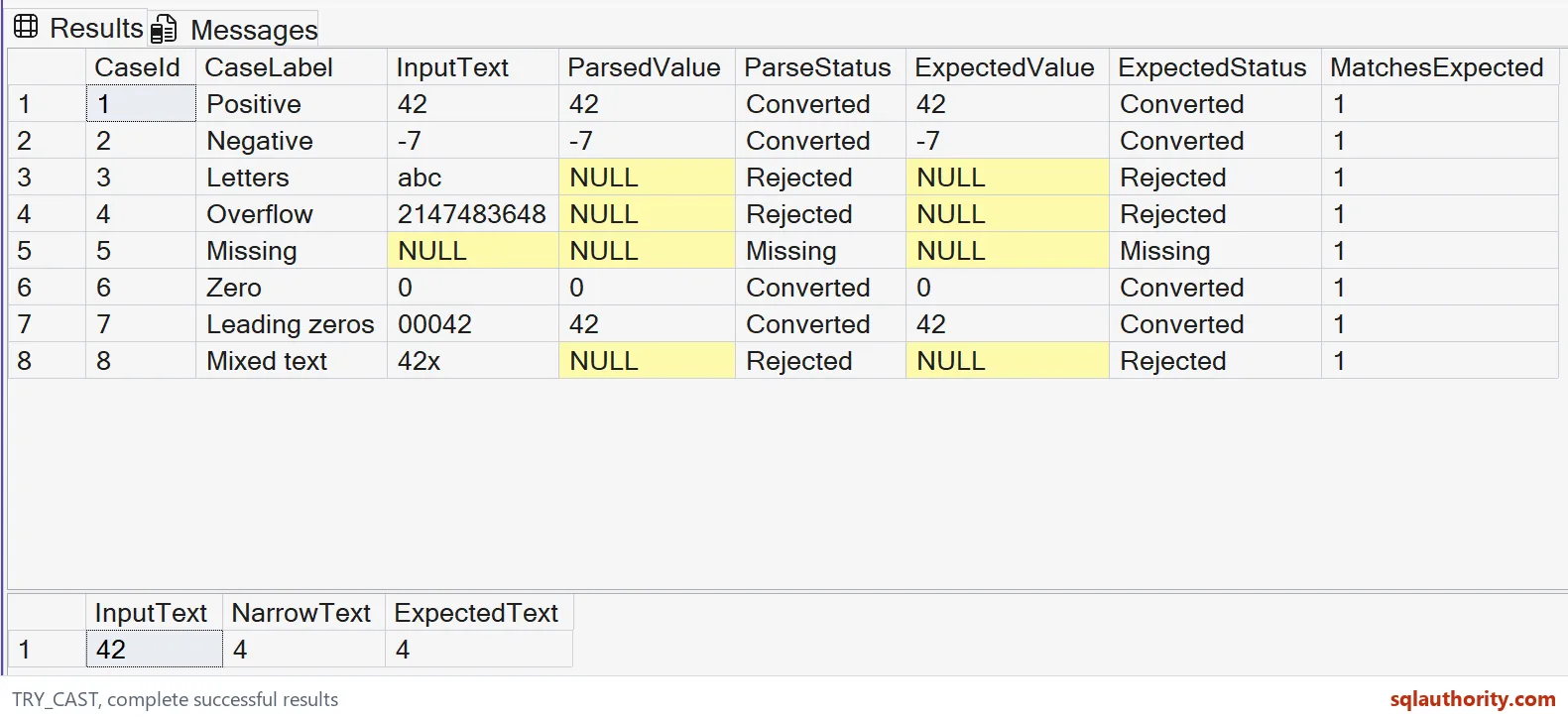
I compare the target contract with the application requirement before accepting that result. A non-NULL value proves neither preserved spelling nor a valid business range. It only supplies the outcome of the requested conversion.
These examples avoid date parsing and culture-dependent number formats. They use bounded Unicode inputs instead of large-object inputs.
Use the status in an intake report
For an optional quantity, keep the source text, parsed value and status together. Decide whether a missing quantity is allowed before counting rejected rows. Then check business limits against converted integers, including negative values and zero.
Keep the source text beside the result, and rejected rows explain themselves.
TRY_CAST is not a validator, it is a conversion that returns NULL when it fails.
Published by Pinal Dave on SQLAuthority. More of my work at pinaldave.com.
Discover more from SQL Authority with Pinal Dave
Subscribe to get the latest posts sent to your email.