GENERATE_SERIES makes a number range convenient, but the step still defines the sequence. I specify its direction and order the result before treating it as a usable list.

Define the range as three inputs
A start and stop do not completely explain a requested series. The step determines which values can be reached. It also determines whether the sequence moves toward the stop. I’d keep all three arguments visible when the series becomes a query input.
GENERATE_SERIES needs SQL Server 2022 or later and database compatibility level 160. The script changes no compatibility setting. Confirm the supporting configuration before adopting its queries.
The stop bounds the series but doesn’t force an extra final value. Starting at one with a step of two reaches one, three and five before six. Six is not on that sequence. An inclusive bound doesn’t imply every bound becomes a returned row.
Compare ascending and descending steps
The first query uses integer arguments one, six and two. The second uses six, one and negative two. Each query includes an explicit ORDER BY. The descending series requests descending output rather than relying on an apparent generation order.
The third query points a negative step away from a larger stop. That direction mismatch returns an empty result. It is different from a runtime failure. Keep that empty result beside the queries whose steps move toward their stops.
A fourth query uses equal start and stop with a positive step. It returns the single start value. That result shows the endpoint can be included when reached. The script does not silently change arguments to force other requested endpoints into the series.
SELECT value
FROM GENERATE_SERIES(1, 6, 2)
ORDER BY value;

SELECT value
FROM GENERATE_SERIES(6, 1, -2)
ORDER BY value DESC;

SELECT value
FROM GENERATE_SERIES(1, 6, -1)
ORDER BY value;

SELECT value
FROM GENERATE_SERIES(3, 3, 1)
ORDER BY value;

SELECT value
FROM GENERATE_SERIES(CAST(0.0 AS decimal(3,1)),
    CAST(1.0 AS decimal(3,1)), CAST(0.3 AS decimal(3,1)))
ORDER BY value;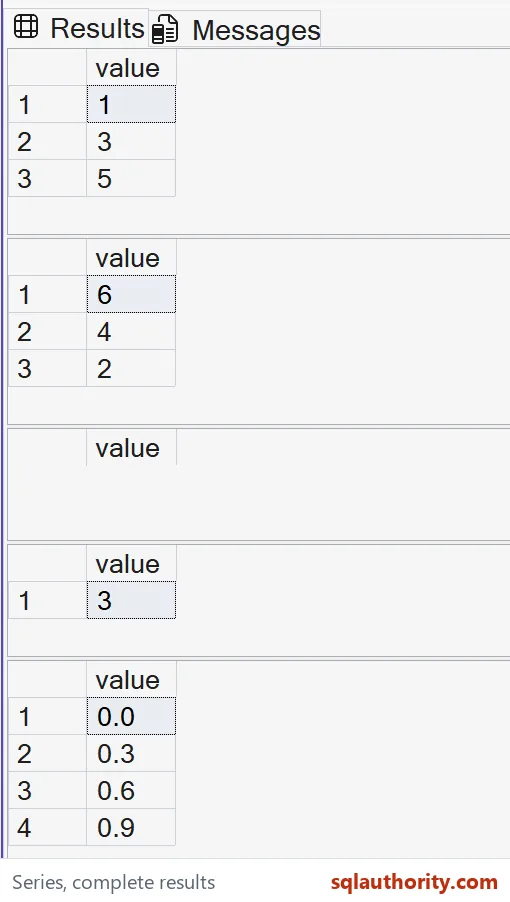

Treat decimal increments as typed values
The fifth query gives start, stop and step the same decimal(3,1) type. Its step is 0.3, not a floating-point approximation. The returned values are 0.0, 0.3, 0.6 and 0.9. The stop at 1.0 isn’t reached.
Start and stop need matching types, and the step must be compatible. The example explicitly types all three decimal expressions. Its expected output records decimal(3,1). It doesn’t infer a universal output type from the numeric characters written in a literal.
I’d choose the supported input type from the actual domain. An integer series can represent positions without fractional values. A decimal series can represent a fixed arithmetic increment. Dates require a separate expression that applies those positions to a typed date.
Keep errors and scale outside this small example
A zero step is invalid. The demonstration doesn’t deliberately execute that error alongside its useful results. Negative and positive steps are supplied explicitly. That avoids making the function’s default step rule part of an otherwise unrelated query.
I can justify omitting the step for a simple range. When the step is omitted, a default is chosen from the start and stop relationship. That choice becomes less obvious when arguments are calculated elsewhere. An explicit step keeps the intended direction available at the call site.
A large range can also create many rows. This demonstration says nothing about memory, join estimates or production runtime for such a range. I’d calculate the intended row count before adding it to another query. A concise expression can still request substantial work.
Compare complete ordered sets
All five queries are read-only SELECT statements with literal arguments. They create no objects, change no options and start no explicit transaction. Their separate result sets keep direction and type differences visible. The empty third set is part of the result contract.
Compare every returned value, ordering and SQL type across all five queries. The equal-bound case still belongs in that comparison. Comparing only their counts would miss the selected endpoint values. Keep the direction that produces no values visible too.
State the step yourself, and the series never surprises you.
An inclusive bound is not a promised final row, it is a limit on what the step reaches.
Published by Pinal Dave on SQLAuthority. More of my work at pinaldave.com.
Discover more from SQL Authority with Pinal Dave
Subscribe to get the latest posts sent to your email.