Inclusive end dates describe whole calendar days, while BETWEEN compares the exact supplied endpoints. A date endpoint becomes midnight when compared with timestamp rows.

Decide what the dates mean
The sample table below holds seven timestamps around the two dates, from the last instant of July 24 to midnight on July 27. Create it first, then run the queries in the same session.
DROP TABLE IF EXISTS #Events;
CREATE TABLE #Events(Id int NOT NULL PRIMARY KEY,OccurredAt datetime2(7) NOT NULL);
INSERT #Events VALUES
 (1,'2024-07-24T23:59:59.9999999'),(2,'2024-07-25T00:00:00'),
 (3,'2024-07-25T12:00:00'),(4,'2024-07-26T00:00:00'),
 (5,'2024-07-26T12:00:00'),(6,'2024-07-26T23:59:59.9999999'),
 (7,'2024-07-27T00:00:00');
Suppose the request includes July 25 through July 26. OccurredAt stores a datetime2 timestamp. Both parameters are date values interpreted in the same calendar as the stored timestamps. A July 26 afternoon row belongs to this request.
A timestamp column without an offset does not identify its time zone. Document that convention separately. If local dates must select UTC timestamps, calculate the corresponding boundaries using the actual zone rules. This example does not perform that conversion.
BETWEEN includes midnight, not the entire last day
BETWEEN includes both endpoints. Comparing with the ending date includes July 26 at midnight. Later times that day are greater than that endpoint. The inclusive operator is behaving as written.
DECLARE @From date='20240725',@Through date='20240726';
SELECT 'BETWEEN date endpoints' AS Test,Id,OccurredAt FROM #Events
WHERE OccurredAt BETWEEN @From AND @Through
ORDER BY OccurredAt,Id;
Use the next day as an exclusive boundary
Keep the start inclusive and make the next day exclusive. The filter then includes every representable time on July 26. July 27 at midnight remains outside it. There is no guessed final millisecond.
DECLARE @From date='20240725',@Through date='20240726';
IF @From IS NULL OR @Through IS NULL OR @From>@Through
 OR @Through='99991231'
 THROW 51643,'Invalid range or no next-day endpoint.',1;
DECLARE @Exclusive date=DATEADD(day,1,@Through);
SELECT 'Inclusive calendar dates, exclusive next day' AS Test,Id,OccurredAt FROM #Events
WHERE OccurredAt>=@From AND OccurredAt<@Exclusive
ORDER BY OccurredAt,Id;
This policy rejects the maximum date because its following day cannot be represented. It also rejects missing or reversed parameters. A product needing the maximum day requires a separate explicit boundary policy. Do not silently overflow DATEADD or replace a missing date with today.

Do not invent a last instant
datetime and datetime2 have different precision. In particular, datetime rounds some fractional inputs to its available increments. The string ending 23:59:59.999 can become midnight on the following day.
SELECT CONVERT(datetime,'2024-07-26T23:59:59.999')
 AS RoundedDatetime,
 CONVERT(datetime2(7),'2024-07-26T23:59:59.9999999')
 AS PreciseDatetime2;
Appending a row-type-specific final fraction makes the contract harder to maintain. The exclusive next-day boundary avoids that dependency. It also makes adjacent calendar ranges meet without sharing their midnight row. Keep the parameter types visible when reviewing the query.
Check boundaries before interpreting performance
The timestamp comparison avoids applying a conversion to every stored value. That shape is useful when evaluating an index on the timestamp column. I would still read the actual plan before claiming a seek or fewer reads. Correct boundaries come before a performance recommendation.
On SQL Server 2025, BETWEEN returned three rows, while the exclusive next-day range returned five. The datetime conversion rounded to July 27 midnight, while datetime2 retained the declared final fraction. When you are done, drop the sample table.
DROP TABLE IF EXISTS #Events;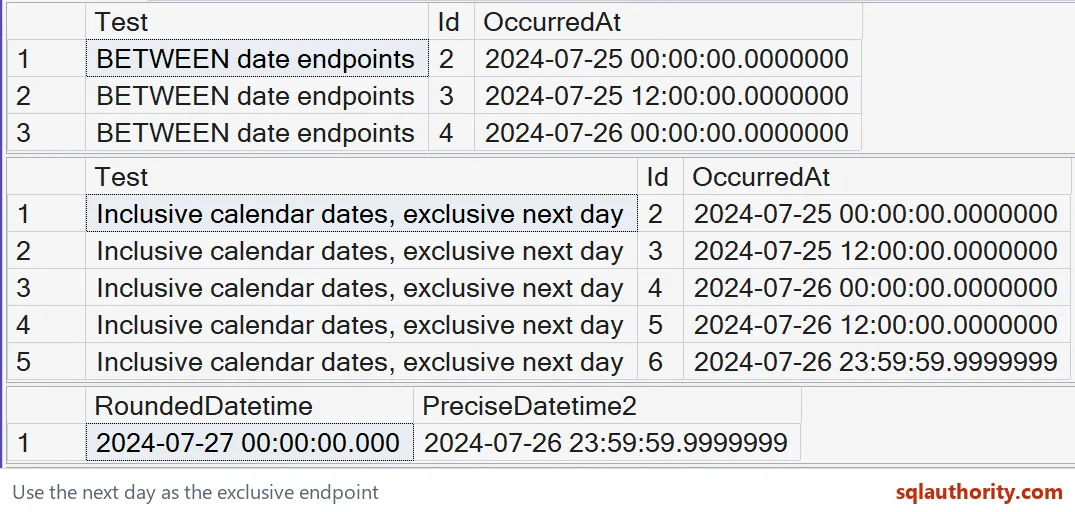
The first two native grids show three midnight-endpoint rows and five exclusive-next-day rows. The third shows datetime rounding into the next day while datetime2 preserves the final fraction. View the native result at full size.
Draw the boundary at the next midnight, and the last day stays whole.
An inclusive end date is not a guessed last instant, it is a calendar boundary.
Published by Pinal Dave on SQLAuthority. More of my work at pinaldave.com.
Discover more from SQL Authority with Pinal Dave
Subscribe to get the latest posts sent to your email.