Keyset paging continues after a saved ordering key instead of counting past an offset. A date and unique ID together keep equal-date rows in the sequence.

Choose an ordering key that identifies each row
This example orders posts by CreatedAt, then Id. CreatedAt is nonnull and fixed after insertion. Id is unique and nonnull. Together, they provide an unambiguous ascending position.
Here is the sample table for this post. It has six rows, and the first three share one date. Run this first, in a new query window.
DROP TABLE IF EXISTS #Posts;

CREATE TABLE #Posts
(Id int NOT NULL PRIMARY KEY, CreatedAt datetime2(0) NOT NULL, Title varchar(20) NOT NULL);

INSERT #Posts VALUES
(1,'2025-01-01T09:00:00','A'),(2,'2025-01-01T09:00:00','B'),
(3,'2025-01-01T09:00:00','C'),(4,'2025-01-02T09:00:00','D'),
(5,'2025-01-03T09:00:00','E'),(6,'2025-01-03T09:00:00','F');
The cursor is the last returned date and ID. It is a pair of application values, rather than a SQL Server CURSOR object. The client must preserve both values without changing their precision.
Fetch the first page
The first request has no previous position. Return the first rows using the declared order. The page size must be a validated positive integer. This example uses two rows per page to make tied dates easy to inspect.
DECLARE @PageSize int=2;
SELECT TOP(@PageSize) Id,CreatedAt,Title
FROM #Posts
ORDER BY CreatedAt,Id;
Continue after both saved values
Take the date and ID from the final row in that page. A later date qualifies regardless of its ID. An equal date qualifies only when its ID is greater. Keep the same ordering in every request.
DECLARE @AfterDate datetime2(0)='2025-01-01T09:00:00';
DECLARE @AfterId int=2;
SELECT TOP(2) Id,CreatedAt,Title FROM #Posts
WHERE CreatedAt>@AfterDate
 OR(CreatedAt=@AfterDate AND Id>@AfterId)
ORDER BY CreatedAt,Id;
Filtering only on a greater date drops remaining rows tied with the cursor date. In this example, IDs 1, 2 and 3 share that date. The first page ends at ID 2. The next page still needs ID 3. Here is the date-only version, and ID 3 never shows up.
DECLARE @AfterDate datetime2(0)='2025-01-01T09:00:00';
SELECT TOP(2) Id,CreatedAt,Title FROM #Posts
WHERE CreatedAt>@AfterDate -- date only: ID 3 is missing
ORDER BY CreatedAt,Id;
The saved row can disappear
The continuation predicate uses saved scalar values, so the cursor row need not still exist. Here I delete ID 2 after saving its position. The next request still starts after that date and ID. Looking up the deleted row would unnecessarily lose the position.
DELETE FROM #Posts WHERE Id=2;

DECLARE @AfterDate datetime2(0)='2025-01-01T09:00:00';
DECLARE @AfterId int=2;
SELECT TOP(2) Id,CreatedAt,Title FROM #Posts
WHERE CreatedAt>@AfterDate
 OR(CreatedAt=@AfterDate AND Id>@AfterId)
ORDER BY CreatedAt,Id;
Keep the ordering fields immutable for this contract. Updating an ordering field can move a row across the saved boundary. That can cause omissions or repeated rows across requests. An ID tie-breaker resolves equal dates; it does not freeze changing data.
Changing data needs its own policy
A newly inserted row before the cursor is outside the next request. A newly inserted row after it can appear in that request. This example makes these changes one after another. It does not establish a snapshot spanning separate requests or test concurrent sessions.
INSERT #Posts VALUES
(7,'2024-12-31T09:00:00','Inserted before'),
(8,'2025-01-02T08:00:00','Inserted after');

DECLARE @AfterDate datetime2(0)='2025-01-01T09:00:00';
DECLARE @AfterId int=2;
SELECT TOP(2) Id,CreatedAt,Title FROM #Posts
WHERE CreatedAt>@AfterDate
 OR(CreatedAt=@AfterDate AND Id>@AfterId)
ORDER BY CreatedAt,Id;
I would choose this approach for a forward feed or continuation workflow. It does not provide an exact total or a direct jump to page 500. Those are separate requirements. A cursor can also become stale when the filter or sort contract changes.
Inspect the index without promising a plan
The sample index starts with CreatedAt and Id, then includes Title. It supports the declared ordering and covers the returned fields. Its maintenance and storage costs still matter in a real workload. Query syntax alone cannot establish a particular physical operator or read count.
CREATE INDEX IX_Posts_Cursor
 ON #Posts(CreatedAt,Id) INCLUDE(Title);
This article does not replace an exact count with an estimate. It makes the continuation boundary explicit. Plans, IO and concurrency claims require their own measured evidence.
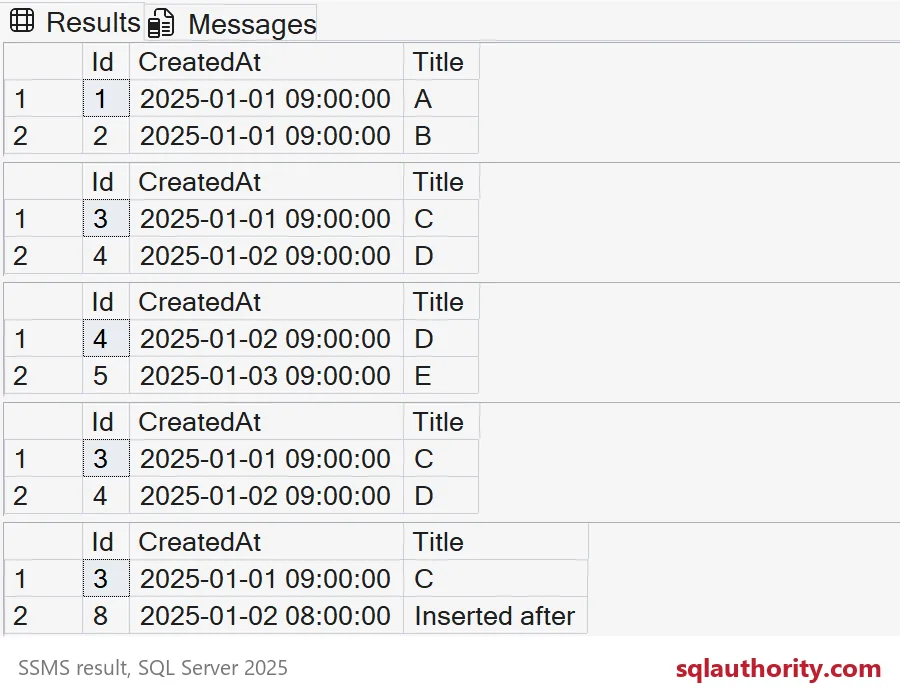
With these six sample rows and a page size of 2, the first page ends at ID 2 and the next page returns IDs 3 and 4. Date-only continuation omits ID 3, while the saved pair still works after ID 2 is deleted. The staged insertion test returns IDs 3 and 8, without establishing a cross-request snapshot.
When you finish, drop the sample table.
DROP TABLE IF EXISTS #Posts;Save the date and the ID, and the next page starts exactly where the last one ended.
Keyset paging is not a numbered-page shortcut, it is a continuation contract built on a complete ordering key.
Published by Pinal Dave on SQLAuthority. More of my work at pinaldave.com.
Discover more from SQL Authority with Pinal Dave
Subscribe to get the latest posts sent to your email.