Count distinct pairs by keeping the two columns together. Joining their text can turn two different pairs into one value. I define the pair first, then count its distinct rows.

Two labels, one misleading string
Imagine sorting stock cards into trays. Each card carries a warehouse code and an item code. A repeated card should not create a new warehouse-item combination. Two different combinations should remain different even when their printed letters happen to fit together.
Warehouse A with item BC is one pair. Warehouse AB with item C is another. Join each pair without a separator and both become ABC. The combined text has lost the boundary between the fields. Counting that text answers a different question.
Pair one
Warehouse A
Item BC
Joined text ABC
Pair two
Warehouse AB
Item C
Joined text ABC
Keep every source case visible
The first query supplies nine cards. Two warehouse-item combinations appear twice. Other rows contain missing fields, empty warehouse text or two missing fields. Explicit varchar widths and a binary collation state this small example’s text contract.
WITH Inputs AS
(
    SELECT RowId,
           CAST(WarehouseCode AS varchar(2)) COLLATE Latin1_General_100_BIN2 AS WarehouseCode,
           CAST(ItemCode AS varchar(3)) COLLATE Latin1_General_100_BIN2 AS ItemCode
    FROM (VALUES
        (1, 'A', 'BC'), (2, 'A', 'BC'), (3, 'AB', 'C'),
        (4, 'A', NULL), (5, NULL, 'BC'), (6, NULL, NULL),
        (7, '', 'ABC'), (8, '', 'ABC'), (9, '', NULL)
    ) AS v(RowId, WarehouseCode, ItemCode)
)
SELECT RowId, WarehouseCode, ItemCode
FROM Inputs
ORDER BY RowId;
Inspect the distinct pairs before counting
SELECT DISTINCT compares the complete projected row. With both fields projected, seven combinations remain. RowId is deliberately excluded: retaining a unique card identifier would keep repeated pairs distinct. The explicit ordering makes the seven rows easy to inspect.
DISTINCT treats NULL values as equal for this row comparison. Two copies of the same missing-field combination would therefore become one pair. The pair containing two NULLs still exists as an output row. It is not the absence of every row.
WITH Inputs AS
(
    SELECT RowId,
           CAST(WarehouseCode AS varchar(2)) COLLATE Latin1_General_100_BIN2 AS WarehouseCode,
           CAST(ItemCode AS varchar(3)) COLLATE Latin1_General_100_BIN2 AS ItemCode
    FROM (VALUES
        (1, 'A', 'BC'), (2, 'A', 'BC'), (3, 'AB', 'C'),
        (4, 'A', NULL), (5, NULL, 'BC'), (6, NULL, NULL),
        (7, '', 'ABC'), (8, '', 'ABC'), (9, '', NULL)
    ) AS v(RowId, WarehouseCode, ItemCode)
)
SELECT DISTINCT WarehouseCode, ItemCode
FROM Inputs
ORDER BY WarehouseCode, ItemCode;
Choose which pairs belong in the count
The outer COUNT(*) counts the rows produced by the distinct query, including rows containing NULL. This gives seven pairs from nine input rows. COUNT(DISTINCT expression) instead counts distinct non-NULL values of one expression. It does not accept this two-column row as two arguments.
The third count applies a different policy: both fields must be non-NULL before the pairs are deduplicated. That leaves three distinct pairs. An empty string is still non-NULL, so the empty warehouse code remains included. Required identifiers need additional validation if blank codes are unacceptable.
WITH Inputs AS
(
    SELECT RowId,
           CAST(WarehouseCode AS varchar(2)) COLLATE Latin1_General_100_BIN2 AS WarehouseCode,
           CAST(ItemCode AS varchar(3)) COLLATE Latin1_General_100_BIN2 AS ItemCode
    FROM (VALUES
        (1, 'A', 'BC'), (2, 'A', 'BC'), (3, 'AB', 'C'),
        (4, 'A', NULL), (5, NULL, 'BC'), (6, NULL, NULL),
        (7, '', 'ABC'), (8, '', 'ABC'), (9, '', NULL)
    ) AS v(RowId, WarehouseCode, ItemCode)
)
SELECT (SELECT COUNT(*) FROM Inputs) AS InputRows,
       (SELECT COUNT(*) FROM
           (SELECT DISTINCT WarehouseCode, ItemCode FROM Inputs) AS Pairs) AS DistinctPairs,
       (SELECT COUNT(*) FROM
           (SELECT DISTINCT WarehouseCode, ItemCode FROM Inputs
            WHERE WarehouseCode IS NOT NULL AND ItemCode IS NOT NULL) AS Pairs) AS NonNullPairs;
Make the concatenation collision observable
These next two queries isolate the two present-text pairs from the opening story. Both combined strings are ABC. Their actual pair count is two, while the combined-key count is one. No NULL conversion rule is needed to cause this collision.
WITH CollisionInputs AS
(
    SELECT RowId,
           CAST(WarehouseCode AS varchar(2)) COLLATE Latin1_General_100_BIN2 AS WarehouseCode,
           CAST(ItemCode AS varchar(3)) COLLATE Latin1_General_100_BIN2 AS ItemCode
    FROM (VALUES (1, 'A', 'BC'), (2, 'AB', 'C'))
         AS v(RowId, WarehouseCode, ItemCode)
)
SELECT RowId, WarehouseCode, ItemCode,
       CAST(CONCAT(WarehouseCode, ItemCode) AS varchar(5)) AS CombinedKey
FROM CollisionInputs
ORDER BY RowId;
WITH CollisionInputs AS
(
SELECT RowId,
CAST(WarehouseCode AS varchar(2)) COLLATE Latin1_General_100_BIN2 AS WarehouseCode,
CAST(ItemCode AS varchar(3)) COLLATE Latin1_General_100_BIN2 AS ItemCode
FROM (VALUES (1, 'A', 'BC'), (2, 'AB', 'C'))
AS v(RowId, WarehouseCode, ItemCode)
)
SELECT (SELECT COUNT(*) FROM
(SELECT DISTINCT WarehouseCode, ItemCode FROM CollisionInputs) AS Pairs) AS ActualPairs,
COUNT(DISTINCT CAST(CONCAT(WarehouseCode, ItemCode) AS varchar(5))) AS CombinedKeys
FROM CollisionInputs;Adding a separator is not a universal identity rule either. If the separator can appear inside either field, escaping or a structured representation needs its own contract. For a distinct row count, the columns can stay separate instead of creating a new serialization problem.
An empty input should count as zero
The final query filters out every source row before selecting distinct pairs. Its count is zero. That differs from the one existing pair whose two fields are NULL. Keep both cases when deciding whether a missing-field record belongs in a report.
WITH Inputs AS
(
    SELECT RowId,
           CAST(WarehouseCode AS varchar(2)) COLLATE Latin1_General_100_BIN2 AS WarehouseCode,
           CAST(ItemCode AS varchar(3)) COLLATE Latin1_General_100_BIN2 AS ItemCode
    FROM (VALUES
        (1, 'A', 'BC'), (2, 'A', 'BC'), (3, 'AB', 'C'),
        (4, 'A', NULL), (5, NULL, 'BC'), (6, NULL, NULL),
        (7, '', 'ABC'), (8, '', 'ABC'), (9, '', NULL)
    ) AS v(RowId, WarehouseCode, ItemCode)
)
SELECT COUNT(*) AS EmptyPairCount
FROM
(
    SELECT DISTINCT WarehouseCode, ItemCode FROM Inputs WHERE RowId < 0
) AS EmptyPairs;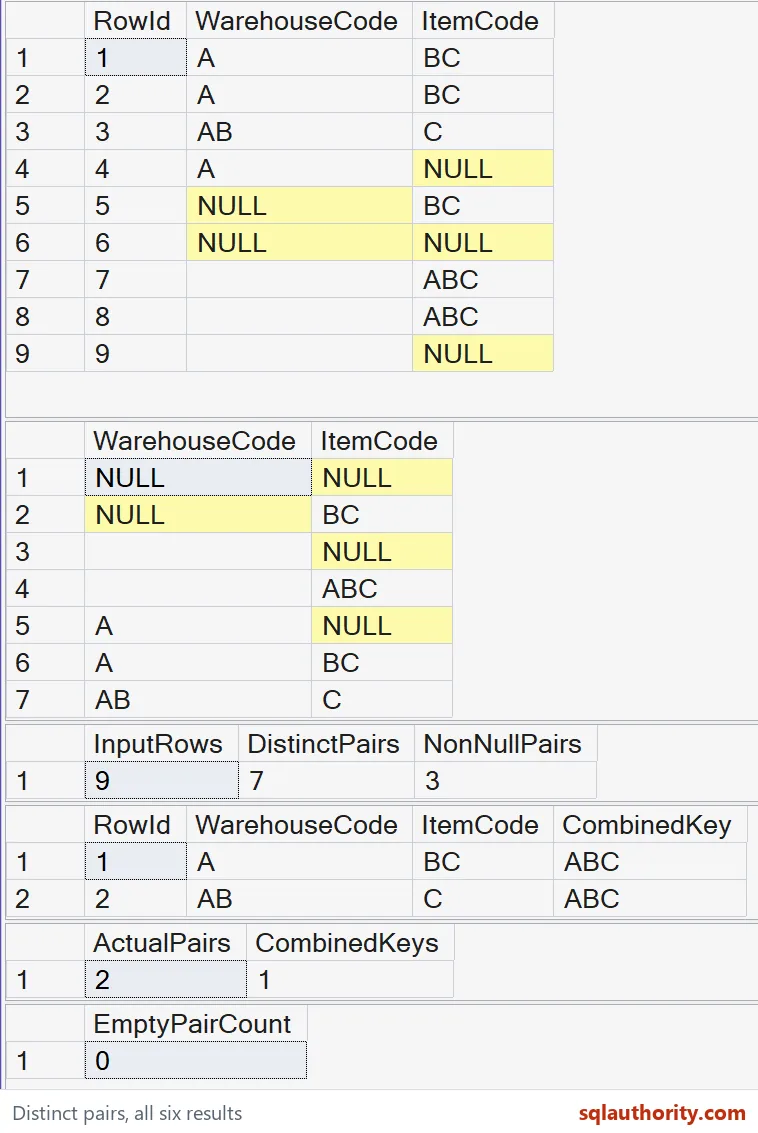
These SELECT statements change no tables or session options. The CONCAT comparison requires SQL Server 2012 or later. COUNT returns int; a count that can exceed its range needs COUNT_BIG. No execution-plan or speed advantage is claimed for this small logical demonstration.
Text equality still follows the chosen collation. Binary comparison does not make every application identifier policy correct. Review case, trailing spaces and allowed characters separately. Also keep every field that defines the business pair; omitting one changes the grain being counted.
Keep the columns apart, and the count stays honest.
A pair is not a joined string, it is two columns that stay together.
Published by Pinal Dave on SQLAuthority. More of my work at pinaldave.com.
Discover more from SQL Authority with Pinal Dave
Subscribe to get the latest posts sent to your email.