
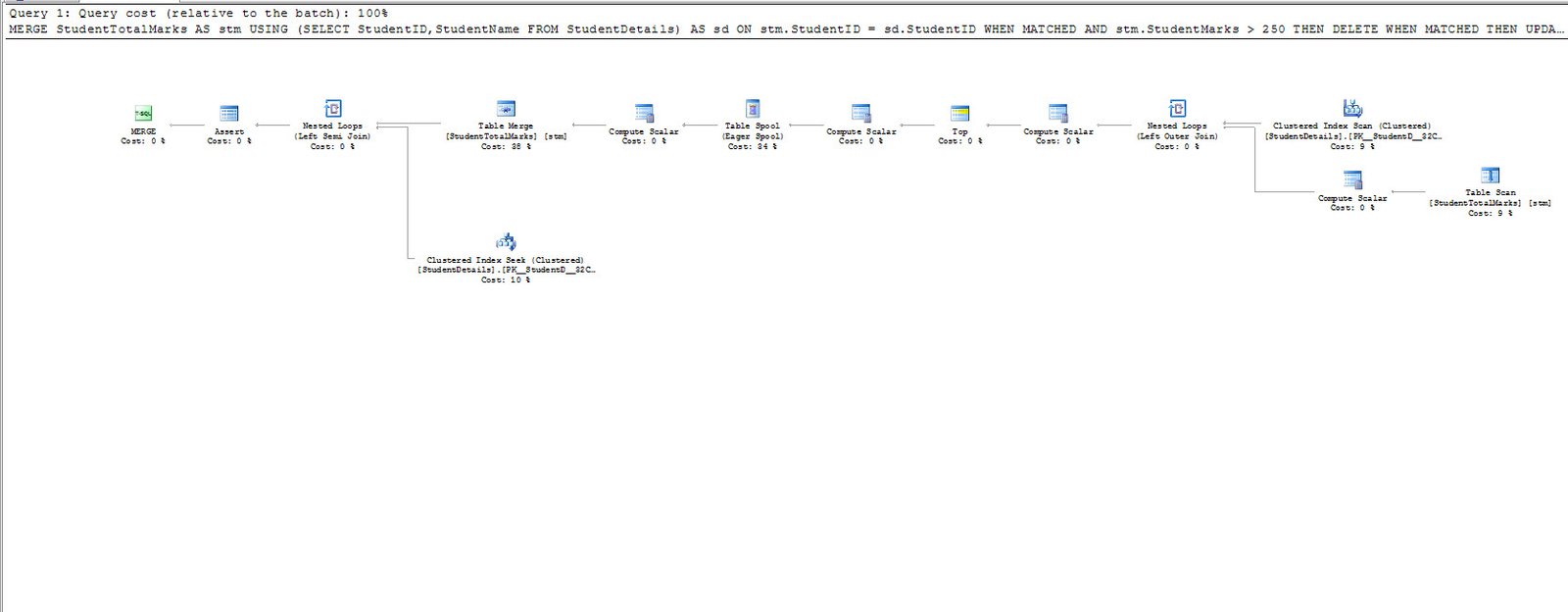
Merge Operations can combine conditional inserts, updates and deletes. I inspect the plan before making any claim about scans or speed.

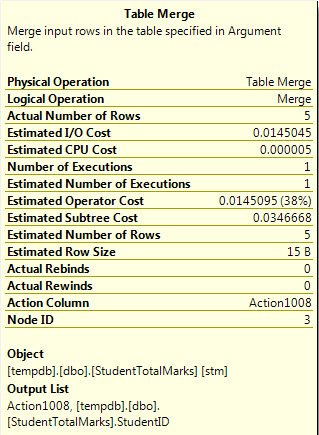
This began with a T-SQL Tuesday discussion hosted by Jorge Segarra. A reader asked how the plan proved a single pass. Number of Executions describes one operator. It doesn’t count every read across the plan.
Keep the original student example
CREATE TABLE #StudentDetails (StudentID int PRIMARY KEY, StudentName varchar(15));
CREATE TABLE #StudentTotalMarks (StudentID int PRIMARY KEY, StudentMarks int);
INSERT INTO #StudentDetails VALUES (1,'SMITH'),(2,'ALLEN'),(3,'JONES'),(4,'MARTIN'),(5,'JAMES');
INSERT INTO #StudentTotalMarks VALUES (1,230),(2,255),(3,200);
SELECT StudentID, StudentMarks FROM #StudentTotalMarks ORDER BY StudentID;
MERGE #StudentTotalMarks AS stm
USING #StudentDetails AS sd ON stm.StudentID = sd.StudentID
WHEN MATCHED AND stm.StudentMarks > 250 THEN DELETE
WHEN MATCHED THEN UPDATE SET stm.StudentMarks = stm.StudentMarks + 25
WHEN NOT MATCHED BY TARGET THEN INSERT (StudentID, StudentMarks) VALUES (sd.StudentID,25)
OUTPUT $action AS action_taken, inserted.StudentID AS new_id, deleted.StudentID AS old_id;
SELECT StudentID, StudentMarks FROM #StudentTotalMarks ORDER BY StudentID;
DROP TABLE #StudentTotalMarks;
DROP TABLE #StudentDetails;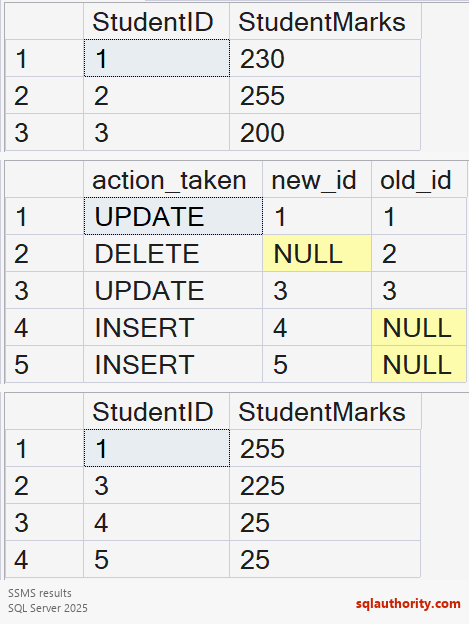
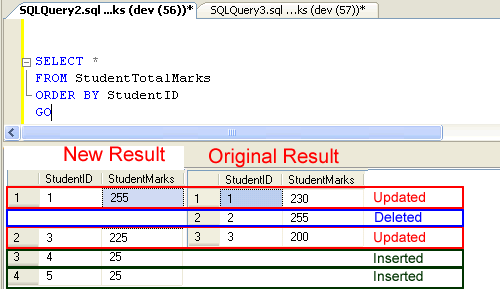
The final marks are 255 for student 1 and 225 for student 3. Students 4 and 5 receive 25 each. Student 2 is deleted because the matched original mark 255 exceeds 250. OUTPUT action order is not guaranteed.
Inspect the actual workload
The worked example uses temporary tables and keeps the student-mark outcomes. It avoids changing a shared schema. If using permanent parent and child tables, drop the child first during cleanup.
I use a unique matching key and inspect source duplicates. I also test concurrency, triggers and actual plans before choosing MERGE. Separate DML statements remain another option to evaluate.
Reference: MERGE reference.
One MERGE statement is not proof of one scan, it is one statement whose actual work needs measurement.
Published by Pinal Dave on SQLAuthority. More of my work at pinaldave.com.
Discover more from SQL Authority with Pinal Dave
Subscribe to get the latest posts sent to your email.




52 Comments. Leave new
IS THIS POSSIBLE TO CREATE INSERT, UPDATE AND DELETE IN A SINGLE TRIGGER?
Good alternative to doing the same on SSIS.
I was wondering how does the performance affect for the two Tables being on different Database/Servers?
SQL SELECT Statement
This query is used to select certain columns of certain records from one or more database tables.
SELECT * from emp
selects all the fields of all the records from the table named ’emp’
SELECT empno, ename from emp
selects the fields empno and ename of all the records from the table named ’emp’
SELECT * from emp where empno < 100
selects all those records from the table named 'emp' where the value of the field empno is less than 100
SELECT * from article, author where article.authorId = author.authorId
selects all those records from the tables named 'article' and 'author' that have the same value of the field authorId
SQL INSERT Statement
This query is used to insert a record into a database table.
INSERT INTO emp(empno, ename) values(101, 'John Guttag')
inserts a record in to the emp table and set its empno field to 101 and its ename field to 'John Guttag'
SQL UPDATE Statement
This query is used to modify existing records in a database table.
UPDATE emp SET ename = 'Eric Gamma' WHERE empno = 101
updates the record whose empno field is 101 by setting its ename field to 'Eric Gamma'
SQL DELETE Statement
This query is used to delete existing record(s) from a database table.
DELETE FROM emp WHERE empno = 101
Hi Pinal,
I want to understand, when we do this for millions of records as insert, which is suggestable to to use whether SSIS OLEDB destination or SQLServer MERGE Command?
Hi,
Does the merge statement works for databases placed on different servers?
Pinal, I have only inserts. But occasionally I deal with Deletes/Updates. Does the MERGE statement takes more time than INSERT Statement? Could you please let me know.
Hello I am Using sql 2008 but below query given error:
— Merge Statement
With CTE AS
(MERGE StudentTotalMarks AS stm
USING (SELECT StudentID,StudentName FROM StudentDetails) AS sd)
ON stm.StudentID = sd.StudentID
WHEN MATCHED AND stm.StudentMarks > 250 THEN DELETE
WHEN MATCHED THEN UPDATE SET stm.StudentMarks = stm.StudentMarks + 25
WHEN NOT MATCHED THEN
INSERT(StudentID,StudentMarks)
VALUES(sd.StudentID,25);
Error:
Msg 102, Level 15, State 1, Line 2
Incorrect syntax near ‘MERGE’.
Msg 156, Level 15, State 1, Line 3
Incorrect syntax near the keyword ‘AS’.
Hello , pleased ignore above and consider this one
below query given error , i am using sql 2008
– Merge Statement
MERGE StudentTotalMarks AS stm
USING (SELECT StudentID,StudentName FROM StudentDetails) AS sd
ON stm.StudentID = sd.StudentID
WHEN MATCHED AND stm.StudentMarks > 250 THEN DELETE
WHEN MATCHED THEN UPDATE SET stm.StudentMarks = stm.StudentMarks + 25
WHEN NOT MATCHED THEN
INSERT(StudentID,StudentMarks)
VALUES(sd.StudentID,25);
Error:
Msg 102, Level 15, State 1, Line 2
Incorrect syntax near ‘MERGE’.
Msg 156, Level 15, State 1, Line 3
Incorrect syntax near the keyword ‘AS’.
Hi Pinal, I am trying to use when not matched by Target then Insert, is it possible to use a different table to insert other than the target? I want to keep the target clean and build the not matched data into a different table. someone suggested using cte, not sure how to, any suggestions are welcome, thanks
Hope for the best!!!!!
i am having a production Database and a staging database having total different table structure.
i Need if any Insert delete ,update operation is performed in production it shall be updated on the staging server.
The database of production is about 15Gb and backup for 3 years has been maintained on staging server .
Dir sir
how can i perform a SEARCH by keyword in sql server.thx
Hi Pinal, i’m trying to sync multiple tables on different database /servers. How can i perform merge operations? please help me.
As per https://docs.microsoft.com/en-us/sql/t-sql/statements/merge-transact-sql?view=sql-server-2017 it should work cross database also. You just need to use three part naming while referencing the table. DB.Schema.Table.
Hello Sir,
Can you please tell me how to call a procedure inside the WHEN MATCHED THEN part
Hi, i have been using merged for upsert command and all the while it is ok for insert and update only. But now the destination table is growing big and the operation time is taking too long. Any way can we improve this?
Seriously, I love how great your solutions, examples and explications are, thank you!