Aggregate before the join when a report needs grouped facts rather than individual lines. First declare the grouping grain and the relationship on the other side. Then compare complete results, actual plans, and logical reads.

Start With the Required Grain
This report needs one total per customer, together with the customer name. The customer key is unique in the first example. Grouping order lines by that key preserves the required detail.
I can make a query look clearer without making its execution cheaper. The optimizer can choose transformations that differ from the written order. A derived table is an expression, not a promise to materialize a smaller table.
Build the Example
Use SQL Server 2022 or later, with compatibility level 160 or higher. Run the setup block below in a new query window, then run the queries that follow in the same window. The setup uses GENERATE_SERIES and creates temporary tables, including deliberate NULL and unmatched cases.
DROP TABLE IF EXISTS #Orders;
DROP TABLE IF EXISTS #Customers;
CREATE TABLE #Orders(OrderId int PRIMARY KEY,CustomerId int NULL,Amount decimal(12,2) NULL,Payload char(300) NOT NULL);
CREATE TABLE #Customers(CustomerId int PRIMARY KEY,CustomerName nvarchar(60) NOT NULL);
INSERT #Orders
SELECT value,value%1000,CONVERT(decimal(12,2),value%100+1),REPLICATE('x',300)
FROM GENERATE_SERIES(1,50000);
INSERT #Orders VALUES(50001,NULL,7,REPLICATE('x',300)),(50002,NULL,3,REPLICATE('x',300)),
(50003,9999,11,REPLICATE('x',300)),(50004,1001,NULL,REPLICATE('x',300));
INSERT #Customers SELECT value,CONCAT(N'Customer ',value) FROM GENERATE_SERIES(0,1001);

SELECT COUNT_BIG(*) AS FactRows,
       (SELECT COUNT_BIG(*) FROM (SELECT CustomerId FROM #Orders GROUP BY CustomerId) g) AS CustomerGroups,
       SUM(Amount) AS RawTotal,
       (SELECT COUNT_BIG(*) FROM #Customers) AS DimensionRows
FROM #Orders;
This setup supplies 50,004 lines and 1,002 customers, and the last query in the block confirms those counts. The regular lines cover customer keys 0 through 999. Customer 1000 has no lines, while customer 1001 has one NULL amount.
Two lines have NULL customer keys, totaling 10.00. Another line references missing customer 9999 and has amount 11.00. Those three lines explain why the inner-join total differs from the raw fact total.
Compare Both Query Shapes
The first query joins lines to customers and then groups. Its customer key remains part of the output. MAXDOP 1 makes the comparison serial without forcing a particular join or aggregate operator.
SET STATISTICS IO ON;
SELECT c.CustomerId,c.CustomerName,SUM(o.Amount) AS TotalAmount
FROM #Customers c JOIN #Orders o ON o.CustomerId=c.CustomerId
GROUP BY c.CustomerId,c.CustomerName OPTION(MAXDOP 1);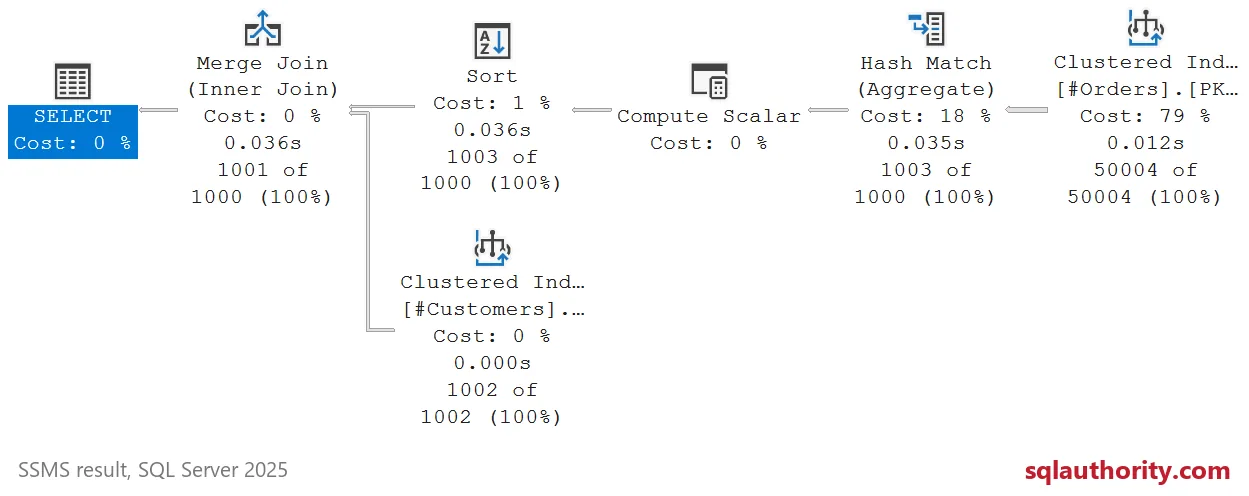
The second query declares the customer totals before joining. Keep the same output columns and customer grain. Inspect actual rows at the access, aggregation, and join operators in both plans.
SELECT c.CustomerId,c.CustomerName,x.TotalAmount
FROM #Customers c JOIN
(SELECT CustomerId,SUM(Amount) AS TotalAmount FROM #Orders GROUP BY CustomerId) x
ON x.CustomerId=c.CustomerId OPTION(MAXDOP 1);
SET STATISTICS IO OFF;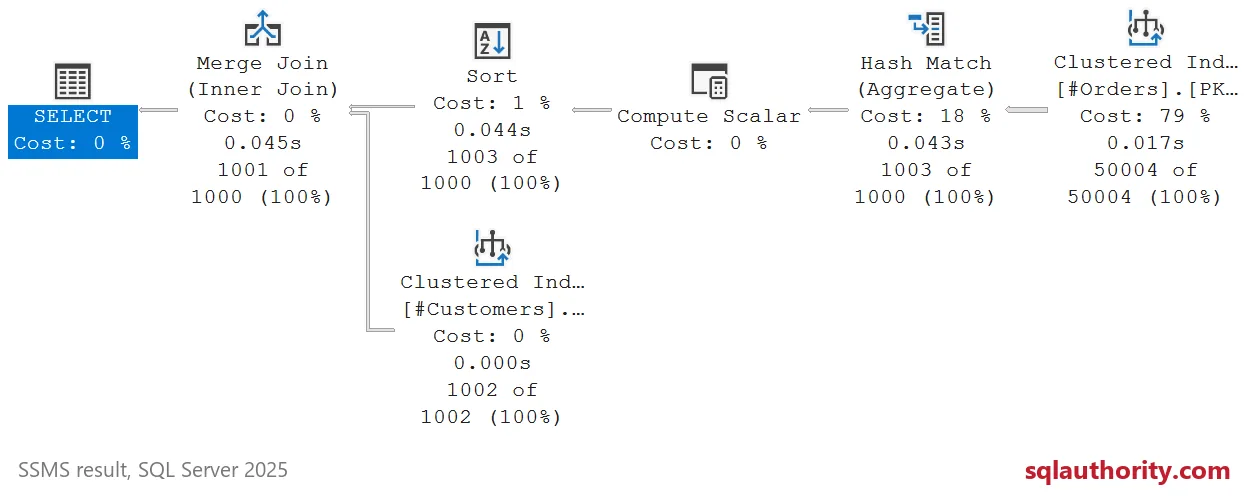
Both forms should return 1,001 customer rows and total 2,525,000.00, as the comparison later in this post shows. The all-NULL amount group still produces a customer row with a NULL total. Compare every key and value, including NULLs, before comparing reads.

Equal Grand Totals Can Hide Different Answers
Now duplicate customer 5, including its name, in a dimension without a unique key. Joining first counts those lines twice and groups them into one 600.00 row. Grouping first produces two identical 300.00 rows.
Both results total 2,525,300.00, yet their customer-level rows differ. A grand total cannot establish equivalence. The query below compares output values and duplicate counts, so repeated rows are not discarded.
SELECT CustomerId,CustomerName INTO #CustomerCopies FROM #Customers;
INSERT #CustomerCopies SELECT CustomerId,CustomerName FROM #Customers WHERE CustomerId=5;

WITH UniqueJoinThenGroup AS
(SELECT c.CustomerId,SUM(o.Amount) AS TotalAmount
 FROM #Customers c JOIN #Orders o ON o.CustomerId=c.CustomerId GROUP BY c.CustomerId),
UniqueGroupThenJoin AS
(SELECT c.CustomerId,x.TotalAmount FROM #Customers c JOIN
 (SELECT CustomerId,SUM(Amount) AS TotalAmount FROM #Orders GROUP BY CustomerId) x
 ON x.CustomerId=c.CustomerId),
DuplicateJoinThenGroup AS
(SELECT c.CustomerId,SUM(o.Amount) AS TotalAmount
 FROM #CustomerCopies c JOIN #Orders o ON o.CustomerId=c.CustomerId GROUP BY c.CustomerId),
DuplicateGroupThenJoin AS
(SELECT c.CustomerId,x.TotalAmount FROM #CustomerCopies c JOIN
 (SELECT CustomerId,SUM(Amount) AS TotalAmount FROM #Orders GROUP BY CustomerId) x
 ON x.CustomerId=c.CustomerId)
SELECT N'Unique join then group' AS QueryCase,COUNT_BIG(*) AS ResultRows,SUM(TotalAmount) AS GrandTotal FROM UniqueJoinThenGroup
UNION ALL SELECT N'Unique group then join',COUNT_BIG(*),SUM(TotalAmount) FROM UniqueGroupThenJoin
UNION ALL SELECT N'Duplicate join then group',COUNT_BIG(*),SUM(TotalAmount) FROM DuplicateJoinThenGroup
UNION ALL SELECT N'Duplicate group then join',COUNT_BIG(*),SUM(TotalAmount) FROM DuplicateGroupThenJoin;

SELECT N'Join then group' AS QueryCase,c.CustomerId,SUM(o.Amount) AS TotalAmount,CONVERT(bigint,1) AS Copies
FROM #CustomerCopies c JOIN #Orders o ON o.CustomerId=c.CustomerId
WHERE c.CustomerId=5 GROUP BY c.CustomerId
UNION ALL
SELECT N'Group then join',c.CustomerId,x.TotalAmount,COUNT_BIG(*)
FROM #CustomerCopies c JOIN
 (SELECT CustomerId,SUM(Amount) AS TotalAmount FROM #Orders GROUP BY CustomerId) x
 ON x.CustomerId=c.CustomerId
WHERE c.CustomerId=5 GROUP BY c.CustomerId,x.TotalAmount;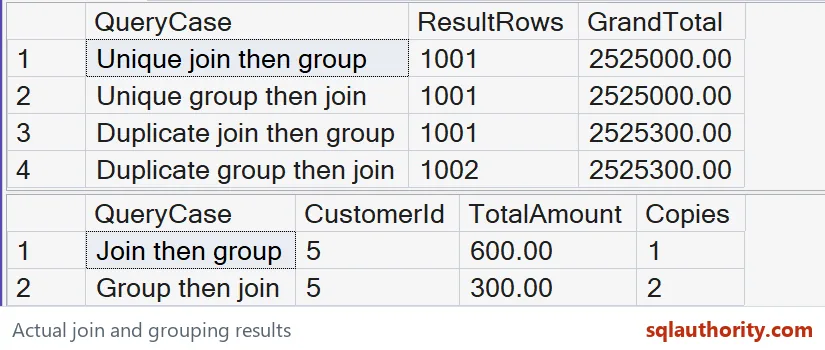
Keep Outer Joins and NULLs Deliberate
The LEFT JOIN version keeps all 1,002 customers. Customer 1000 has a NULL total and zero lines. Customer 1001 has a NULL total and one line, which is a different condition.
SELECT c.CustomerId,c.CustomerName,x.TotalAmount,
       COALESCE(x.LineCount,CONVERT(bigint,0)) AS LineCount
FROM #Customers c LEFT JOIN
(SELECT CustomerId,SUM(Amount) AS TotalAmount,COUNT_BIG(*) AS LineCount
 FROM #Orders GROUP BY CustomerId) x ON x.CustomerId=c.CustomerId
ORDER BY c.CustomerId;
COUNT_BIG(*) inside the grouped facts counts stored lines, including a line with a NULL amount. COALESCE supplies zero only when no grouped row matched. SUM ignores NULL amounts.
GROUP BY collects NULL keys into one group, but equality joins do not match NULL keys. The orphan key and NULL-key group stay outside this customer report. Define whether your own report must expose those unmatched facts separately.
Read the Plan Before Claiming a Saving
The 50,004 fact rows contain 1,003 logical customer groups, including the NULL-key group. That is an opportunity for reduction, not a measured performance gain. The optimizer can already place aggregation below an eligible join.
In my SQL Server 2025 run, both natural plans grouped 50,004 fact rows into 1,003 groups before a Merge Join. Each returned 1,001 customer rows.
Each query recorded 2,089 logical reads for facts and eight for customers. Worktable and Workfile logical reads were zero for both queries. Their physical operator chains matched. This rewrite saved no measured logical reads in that run.
Compare the two actual plans and their STATISTICS IO messages from the same demo tables. A matching plan and read count means the rewritten spelling saved no measured reads. Different plans still need complete-result checks and a representative workload.
A selective customer filter changes the comparison, especially when suitable indexes exist. These demo tables have no customer-key index on the facts. It does not prove a result for selective reports, production concurrency, or other aggregates.
When you are done, drop the temporary tables.
DROP TABLE #CustomerCopies;
DROP TABLE #Customers;
DROP TABLE #Orders;
Declare the grain, check every row, and let the actual plan have the last word.
Aggregating early is not a speed trick, it is a grain decision that plans must confirm.
Published by Pinal Dave on SQLAuthority. More of my work at pinaldave.com.
Discover more from SQL Authority with Pinal Dave
Subscribe to get the latest posts sent to your email.