datetime can display three fractional digits without preserving every millisecond supplied to it. I compare the complete converted value with its source before treating those digits as stored precision.

Display width is not storage resolution
datetime rounds to increments displayed as .000, .003 or .007 seconds. That differs from a uniform one-millisecond grid. Three displayed digits therefore don’t prove every possible three-digit input is retained. The type’s resolution defines the representable values.
I prefer datetime2 for new work. Existing datetime columns can still affect an application’s comparisons and round trips. This example reads that conversion behavior without changing any schema. Its source is an explicitly typed datetime2(3) value.
I’d check the declared type before diagnosing a timestamp that changed during a write. A display formatter may show milliseconds for several temporal types. Their actual resolutions can differ. The visible number of digits isn’t enough to identify the storage contract.
Compare nearby millisecond inputs
The script supplies six timestamps near the start of the same second. Their fractional inputs are .001, .002, .004, .005, .008 and .009. A seventh row contains NULL. ISO style 126 establishes each typed source value.
Each source is cast to datetime. Both values are then rendered using explicit style 121 into varchar(23). This comparison keeps all date and millisecond characters visible. It doesn’t rely on a client’s default timestamp formatting.
The .001 input is expected to display .000 after narrowing. The .002 and .004 inputs display .003. The .005 and .008 inputs display .007. The .009 input advances to .010 rather than retaining the supplied millisecond exactly.
WITH Inputs AS
(
    SELECT Id, CONVERT(datetime2(3), DateText, 126) AS OriginalTime
    FROM (VALUES (1, '2026-01-01T12:00:00.001'),
                 (2, '2026-01-01T12:00:00.002'),
                 (3, '2026-01-01T12:00:00.004'),
                 (4, '2026-01-01T12:00:00.005'),
                 (5, '2026-01-01T12:00:00.008'),
                 (6, '2026-01-01T12:00:00.009'), (7, NULL)) AS v(Id, DateText)
)
SELECT Id, CONVERT(varchar(23), OriginalTime, 121) AS OriginalText,
       CONVERT(varchar(23), CAST(OriginalTime AS datetime), 121) AS DatetimeText
FROM Inputs
ORDER BY Id;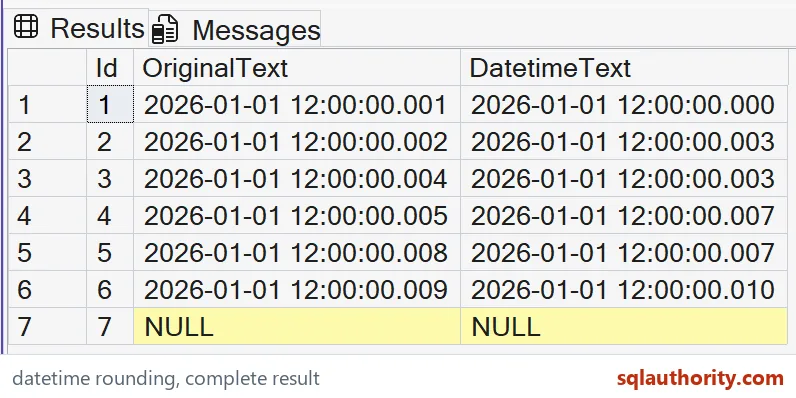

Keep equality and event order separate
Two different source timestamps can become the same datetime value. That can affect equality checks, deduplication or event ordering. A later conversion to a wider temporal type cannot distinguish those collapsed inputs. The lost detail no longer exists in the narrowed value.
I can justify retaining a legacy datetime column for compatibility while investigating its behavior. That doesn’t make it suitable for every new precision requirement. A migration decision needs the surrounding application contract. This small conversion example isn’t a schema-change recommendation.
A deterministic event sequence may also require an independent unique key. Even a finer temporal type can receive tied input timestamps. Rounding adds another source of ties but isn’t the only one. Don’t infer unique ordering from a column being named EventTime.
Check the full converted representation
The demonstration fixes its output format only after each typed conversion. Original text and narrowed text remain beside each other. NULL remains missing in both. It isn’t represented as an assumed timestamp.
The selected values remain within the datetime range. A datetime2 source can hold earlier dates that don’t fit datetime. These seven rows make no universal range claim. Validate both range and resolution when converting a real source.
The complete CTE and SELECT create no objects or session changes. ORDER BY fixes all seven cases. Keep exact full strings and their declared varchar widths in the comparison. Compare the final fractional digits rather than only the common second.
Check the type first, and the digits will make sense.
A three-digit display is not millisecond storage, it is the type’s own rounding grid.
Published by Pinal Dave on SQLAuthority. More of my work at pinaldave.com.
Discover more from SQL Authority with Pinal Dave
Subscribe to get the latest posts sent to your email.