
In this article we will go over basic understanding of Rollup clause in SQL Server. ROLLUP clause is used to do aggregate operation on multiple levels in hierarchy. Let us understand how it works by using an example.
Consider a table with the following structure and data:
CREATE TABLE tblPopulation (
Country VARCHAR(100),
[State] VARCHAR(100),
City VARCHAR(100),
[Population (in Millions)] INT
)
GO
INSERT INTO tblPopulation VALUES('India', 'Delhi','East Delhi',9 )
INSERT INTO tblPopulation VALUES('India', 'Delhi','South Delhi',8 )
INSERT INTO tblPopulation VALUES('India', 'Delhi','North Delhi',5.5)
INSERT INTO tblPopulation VALUES('India', 'Delhi','West Delhi',7.5)
INSERT INTO tblPopulation VALUES('India', 'Karnataka','Bangalore',9.5)
INSERT INTO tblPopulation VALUES('India', 'Karnataka','Belur',2.5)
INSERT INTO tblPopulation VALUES('India', 'Karnataka','Manipal',1.5)
INSERT INTO tblPopulation VALUES('India', 'Maharastra','Mumbai',30)
INSERT INTO tblPopulation VALUES('India', 'Maharastra','Pune',20)
INSERT INTO tblPopulation VALUES('India', 'Maharastra','Nagpur',11 )
INSERT INTO tblPopulation VALUES('India', 'Maharastra','Nashik',6.5)
GO

Now, we need to create a report on population at 3 levels: City, State and Country.
Can we do it by using SUM with GROUP BY clause?
Yes, we can, but we will have to write a separate query to GROUP BY at each level and then union the result of all queries; even after this, the proper ordering or the result would still need more work.
However, SQL Server provides a very easy solution. Just add the WITH ROLLUP clause in GROUP BY and you get the desired results.
SELECT Country,[State],City,
SUM ([Population (in Millions)]) AS [Population (in Millions)]
FROM tblPopulation
GROUP BY Country,[State],City WITH ROLLUP
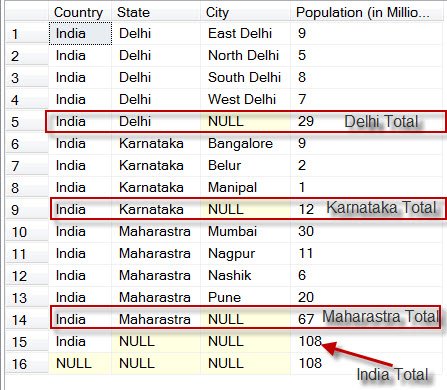
Let me know if this explanation is easy to understand.
Reference: Pinal Dave (https://blog.sqlauthority.com)




68 Comments. Leave new
Dear Pinal,
Excellent article regarding rollup clause.
i generally use ROLLUP like this
——————————————————————-
SELECT COUNTRY, STATE, CITY, SUM([Population (in Millions)]) FROM dbo.TBLPOPULATION
GROUP BY ROLLUP(COUNTRY, STATE, CITY)
——————————————————————–
i didnt find any difference in Performance.
which way could be better? coz
Microsoft plans to remove WITH ROLLUP clause in future version
ms-help://MS.SQLCC.v10/MS.SQLSVR.v10.en/s10de_6tsql/html/40075914-6385-4692-b4a5-62fe44ae6cb6.htm
can v use like this ROLLUP(column1,column2)? or any drawbacks in this method.
Hello siva,
i tried to use rollup with ur query but i received an error.
“The CUBE() and ROLLUP() grouping constructs are not allowed in the current compatibility mode. They are only allowed in 100 mode or higher.”
I am using SQL Server 2008.
dear pinal ,
my query is also wrkng like the one said by siva….and no more errors…result is equivalent to using with rollup…I mean
SELECT COUNTRY, STATE, CITY, SUM([Population (in Millions)]) FROM dbo.TBLPOPULATION
GROUP BY ROLLUP(COUNTRY, STATE, CITY)
is wrkng with me…
do like this Compatibility error will go
ALTER DATABASE dbName SET COMPATIBILITY_LEVEL = 100
2008 R2 and up
hi pinal,
the explanation u provided is very precise….
understood in one read only….
Hi .Thanks for the great article.But I do get an error when trying to manipulate a table which uses a rollup clause for futher processing. eg by making a slight change into your code(adding the “into tbl_tempHolder”) string to your code
SELECT Country,[State],City,
SUM ([Population (in Millions)]) AS [Population (in Millions)] into tbl_tempHoder
FROM tblPopulation
GROUP BY Country,[State],City WITH ROLLUP
I get this error
Attempting to set a non-NULL-able column’s value to NULL.
In my case I would now want to get the aggregated totals into another table and order them then and assign positions to them.
Assuming tbl_tempHoder has been populated this would be my final table after further processing
City | Total | Position
————————————
Mahastra | 67 | 1
———————————
Dehli | 29 | 2
———————————-
Karnataka| 12 | 3
Is there any way you can suggest to manipulate the totals without the requirement of creating a temporary table which then results in the error.
If I do the following without a roll up clause
SET NOCOUNT ON;
IF object_id(‘tbl_ferma’) IS NOT NULL
BEGIN
DROP TABLE [dbo].[tbl_ferma]
END
SELECT State,
SUM ([Population (in Millions)]) AS [Population (in Millions)] into tbl_ferma
FROM tblPopulation
GROUP BY State
and querying the table
select * from tbl_ferma order by [Population (in Millions)] desc
I get
City | Total |
————————————
Mahastra | 67 |
———————————
Dehli | 29 |
———————————-
Karnataka| 12 |
And am struggling on how to get the actual position of a record which i want to insert into another table so that i could use in in a certain report.
Hope you will be able to help.
Best ,Abide
You are great man thanks;
Siva – in your approach, you can include or exclude the rollup from any column. Like, you can use GROUP BY Country, [State], Rollup( City) to rollup only at City Level.
The one mentioned in the article runs it on all the columns in Group By clause. I compared it both ways and there is no impact on the subtree cost.
Hi Pinal,
Can you please also include that,
If we apply Rollup (a,b,c) then it acts as (a,b,c) (a,b) (a) ()
Now in SQL Server 2008, Rollup is implemented as subclause of GROUP BY clause.
i.e., the syntax in SQL Server 2008 would be:
SELECT Country,[State],City,
SUM ([Population (in Millions)]) AS [Population (in Millions)]
FROM tblPopulation
GROUP BY ROLLUP(Country,[State],City)
You shouldn’t use ROLLUP operator in sql until there is no other option. It is actually a job of a reporting tool to display summary informations to each group.
If you do it via sql, there is not a easy way to uniquely identify a row also it is a performation problem for large number of data
@Madhivanan
“If you do it via sql, there is not a easy way to uniquely identify a row”
Check out GROUPING(). It makes it very easy.
You can use GROUPING function. But you need to depend on that. Also did you test running a query involving GROUPING with ROLLUP or CUBE?
Also as I specified in my first reply, it should be done in a reporting tool
@Madhivanan
I am currently using ROLLUP because i need different totals in a query. It uses the numbers for further calculations. Without ROLLUP i would need to run the query a second time with another GROUP BY clause adding unneeded complexity to the query.
ROLLUP with GROUPING works well.
Pinal, very interesting. Just yesterday i used ROLLUP in a query (and toyed with CUBE, not sure if i need it yet.) And, i responded to someone’s question with it (but they didn’t use it):
Interesting how thing come together like that.
I’d suggest that you explain GROUPING() as well. Otherwise, the NULLs are not really trustworthy. They may be unknown, that may be the grouping identifier.
I went for a smaller basic test to see it myself.
WITH
A(A, B, C)
AS
(
SELECT 1, 1, 1 UNION ALL
SELECT 1, 1, 2 UNION ALL
SELECT 1, 2, 1 UNION ALL
SELECT 1, 2, 1 UNION ALL
SELECT 2, 1, 1 UNION ALL
SELECT 2, 1, 2 UNION ALL
SELECT 2, 2, 1 UNION ALL
SELECT 2, 2, 1
)
SELECT
A,
B,
SUM(C),
GROUPING(A),
GROUPING(B)
FROM
A
GROUP BY
A,
B
WITH ROLLUP; –CUBE;
Hi,
I agree with Madhivanan, for summarisation reporting tools can provide complex group by’s for example ssrs 2008 has very good row and column groupings. Most of the rollup like capabilties have been handled at the reports by me.
Thank you
@Madhivanan, you say “If you do it via sql, there is not a easy way to uniquely identify a row”.
Do you mean no way to identify what rows are rollup totals? Actually, you can identify that. See the Grouping function. You can use grouping(colname) and it will be 1 if the rollup is for that column.
Using a CASE clause with that (to identify when the value is 1 and output a descriptive column value), you can get the kind of identification I think you seek. Let us know if it helps.
yes thnkx a lot…
your way of explanation is always easy to understand…
and my i que… ? before going more or searching any thing…
is ROLLUP awailable in Sql server 2005 ?
and ROLLUP must be available in all upper versions ….
so i just want to confirm about SS 2005.. is it ?
thnx
Hello Sandeep,
In this article I demonstrated this functionality in SQL Server 2005. Even this is supported in 2008 but a recommonded syntax that would be supported in future versions is:
SELECT Country,[State],City,
SUM ([Population (in Millions)]) AS [Population (in Millions)]
FROM tblPopulation
GROUP BY ROLLUP (Country,[State],City)
Regards,
Pinal Dave
The same can be achieve thru grouping sets isnt it?
Hi,
I dont see Rollup inbuilt function in SQL Server 2005. Any headsup why I am not able to use this function?
Thanks,
Raj
@Raj
Here is an example:
WITH
A(A, B, C)
AS
(
SELECT 1, 1, 1 UNION ALL
SELECT 1, 1, 2 UNION ALL
SELECT 1, 2, 1 UNION ALL
SELECT 1, 2, 1 UNION ALL
SELECT 2, 1, 1 UNION ALL
SELECT 2, 1, 2 UNION ALL
SELECT 2, 2, 1 UNION ALL
SELECT 2, 2, 1
)
SELECT
A,
B,
SUM(C),
GROUPING(A),
GROUPING(B)
FROM
A
GROUP BY
A,
B
WITH ROLLUP; –CUBE;
Thanks Brian,
Interesting, Your query works. I still trying to understand example provided at the beginning of this Post. Your Comment helped.
Raj
@Raj
You’re welcome. I was toying with it myself and my efforts helped you too. I’m so excited. :)
Now, you have to teach me something!
Can you post the code that didn’t work?
good article
I think the Rollup and Cube functions have been with SQL Server since 6.5, am I wrong?
Hello Feodor,
You are right. ROLLUP is available since SQL Server 6.5.
Regards,
Pinal Dave
Please Help me out of this problem how can i add sum of overdue and due using rollup
this is stored procedure
create procedure damaka
(@EMP_CODE VARCHAR(15),
@MONTH VARCHAR(10),
@WEEK VARCHAR(10),
@DEMAND_DATE DATETIME
)
AS
IF @MONTH>=’28’
BEGIN
–OPEN CASES
SELECT d.file_no AS FileNo,d.hirer_name as CustomerName,demand_month1.due_amt As OverDue,d.instalment as Due FROM demand_month1 d where(EMP_CODE=@EMP_CODE AND demand=@MONTH AND Closing>@DEMAND_DATE)
UNION all
SELECT W.file_no as FileNo,W.hirer_name as CustomerName,convert(char(10),W.Starting,103) as Starting,convert(char(10),W.Closing,103) as Closing,W.Mode,W.due_AMT as OverDue,W.instalment as Due from demand_week1 W where EMP_CODE=@EMP_CODE AND demand=@WEEK AND Closing>@DEMAND_DATE
else
select W.file_no as FileNo,W.hirer_name as CustomerName,W.due_AMT as OverDue,W.due_AMT as Due,” as SlipDate, ” as SlipNo from W where((EMP_CODE=@EMP_CODE AND demand=@WEEK AND W.Closing0 AND closing<@DEMAND_DATE))
UNION all
SELECT HIRER.file_no as FileNo,HIRER.hirer_name as CustomerName,overdue.due_amt as OverDue, overdue.DUE_AMT as Due FROM HIRER INNER JOIN OVERDUE ON HIRER.FILE_NO=OVERDUE.FILE_NO WHERE EMP_CODE=@EMP_CODE AND MODE='D' AND HIRER.Closing<@DEMAND_DATE order by closing desc
END
plz help me in this problem
can we use with rollup in above problem
hi,
i want to use group by clause with joins in stored procedure..
how can i achieve it,is there any rules to use group by clause in stored procedure with joins.
i tried but i didn’t succeed.
please can u send any sample to achieve it.
thanks..
Same rules apply when grouping outside the procedure. It’s impossible to say what went wrong with your query without seeing the actual statement. But here’s my two cents…
GROUP BY is unfortunately not the easiest thing to understand. Especially if you start up with MySQL where you can return any fields you like from the query and not just those in the group (+ aggregated fields). Probably the basic rule is that:
– You can return only those fields you use in GROUP BY
– Addition to that, you can return aggregated fields also, like SUM(somefield) and AVG(somefield)
When dealing with views, procedures and functions, if you return aggregated values you need specify names for the fields. For example:
SELECT [Order], SUM([Price]) AS [Price]
FROM [Orders]
GROUP BY [Order]
Joins does not make exceptions to these rules. No matter how many joins you make, how complex they are, grouping rules are still the same.
Sometimes you need to group and calculate some values and return other values also. In that case you need joins and subqueries like this (and this is very bad example):
SELECT p.[Purchaser], g.[Order], g.[Price]
FROM Purchaser p
JOIN (SELECT [Order], SUM([Price]) [Price] FROM [Orders] GROUP BY [Order]) g ON g.[Order] = p.[Order]
Well, I can’t come up with anything else. I hope this helps. Now I have to clean up the mess my 1,5 year daughter just made when I was writing this :)
Nice Solution Marko,
may be problem with sub queries in my case,
thanks marko, now i able to do.
I thank you for for all your articles; very easy to understand.
Could you please explain a practical use of WITH CUBE clause?
Thanks
It is maninly used to generate detail data along with summary data. See the output
When WITH CUBE clause is used every row is subtotaled along with other combinations. The output is not sorted and difficult to understand. Is there any way the result can be sorted?
Thanks
Hi all,
I am doing a rollup with grouping, and I was wondering if there is a way for me to only round the subtotals.
I’ve included a simplified example of what I want to do. After running the Select Script, I want only the ‘Total_Costs’ for all ‘Report Total’ to be rounded.
I’ve tried a few variations of case statements but was unable to get it to work.
–Table Creation
CREATE TABLE [dbo].[SalesItems](
[Product] [nchar](10) NULL,
[Store] [nchar](10) NULL,
[Cost] [numeric](18, 5) NULL
)
GO
INSERT INTO SalesItems VALUES (‘Chips’,’A’,2.50000)
INSERT INTO SalesItems VALUES (‘Chips’,’B’,3.00000)
INSERT INTO SalesItems VALUES (‘Napkins’,’A’,1.90000)
INSERT INTO SalesItems VALUES (‘Chips’,’B’,3.00000)
INSERT INTO SalesItems VALUES (‘Napkins’,’B’,2.50000)
INSERT INTO SalesItems VALUES (‘Dip’,’A’,4.00000)
INSERT INTO SalesItems VALUES (‘Dip’,’A’,4.30000)
INSERT INTO SalesItems VALUES (‘Dip’,’B’,3.40000)
INSERT INTO SalesItems VALUES (‘Chips’,’A’,2.75000)
INSERT INTO SalesItems VALUES (‘Napkins’,’A’,2.10000)
INSERT INTO SalesItems VALUES (‘Napkins’,’B’,2.60000)
GO
–Select Script
SELECT CASE WHEN (Grouping(Store) = 1) THEN ‘Report Total’ ELSE Store END AS report_total, Product, Store, SUM(Cost) AS Total_Cost
FROM SalesItems
GROUP BY Product, Store WITH ROLLUP
ORDER BY report_total
Can we use multiple ROLLUP
i.e.
GROUP BY GroupId, Col1 WITH ROLLUP, Col2 WITH ROLLUP
HI,
We get total fine…. How I can make “Total” Instead of “NULL” at end(Naming convention )