I check DATEADD fractional numbers before treating them as partial intervals. Its number argument is truncated rather than rounded. Adding 1.9 days therefore doesn’t mean adding almost two days.

Expose the fractional input
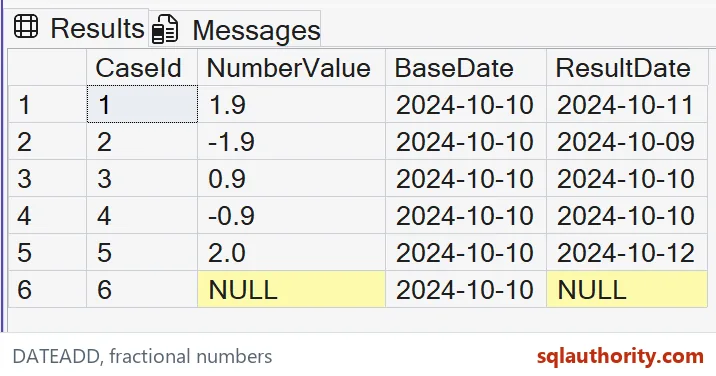
The example retains NumberValue as decimal(4,1). The first two values are positive and negative 1.9, so their fractions remain visible in the input column. Each result uses the same base date.
The expected additions are one day and minus one day. SQL Server doesn’t round them to two and minus two. I keep both signs because a rule remembered only from positive examples can hide the direction of truncation.
WITH Amounts AS
(
 SELECT CaseId, CAST(NumberValue AS decimal(4,1)) AS NumberValue
 FROM (VALUES (1,1.9),(2,-1.9),(3,0.9),(4,-0.9),(5,2.0),
              (6,CAST(NULL AS decimal(4,1)))) v(CaseId,NumberValue)
)
SELECT CaseId, NumberValue,
       CONVERT(date,'20241010',112) AS BaseDate,
       DATEADD(day,NumberValue,CONVERT(date,'20241010',112)) AS ResultDate
FROM Amounts
ORDER BY CaseId;
Read truncation toward zero
The values 0.9 and minus 0.9 both contribute zero days. Their expected results stay on October 10. The fraction is discarded before the selected datepart is added.
That isn’t the same operation as rounding to the nearest day. I’d retain these two cases during review, because they make the difference especially clear. A number smaller than one can look meaningful to a caller while contributing no interval through this expression.

Keep the datepart in view
The query chooses day explicitly. A decimal fraction in the number argument doesn’t create a second, finer datepart. It is still a request to add an integer count of days after truncation.
If the business needs hours, choose an appropriate datepart and provide the corresponding number. I’d define that conversion rule before changing the code. Multiplying a value mechanically can hide the intended unit, rounding policy and allowed precision of the original input.
Preserve an explicit input type
The base value is converted to date using style 112. DATEADD returns the same date type for that typed input. The result therefore has a calendar date contract, rather than a hidden timestamp component.
A direct string-literal input follows a different return-type rule. I prefer the explicit type here so the example’s purpose stays clear. Changing to datetime2 would require reviewing both the datepart and the precision needed by its consumer.
Keep NULL and zero different
The last row supplies a missing number and produces NULL ResultDate. That differs from the two fractional values that truncate to zero. Their dates remain known even though no whole day is added.
I’d keep the distinction when reporting an incomplete calculation. Filling a missing interval with zero can make an unknown due date look confirmed. If a default interval is part of the business rule, record that default separately from DATEADD’s numeric behavior.
Avoid unbounded arithmetic
These examples use small values and a base date comfortably inside the date range. DATEADD has numeric limits and raises an error when the date overflows. A fractional argument doesn’t exempt the resulting operation from those limits.
I wouldn’t test overflow by changing a live schedule value. Keep such checks in a controlled validation environment with a clear input domain. For production, review the allowed number range and destination date range together. An accepted number must also produce a usable date.
Compare complete outcomes
The expected grid includes all six cases, both signs and the base date. A check that only counts returned rows would miss an incorrect rounding policy. Comparing the actual ResultDate for each input exposes the intended truncation.
I’d also document the rule where fractional values enter the system. A report should explain whether those fractions are valid, rejected or converted upstream. DATEADD can process them, but accepting a fraction is still a separate business decision.
Try 1.9 on a date of your own and count the days that move.
A fractional DATEADD number is not a partial interval, it is truncated before the selected unit is added.
Published by Pinal Dave on SQLAuthority. More of my work at pinaldave.com.
Discover more from SQL Authority with Pinal Dave
Subscribe to get the latest posts sent to your email.