CAST to date keeps the calendar day while removing the time from a typed datetime2 value. I distinguish that conversion from a display format that merely hides the time.

Decide whether the time should remain
An event timestamp and its calendar date answer different questions. A date-only grouping may intentionally ignore the time. A sequence comparison may still require it. Choose the intended representation before narrowing a timestamp.
The date type holds a calendar date without time. Converting datetime2 to date copies the year, month and day. This example starts from typed datetime2 values. It doesn’t ask an implicit locale-dependent parser to decide the meaning of ambiguous text.
I’d retain the original timestamp when a derived date is used for a report. That makes the transformation reviewable. A date-only column cannot explain whether an event occurred at midnight or late evening. Both times can produce the same date.
Compare several times on the same day
The script includes midnight and a late time on April 3, 2026. Another input is midnight on the following day. A leap-day timestamp and NULL complete the cases. Each original text is converted explicitly using ISO style 126.
The date output is produced through CAST. A second output converts that date back to datetime2(3). Its time is midnight because the date no longer contains a time. That wider type doesn’t restore the original hours or fractions.
The late-time case therefore returns the same date as the first midnight case. Its round-trip timestamp is different from the original. That distinction separates removal from display formatting. Hiding a time in a report can leave the underlying timestamp unchanged.
WITH Inputs AS
(
    SELECT Id, CONVERT(datetime2(3), DateText, 126) AS OriginalTime
    FROM (VALUES (1, '2026-04-03T00:00:00.000'),
                 (2, '2026-04-03T23:59:59.999'),
                 (3, '2026-04-04T00:00:00.000'),
                 (4, '2024-02-29T12:34:56.789'), (5, NULL)) AS v(Id, DateText)
)
SELECT i.Id, i.OriginalTime, a.DateOnly,
       CAST(a.DateOnly AS datetime2(3)) AS DateAsTimestamp
FROM Inputs AS i
CROSS APPLY (VALUES (CAST(i.OriginalTime AS date))) AS a(DateOnly)
ORDER BY i.Id;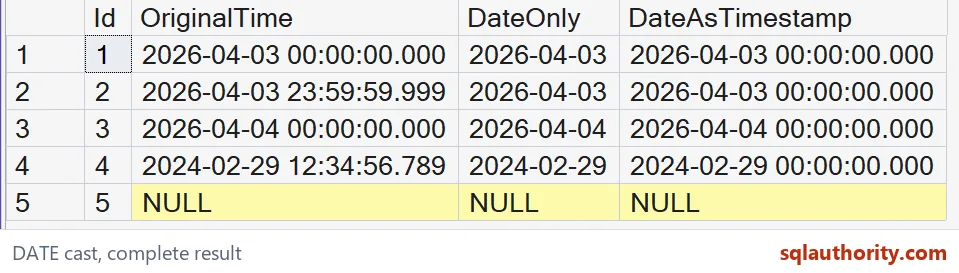

Keep time zone decisions separate
The supplied datetime2 values contain no offset. CAST to date doesn’t establish whether they describe UTC or a local clock. It simply reads their calendar components. A reporting day defined by another time zone needs an appropriate earlier conversion.
I can justify extracting a local business date after an instant has been converted to the required zone. That sequence must be specified explicitly. Extracting first can discard the information needed to move the day correctly. This demonstration performs no such zone conversion.
A date-only result also doesn’t preserve ordering among events within that day. A deterministic event sequence needs the original timestamp and any required tie breaker. Grouping by date is another operation with another purpose. The cast alone doesn’t implement either contract.
Check the narrowed and widened values
NULL remains missing in the date and reconstructed timestamp. It isn’t replaced with an assumed day. The leap-day case retains its valid calendar date. These rows help distinguish missingness from a real date boundary.
The complete script reads literal inputs through a CTE. It creates no objects or session settings. ORDER BY fixes the five-case sequence. Original timestamp, derived date and widened date all appear in the output.
Compare each complete temporal value and SQL type across the date round trip. Keep the original timestamp beside the returned midnight value. Check the time lost rather than only the displayed date. A matching date doesn’t establish that the original timestamp remains recoverable.
Keep the original timestamp close, and the date is never a mystery.
A date-only value is not a hidden timestamp, it is a narrower value with the original time removed.
Published by Pinal Dave on SQLAuthority. More of my work at pinaldave.com.
Discover more from SQL Authority with Pinal Dave
Subscribe to get the latest posts sent to your email.