
ALLOW_PAGE_LOCKS set to OFF prevents rowstore index REORGANIZE. Check the index option before treating that maintenance failure as corruption. The same restriction can occur on a healthy index with intact data.

Reproduce the restriction on a temporary index
First, make a temporary table with 1,000 made-up rows.
DROP TABLE IF EXISTS #Rows;

CREATE TABLE #Rows (Id int NOT NULL, Payload varchar(100) NOT NULL);

WITH Digits(n) AS (
    SELECT n FROM (VALUES (0),(1),(2),(3),(4),(5),(6),(7),(8),(9)) AS d(n)
)
INSERT #Rows (Id, Payload)
SELECT a.n + 10 * b.n + 100 * c.n, REPLICATE('x', 100)
FROM Digits AS a CROSS JOIN Digits AS b CROSS JOIN Digits AS c;
Now create a unique clustered index with page locking disabled and try to REORGANIZE it. This does not touch any existing index.
CREATE UNIQUE CLUSTERED INDEX CX_Rows
ON #Rows (Id)
WITH (ALLOW_PAGE_LOCKS = OFF);

-- This fails, and that is the point.
ALTER INDEX CX_Rows ON #Rows REORGANIZE;
SQL Server 2025 returned error 1943. Its message said page-level locking was disabled. The internal temporary-table name in the message includes a session-specific suffix. That suffix can differ when you repeat the demonstration.
Change only the option in this example
ALTER INDEX CX_Rows ON #Rows
SET (ALLOW_PAGE_LOCKS = ON);

ALTER INDEX CX_Rows ON #Rows REORGANIZE;
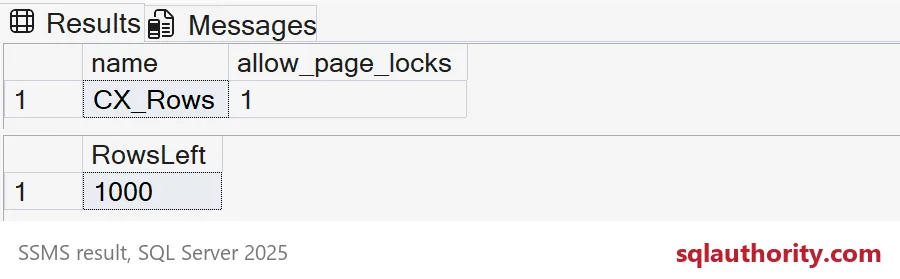
The second attempt succeeds after the index allows page locks. You can confirm the option and the row count yourself.
SELECT name, allow_page_locks
FROM tempdb.sys.indexes
WHERE object_id = OBJECT_ID(N'tempdb..#Rows')
  AND name = N'CX_Rows';

SELECT COUNT(*) AS RowsLeft FROM #Rows;

DROP TABLE #Rows;| Index option | Outcome |
|---|---|
| OFF | Error 1943, page-level locking disabled |
| ON | REORGANIZE succeeded; 1,000 rows unchanged |
Inspect the existing option before deciding on maintenance
REORGANIZE needs page locks, so ALLOW_PAGE_LOCKS = OFF causes error 1943. Review the existing workload and maintenance purpose before changing its locking policy.
An option may have been chosen for a reason beyond this one maintenance command. The demonstration only establishes the restriction and how the error looks. It does not compare rebuild and reorganize performance. It does not establish a production maintenance schedule.
Ask which index failed, what its option is and why that option was chosen. Keep the scope on that index. An automatic change across every index would answer a different question. The demonstration makes one prerequisite visible without prescribing a blanket change.

Check the one index, make one decision, and let the maintenance run.
A failed REORGANIZE is not corruption, it is an index option asking for a decision.
Published by Pinal Dave on SQLAuthority. More of my work at pinaldave.com.
Discover more from SQL Authority with Pinal Dave
Subscribe to get the latest posts sent to your email.


