I review MIN and MAX text as ordered character values. Their extremes follow collation rules, not numeric magnitude. An explicit comparison rule makes that distinction easier to explain before digit strings are converted.

State the comparison rule
The example applies Latin1_General_100_BIN2 to short Unicode labels. That makes its character ordering explicit instead of inheriting an unknown database default. The supplied labels contain simple digits, empty text and NULL.
I’d state the actual collation whenever textual extremes matter to a consumer. A result called first or last can imply a business order that the query hasn’t defined. The comparison rule belongs beside the type, rather than being inferred from a familiar-looking label.
WITH Labels AS
(
 SELECT CAST(Label AS nvarchar(10)) COLLATE Latin1_General_100_BIN2 AS Label
 FROM (VALUES (N'2'),(N'10'),(N'9'),(N''),
              (CAST(NULL AS nvarchar(10)))) v(Label)
)
SELECT MIN(Label) AS FirstText, MAX(Label) AS LastText FROM Labels;

WITH Labels AS
(
 SELECT CAST(Label AS nvarchar(10)) COLLATE Latin1_General_100_BIN2 AS Label
 FROM (VALUES (N'2'),(N'10'),(N'9'),
              (CAST(NULL AS nvarchar(10)))) v(Label)
)
SELECT MIN(Label) AS FirstText, MAX(Label) AS LastText,
       MIN(CAST(Label AS int)) AS SmallestNumber,
       MAX(CAST(Label AS int)) AS LargestNumber
FROM Labels;
Read the empty value separately
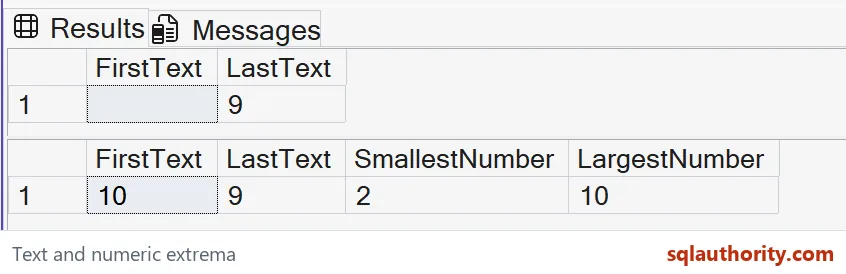
The first grid has an empty FirstText and a LastText of nine. The empty string is a supplied value and participates in the ordering. The NULL input is ignored by these aggregates.
I don’t treat those two inputs as interchangeable blanks. A grid cell can look similar, but the aggregate sees different values. Retaining an explicit empty example prevents a report from silently classifying missing text as the same ordered label.
Remove empty text to expose digit ordering
The second query omits the empty string while retaining NULL. Its textual minimum is ten and its textual maximum is nine. Those results compare the digit strings under the stated collation.
The first character of ten sorts before the first character of two or nine here. I’d keep all three strings during review. A sample containing only one-digit values could accidentally make character order look identical to numeric magnitude.
Compare a deliberate numeric interpretation
The second grid also casts each supplied label to int before calculating numeric extremes. Those expected results are two and ten. Every non-NULL value in that query is valid integer text, so it doesn’t execute an invalid conversion.
That cast changes the question. I’d apply it only when the field’s contract is numeric, not because a particular sample happens to contain digits. Labels with leading zeros or mixed characters can have a meaning that integer conversion would erase.

Keep the return types visible
The textual aggregates return the same character type as their input. The numeric aggregates return int values from the converted expression. Each output name identifies the interpretation being requested.
I’d avoid giving both kinds of output a vague name such as LowestValue. A reader should know whether it refers to a label’s ordering or a numeric magnitude. That distinction also helps the application bind the expected type without recovering meaning from display formatting.
Validate the intended domain
These queries create no objects and change no stored labels. Their full expected outputs compare a stated collation with a deliberately numeric interpretation. They aren’t a recommendation to convert every text column or change a database collation.
For a real query, I’d review allowed inputs and representative character cases separately. Alphabetic labels need their intended linguistic ordering, while numeric fields need conversion and range rules. A correct extreme for these simple digits doesn’t establish the right business ordering for every possible label.
Say the collation out loud, and the extremes stop surprising anyone.
A text maximum is not a numeric maximum, it is the last character value under the chosen collation.
Published by Pinal Dave on SQLAuthority. More of my work at pinaldave.com.
Discover more from SQL Authority with Pinal Dave
Subscribe to get the latest posts sent to your email.