Date conversion styles tell SQL Server how to interpret day and month positions in incoming text. The label 03/04/2026 can describe two different dates. Both dates exist, so a successful conversion cannot tell you which one the sender intended. I start with the input agreement.

Two boxes, one ambiguous label
Imagine two delivery boxes carrying the same handwritten date. One depot writes the month first, while the other writes the day first. Nothing on 03/04/2026 identifies the depot. Guessing from the label can send the box to the wrong day’s shelf.
Our SQL example makes that disagreement visible. Style 101 interprets month, day and four-digit year. Style 103 interprets day, month and four-digit year. The conversion produces a date value, rather than preserving the text’s slash layout.
Compare both interpretations
Copy the complete query below into a SQL Server query window. It uses TRY_CONVERT, available in SQL Server 2012 and later. Every source string is explicitly nvarchar(10). The final two columns render the dates as yyyy-mm-dd for easy comparison.
WITH Inputs AS
(
    SELECT Id, CAST(RawText AS nvarchar(10)) AS RawText
    FROM (VALUES
        (1, N'03/04/2026'),
        (2, N'13/04/2026'),
        (3, N'02/29/2024'),
        (4, N'29/02/2023'),
        (5, NULL)
    ) AS v(Id, RawText)
),
Parsed AS
(
    SELECT Id, RawText,
           TRY_CONVERT(date, RawText, 101) AS MonthFirst,
           TRY_CONVERT(date, RawText, 103) AS DayFirst
    FROM Inputs
)
SELECT Id, RawText, MonthFirst, DayFirst,
       CONVERT(char(10), MonthFirst, 23) AS MonthFirstISO,
       CONVERT(char(10), DayFirst, 23) AS DayFirstISO
FROM Parsed
ORDER BY Id;
The first row has March 4 in MonthFirst and April 3 in DayFirst. Both conversions succeed. Neither result proves the sender’s intention. This is the most dangerous row because a success-only validation rule would accept either interpretation.
The next row contains 13/04/2026. It fits day-first interpretation as April 13, while month-first interpretation has no month 13. The third row is a valid month-first leap date. Its day-first interpretation has no month 29.
February 29, 2023 is invalid, so neither interpretation supplies a date in the fourth row. The missing input also returns NULL. Those NULL results share a SQL representation, but their business meanings differ. Preserve the input alongside its converted value.
Use date conversion styles from the source contract
Do not try one style and silently fall back to the other. That trick still leaves the first row unresolved. It also mixes interpretation policies within a single column. Choose one agreed input format for each known source.
TRY_CONVERT returns NULL when an allowed conversion fails. It does not make every prohibited conversion safe, and it does not infer intent. A successful date conversion is also not a strict text-shape check. Validate exact length and permitted characters separately when your contract requires them.

A compact year-first contract
A source that supplies eight digits can agree on yyyyMMdd. Style 112 expresses that interpretation without slash positions. The next query keeps missing input separate from invalid input. It still retains the full supplied string for diagnosis.
WITH Inputs AS
(
    SELECT Id, CAST(RawText AS nvarchar(8)) AS RawText
    FROM (VALUES
        (1, N'20240229'),
        (2, N'20230229'),
        (3, N'20261231'),
        (4, NULL)
    ) AS v(Id, RawText)
),
Parsed AS
(
    SELECT Id, RawText,
           TRY_CONVERT(date, RawText, 112) AS ParsedDate
    FROM Inputs
)
SELECT Id, RawText, ParsedDate,
       CONVERT(char(10), ParsedDate, 23) AS ISOText,
       CAST(CASE
           WHEN RawText IS NULL THEN 'Missing'
           WHEN ParsedDate IS NULL THEN 'Invalid'
           ELSE 'Parsed'
       END AS varchar(7)) AS ParseStatus
FROM Parsed
ORDER BY Id;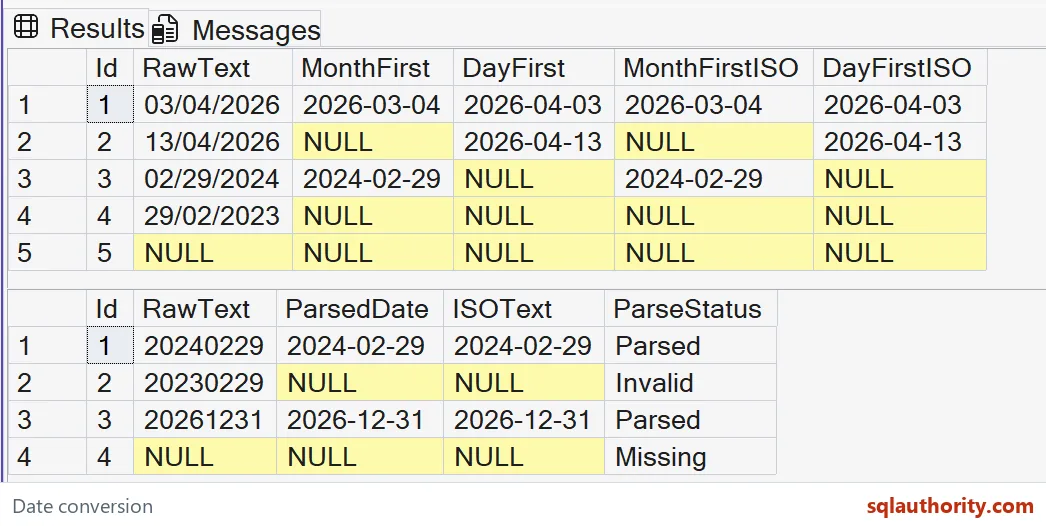
The leap date 20240229 becomes February 29, 2024. The invalid 20230229 receives Invalid, while the absent input receives Missing. The valid year-end value becomes December 31, 2026. These labels describe conversion outcomes, not authorization to store a record.
Use four-digit years to avoid the separate rules for interpreting two-digit years. Store the result in a date column when the business value is a calendar date. Apply a display format when presenting it. Formatting text and interpreting incoming text are different operations.
Keep missing and invalid values visible
A default date can hide a failed conversion behind a plausible calendar value. Instead, let your import process retain the raw input and an explicit outcome. Decide whether missing dates are permitted. Reject or quarantine invalid ones according to the application’s rule.
This example does not change LANGUAGE or DATEFORMAT settings. Its numeric styles are written directly beside each conversion. It also says nothing about time zones, time-of-day values or production throughput. Those require their own input contracts and checks.
Agree on the format with the sender, and keep failed and missing inputs distinguishable.
A converted date is not the sender’s intent, it is only one reading of the text.
Published by Pinal Dave on SQLAuthority. More of my work at pinaldave.com.
Discover more from SQL Authority with Pinal Dave
Subscribe to get the latest posts sent to your email.