CASE sort priority turns a list of status labels into an explicit business queue. Alphabetical order knows nothing about urgency. A ticket marked Hold can appear before one marked Ready. I prefer to show the priority as a column before trusting the displayed order.

The sorting tray has a rule
Imagine a workshop with three trays for repairs. Ready items can leave, Waiting items need a part, and Hold items need approval. The tray names describe the work, but their alphabetical order does not describe the next action. Give each tray a numeric position.
Our policy puts Ready first, Waiting second and Hold third. Anything else goes into a fourth group for inspection. That last group includes an unfamiliar label and a missing label. They remain visible instead of disappearing from the report.
First inspect alphabetical order
Copy this query into a SQL Server query window. The seven rows are examples, so the query creates no permanent objects. ReceivedOrder is a small sequence number used to break status ties. TicketId is unique within this example.
WITH Tickets AS
(
    SELECT TicketId,
           CAST(StatusText AS varchar(7))
               COLLATE Latin1_General_100_BIN2 AS StatusText,
           ReceivedOrder
    FROM (VALUES
        (101, 'Waiting', 2),
        (102, 'Ready',   5),
        (103, 'Hold',    1),
        (104, 'Ready',   5),
        (105, 'Other',   0),
        (106, NULL,      0),
        (107, 'ready',   0)
    ) AS v(TicketId, StatusText, ReceivedOrder)
)
SELECT TicketId, StatusText, ReceivedOrder
FROM Tickets
ORDER BY StatusText, ReceivedOrder, TicketId;
The first result begins with the missing status, followed by Hold. Ready appears before Waiting, but Hold has already reached the front. That is a valid text ordering under the chosen collation. It does not match our workshop policy.
The query uses a binary collation to make label matching explicit. Ready and ready are different strings here. Your database can use different comparison rules. Choose those rules deliberately before treating two labels as the same status.
CASE sort priority makes the policy visible
The next query returns a numeric SortPriority beside every ticket. A simple CASE maps each recognized label to its position. The ELSE branch assigns every remaining label to position four. A separate classification distinguishes missing labels from unfamiliar ones.
WITH Tickets AS
(
    SELECT TicketId,
           CAST(StatusText AS varchar(7))
               COLLATE Latin1_General_100_BIN2 AS StatusText,
           ReceivedOrder
    FROM (VALUES
        (101, 'Waiting', 2),
        (102, 'Ready',   5),
        (103, 'Hold',    1),
        (104, 'Ready',   5),
        (105, 'Other',   0),
        (106, NULL,      0),
        (107, 'ready',   0)
    ) AS v(TicketId, StatusText, ReceivedOrder)
),
RankedTickets AS
(
    SELECT TicketId, StatusText, ReceivedOrder,
           CASE StatusText
               WHEN 'Ready' THEN 1
               WHEN 'Waiting' THEN 2
               WHEN 'Hold' THEN 3
               ELSE 4
           END AS SortPriority,
           CAST(CASE
               WHEN StatusText IS NULL THEN 'Missing'
               WHEN StatusText IN ('Ready', 'Waiting', 'Hold')
                   THEN 'Known'
               ELSE 'Unknown'
           END AS varchar(7)) AS StatusClass
    FROM Tickets
)
SELECT TicketId, StatusText, ReceivedOrder,
       SortPriority, StatusClass
FROM RankedTickets
ORDER BY SortPriority, ReceivedOrder, TicketId;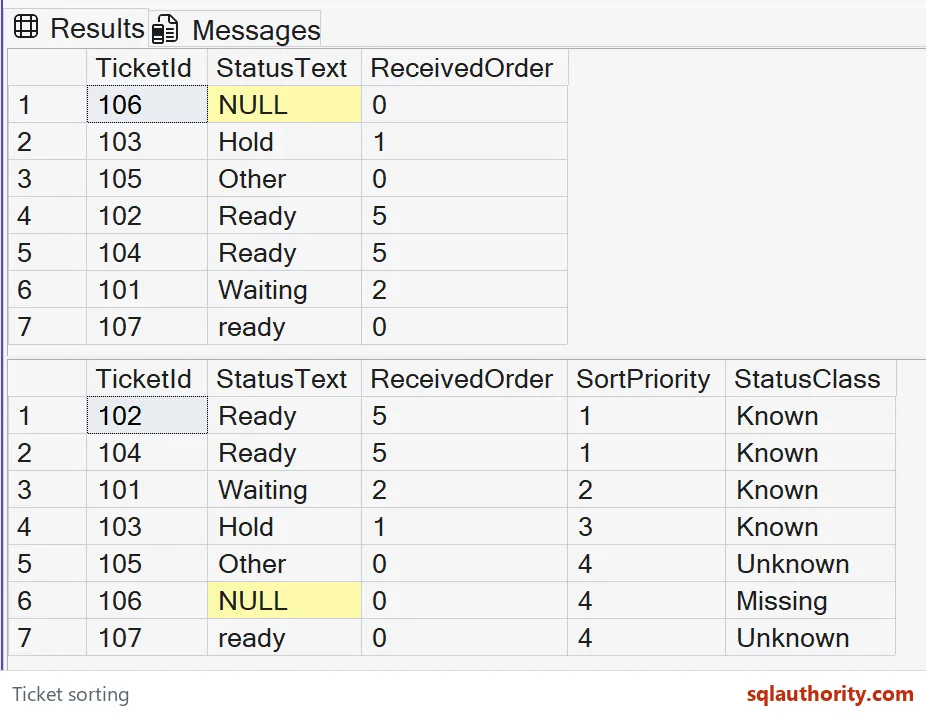
Tickets 102 and 104 lead the result because both are Ready. Ticket 101 follows as Waiting, then ticket 103 as Hold. Tickets 105, 106 and 107 remain in the final group. The lowercase ready label is unfamiliar under this example’s comparison rules.
A missing status does not match any WHEN label in the simple CASE. It reaches ELSE and receives priority four. The searched CASE uses IS NULL to label that row Missing. This keeps the priority policy separate from the explanation of bad input.

Ties still need an answer
SortPriority alone cannot distinguish tickets 102 and 104. They also share ReceivedOrder, so the final TicketId key settles their order. Use a genuinely unique key in your own query. A label or timestamp that repeats does not finish the ordering contract.
Keep all CASE result branches numeric when they represent priority. Mixing a text label with an integer introduces conversion concerns. The rank is an int in this query, while StatusClass is explicitly varchar(7). Their jobs remain separate.
Make the policy maintainable
A short, stable status list fits comfortably inside CASE. A larger list maintained by users can belong in a reference table. Then define the relationship and the fallback for missing mappings. A join must not multiply tickets through duplicate status mappings.
Changing a priority number changes report behavior, so treat that change as a business decision. Neither the visible rank nor the VALUES example proves a production performance benefit. Check a real execution plan separately when the workload requires it.
Write the business order down, expose the fallback and finish every tie with a unique key.
Alphabetical order is not a business rule, it is only the default sort.
Published by Pinal Dave on SQLAuthority. More of my work at pinaldave.com.
Discover more from SQL Authority with Pinal Dave
Subscribe to get the latest posts sent to your email.