Decimal division can lose fractional detail before the final cast adds your requested decimal places. Inspect the quotient’s type before choosing a fix. Declaring every operand as wide as possible can leave less fractional room in an intermediate result.

Compare the intermediate quotient with the final output
The four main cases divide one by three. They compare decimal(38,10) operands with bounded decimal(19,10) operands. The final casts use the same target type. The code runs on SQL Server 2012 or later. First, a temporary table holds the results.
DROP TABLE IF EXISTS #DivisionResults;
CREATE TABLE #DivisionResults(CaseName varchar(40) NOT NULL PRIMARY KEY,Quotient sql_variant NULL);
DECLARE @WideA decimal(38,10)=1,@WideB decimal(38,10)=3;
DECLARE @NarrowA decimal(19,10)=1,@NarrowB decimal(19,10)=3;
INSERT #DivisionResults VALUES('Wide inputs',@WideA/@WideB);
INSERT #DivisionResults VALUES('Cast only the wide output',CAST(@WideA/@WideB AS decimal(19,10)));
INSERT #DivisionResults VALUES('Narrow inputs',@NarrowA/@NarrowB);
INSERT #DivisionResults VALUES('Cast the narrow output',CAST(@NarrowA/@NarrowB AS decimal(19,10)));The first quotient is 0.333333, with precision 38 and scale 6. Casting that quotient produces 0.3333330000. Those added zeros do not recover the digits already lost.
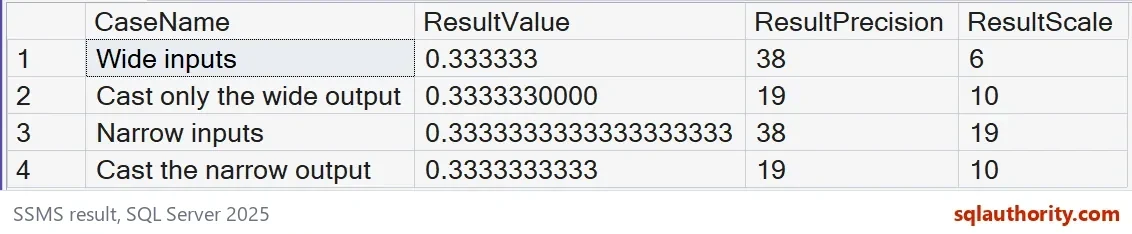
The narrower operands produce 0.3333333333333333333, with precision 38 and scale 19. Their final cast yields 0.3333333333. This is an observed difference on SQL Server 2025. Choose operand types using the required range, rather than this value alone.
Check precision and scale before the final cast
SELECT CaseName,CONVERT(varchar(60),Quotient) AS ResultValue,
  SQL_VARIANT_PROPERTY(Quotient,'Precision') AS ResultPrecision,
  SQL_VARIANT_PROPERTY(Quotient,'Scale') AS ResultScale
 FROM #DivisionResults ORDER BY CaseName;
SQL_VARIANT_PROPERTY exposes the stored quotient’s precision and scale. SQL Server derives the result type from the declared operand types. Division can exceed the maximum precision of 38. Scale reductions then depend on the whole-number room and fractional scale.
A smaller operand type also limits accepted values
A decimal(19,10) operand has nine digits available before the decimal point. It accepts 999999999.9999999999. The next whole number, 1000000000, does not fit. Narrowing blindly can replace a precision problem with an overflow problem.
SELECT TRY_CONVERT(decimal(19,10),N'999999999.9999999999') AS LargestNarrowPositive,
  TRY_CONVERT(decimal(19,10),N'1000000000') AS TooLargeForNarrow;
Precision counts both whole and fractional digits. Establish the business range before narrowing the inputs. Check multiplication, subtraction and intermediate totals as well. A final destination column alone does not define every expression’s type.

Test small values and the rounding boundary
The next block divides 0.0000009000 by one using both operand declarations. Wide inputs return 0.000000 in this tested calculation. Narrow inputs retain 0.0000009000000000000. This observation does not establish a universal rounding or truncation rule.
DECLARE @WideA decimal(38,10)=0.0000009000,@WideB decimal(38,10)=1;
DECLARE @NarrowA decimal(19,10)=0.0000009000,@NarrowB decimal(19,10)=1;
SELECT @WideA/@WideB AS TinyWide,@NarrowA/@NarrowB AS TinyNarrow;

DECLARE @LineValue decimal(19,10)=1,@Divisor decimal(19,10)=3;
SELECT CAST(@LineValue/@Divisor AS decimal(19,2))*3 AS RoundedEachLine,
  CAST((@LineValue*3)/@Divisor AS decimal(19,2)) AS RoundedOnce;

SET @NarrowA=1; SET @NarrowB=0;
SELECT @NarrowA/NULLIF(@NarrowB,0) AS ZeroDenominator;

DROP TABLE #DivisionResults;
Rounding each third to two places before adding gives 0.99. Rounding the combined amount once gives 1.00. Select the rounding boundary required by your application.
The denominator in the last query uses NULLIF. A zero denominator becomes NULL, so this calculation returns NULL. Decide explicitly how your application handles that missing result. Returning zero would express a different rule.
Small type choices upstream save a lot of rounding arguments later.
A final cast is not a repair, it is a label on digits already decided.
Published by Pinal Dave on SQLAuthority. More of my work at pinaldave.com.
Discover more from SQL Authority with Pinal Dave
Subscribe to get the latest posts sent to your email.