DEGREES converts a radian angle, and its return type follows the supplied numeric category. I choose that category before deciding how many displayed degree digits the consumer needs.

State what the number represents
A value of one radian is not one degree. The unit must be known before conversion. A value passed from another calculation may already be in degrees. Applying DEGREES to it again would produce a different angle without identifying the mistake.
DEGREES converts radians to degrees, and its return type depends on the argument type. Integer input returns an integer result, while float or real input returns float. Those categories can produce visibly different detail for the same original number.
I’d name the source and destination units beside the expression. That makes repeated conversions easier to spot. It also avoids a bare Angle column whose meaning changes between steps. Units belong to the data contract along with the numeric type.
Compare two type paths
The script supplies integer radian values zero, one, two and negative one. A final row contains NULL. It calls DEGREES directly on those integers. A separate expression first converts the same integer value to float.
The float result is cast to decimal(12,6) for display. One radian is expected to display as 57.295780 degrees. The integer path retains only a whole-number result. Casting that integer output afterward wouldn’t recover the original fraction.
Two radians makes the difference visible again. Its float path displays 114.591559, while the direct integer path displays 114. These are two result contracts over the same input. The final output keeps both rather than quietly selecting one.
WITH Inputs AS
(
    SELECT Id, RadiansInput
    FROM (VALUES (1, 0), (2, 1), (3, 2), (4, -1), (5, NULL))
        AS v(Id, RadiansInput)
)
SELECT Id, RadiansInput, DEGREES(RadiansInput) AS IntegerDegrees,
       CAST(DEGREES(CAST(RadiansInput AS float))
           AS decimal(12,6)) AS DisplayDegrees
FROM Inputs
ORDER BY Id;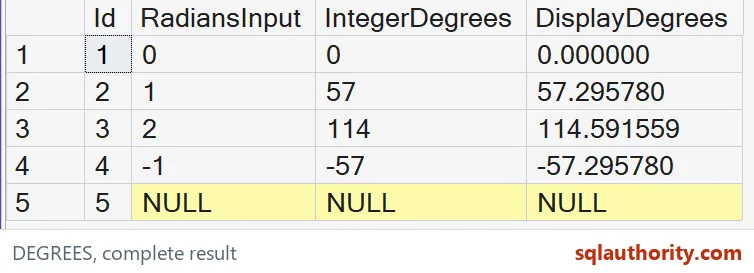
Choose precision before formatting
The decimal, bigint and money categories have their own return rules. This example doesn’t claim they all behave like float. An application’s argument can also be an arithmetic expression with an inferred type. Inspect that expression before assigning a precision requirement.
I can justify whole-degree output for a display that deliberately rounds or narrows angles. That is a presentation policy needing its own rule. The function’s integer contract isn’t a substitute for documenting that policy. A later format string cannot reconstruct lost detail.
The demonstrated float conversion is approximate. Its final decimal cast fixes only the displayed scale. It doesn’t make the underlying representation exact. Keep the required error tolerance separate from the number of digits shown on a screen.

Retain sign, zero and missingness
Negative one radian produces a negative degree value in both paths. The sign remains part of the conversion. Zero remains zero. NULL remains missing rather than becoming an assumed zero orientation.
A reported angle may need additional normalization into a chosen interval. This script doesn’t wrap negative values or reduce values by a complete turn. Those rules would answer another question. The example focuses on unit conversion and input-dependent output detail.
The complete CTE reads five literal inputs without objects or session changes. ORDER BY fixes their case order. Keep every input beside both conversion outputs. Compare their SQL types and complete decimal displays rather than an angle rounded by the grid.
Write the unit next to the number, and the angle will keep its meaning.
A degree count is not a complete angle contract, it is a value with a unit.
Published by Pinal Dave on SQLAuthority. More of my work at pinaldave.com.
Discover more from SQL Authority with Pinal Dave
Subscribe to get the latest posts sent to your email.