Running start times come from the durations before each activity in an ordered agenda. Store the order and duration, then calculate the clock times. Keep full datetimes so an activity after midnight retains its correct date.

Store an unambiguous order and a deliberate duration rule
The example gives each activity a stable identifier and a unique slot. Different durations are allowed, including a break. Durations must be between one minute and one day in this example. A zero-length marker would require a different input rule.
An agenda identifier remains stable when an activity moves. The slot determines its current order. Duplicate slots are rejected here, rather than leaving tied activities ambiguously ordered. Several events would additionally need an event identifier and partitioned calculations.
This needs SQL Server 2012 or later. The code uses temporary tables, so run the blocks in order in one query window.
CREATE TABLE #Agenda
 (AgendaId int NOT NULL PRIMARY KEY,Slot int NOT NULL UNIQUE,
  Title nvarchar(40) NOT NULL,DurationMinutes int NOT NULL CHECK(DurationMinutes BETWEEN 1 AND 1440));
 INSERT #Agenda VALUES
 (1,10,N'Opening',20),(2,20,N'First topic',45),(3,30,N'Break',15),(4,40,N'Second topic',50);
 DECLARE @Start datetime2(0)='2026-01-01T23:00:00';
 DECLARE @Total bigint=(SELECT SUM(CONVERT(bigint,DurationMinutes)) FROM #Agenda);
 IF @Total>2147483647 THROW 51002, 'Total minutes exceed this example limit.', 1;
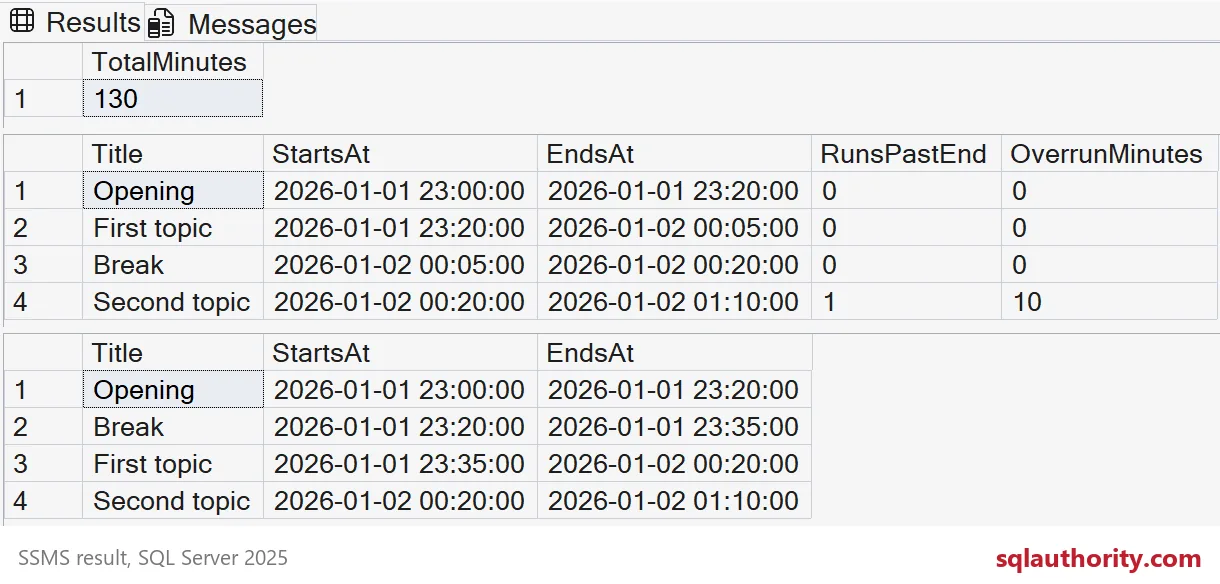
 SELECT @Total AS TotalMinutes;
 ;WITH AgendaOffsets AS
 (SELECT *,SUM(CONVERT(bigint,DurationMinutes))
  OVER(ORDER BY Slot ROWS UNBOUNDED PRECEDING)-DurationMinutes AS MinutesBefore
  FROM #Agenda)
 SELECT AgendaId,Slot,Title,MinutesBefore,
        DATEADD(minute,CONVERT(int,MinutesBefore),@Start) AS StartsAt,
        DATEADD(minute,CONVERT(int,MinutesBefore+DurationMinutes),@Start) AS EndsAt
 INTO #Schedule FROM AgendaOffsets;
Calculate running start times with an explicit row frame
SUM includes the current duration in its running total. Subtracting that duration gives the offset before the current activity. The explicit ROWS UNBOUNDED PRECEDING frame describes ordered rows. The unique slot makes that ordering unambiguous.
Without an explicit frame, an ordered aggregate normally uses a RANGE frame. Tied ordering values can therefore behave differently. Fix the order contract rather than relying on accidental input order. This window-frame example requires SQL Server 2012 or later.

Keep sums and date arithmetic within their intended ranges
The sum converts each duration to bigint before aggregation. An int input normally produces an int sum. The example then checks the total against the int boundary. The conversion back to int is explicit because DATEADD takes an int number argument.
The supplied dates and 130-minute total fit safely within the chosen datetime range. An application must also validate its starting datetime and maximum permitted agenda length. A large enough integer cannot make an out-of-range datetime valid.
Report midnight crossings and the planned end explicitly
The example starts at 23:00 on January 1, 2026. The break begins at 00:05 on January 2. The last activity ends at 01:10. A clock-only display would conceal that date change.
DECLARE @PlannedEnd datetime2(0)='2026-01-02T01:00:00';
 SELECT Title,StartsAt,EndsAt,
        CASE WHEN EndsAt>@PlannedEnd THEN 1 ELSE 0 END AS RunsPastEnd,
        CASE WHEN EndsAt>@PlannedEnd THEN DATEDIFF(minute,@PlannedEnd,EndsAt) ELSE 0 END AS OverrunMinutes
 FROM #Schedule ORDER BY Slot;
The planned end is 01:00 on January 2. The last activity therefore overruns by ten minutes. An activity ending exactly at the planned end is accepted by this comparison. Keep that boundary policy explicit in the report.
Recalculate running start times after an order change
Moving the break to slot 15 places it immediately after the opening. The break starts at 23:20, and First topic moves to 23:35. Second topic still starts at 00:20. The total duration stays the same, so the final finish does too.
UPDATE #Agenda SET Slot=15 WHERE AgendaId=3;
 DECLARE @Start datetime2(0)='2026-01-01T23:00:00';
 ;WITH AgendaOffsets AS
 (SELECT *,SUM(CONVERT(bigint,DurationMinutes))
  OVER(ORDER BY Slot ROWS UNBOUNDED PRECEDING)-DurationMinutes AS MinutesBefore
  FROM #Agenda)
 SELECT Title,
        DATEADD(minute,CONVERT(int,MinutesBefore),@Start) AS StartsAt,
        DATEADD(minute,CONVERT(int,MinutesBefore+DurationMinutes),@Start) AS EndsAt
 FROM AgendaOffsets ORDER BY Slot;
 -- Clean up when you are done.
 DROP TABLE #Schedule,#Agenda;
Recalculate from one consistent version of the source rows when several editors can change an agenda. Planned times and actual delivery times belong in separate fields. The screenshot above also shows an empty agenda, one activity, zero duration and a duplicate slot.
Run it once with your own agenda and watch the midnight row.
A start time is not a stored fact, it is the sum of everything before it.
Published by Pinal Dave on SQLAuthority. More of my work at pinaldave.com.
Discover more from SQL Authority with Pinal Dave
Subscribe to get the latest posts sent to your email.