STR can reduce decimal places when its requested width cannot hold the complete fractional display. I inspect the complete text, including spaces and signs. A populated result does not guarantee that the number remains visible.
The width includes more than digits. A decimal point, a negative sign and leading spaces all occupy positions. A requirement for a fixed-width numeric display needs to account for each of them.

Expose the edges of the formatted text
The query returns the requested width and decimal places beside each number. Its FormattedText column contains the actual string expression. VisibleEdges adds square brackets so leading spaces are easier to inspect.
The first input is explicitly float, which gives the VALUES column its approximate numeric type. STR is a formatting function for that type of input. The example is not a calculation for exact financial amounts.
All rows use small bounded values and positive output widths. The batch contains one read-only query. It creates no objects and changes no language or other session setting.
WITH Inputs AS
(
    SELECT CaseId, NumberValue, OutputWidth, DecimalPlaces
    FROM (VALUES (1, CAST(12.3 AS float), 6, 2),
                 (2, 1234.5, 6, 2), (3, -12.3, 6, 2),
                 (4, -12.3, 5, 2), (5, 12.3, 6, 0),
                 (6, NULL, 6, 2)) AS v(CaseId, NumberValue, OutputWidth, DecimalPlaces)
)
SELECT CaseId, NumberValue, OutputWidth, DecimalPlaces,
       STR(NumberValue, OutputWidth, DecimalPlaces) AS FormattedText,
       '[' + STR(NumberValue, OutputWidth, DecimalPlaces) + ']' AS VisibleEdges
FROM Inputs
ORDER BY CaseId;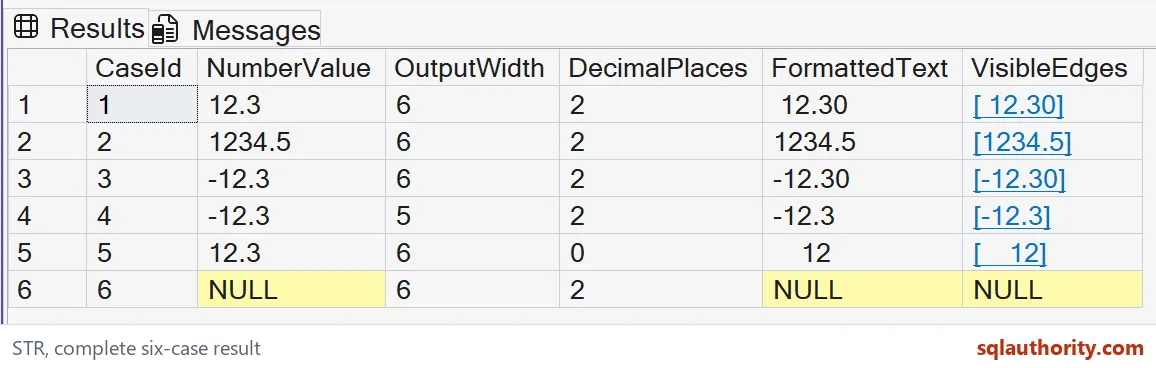
Read the spaces, sign and decimal point
For 12.3 with width six and two decimal places, the measured text is one space followed by 12.30. That is six characters in total. The visible brackets make the initial space apparent.
The input 1234.5 needs seven positions when displayed with two decimal places. At width six, the measured output is 1234.5. STR reduces the fractional display to one place, rather than returning asterisks in this case.
Negative 12.3 fits exactly in width six as -12.30. Reducing that width to five produces -12.3 in the measured result. The negative sign still occupies one position, while the fractional display loses its trailing zero.
With zero decimal places, the 12.3 row is formatted as the integer text 12. It has four leading spaces within width six. This is display rounding, rather than a change to the original numeric input.

Handle missing output and insufficient width separately
The NULL input has a NULL formatted result. The bracket expression also remains NULL for that row. A missing input is therefore separate from a numeric value whose fractional display has been reduced.
Do not use the presence of text as the only validation rule. STR returns asterisks when the integer part cannot fit the width. None of these six measured cases produces asterisks. Keep the original numeric column available during inspection.
I would define the accepted numeric range before choosing a fixed width. Large magnitudes, signs and required fractional digits can all increase the needed space. The chosen width should follow that complete display contract.
Removing leading spaces afterward changes the fixed-width presentation. That may be appropriate for another destination, but it is a separate choice. Inspect the untrimmed STR result before adding another transformation.
Keep approximation and presentation in view
STR returns varchar text rather than a numeric data type. Sorting those strings is not the same as sorting the source numbers. Perform numeric comparisons on numeric values when that is the intended operation.
Its numeric argument is approximate, so binary representation can affect rounding near a decimal boundary. This example avoids delicate halfway cases. Do not infer an exact decimal accounting rule from these display results.
The decimal argument allows at most sixteen decimal places. Wider requests do not create unlimited fractional precision. A larger field also cannot recover precision already absent from the approximate input.
The complete six-row example keeps input, request and output together. Use the same approach when reviewing a report format. A clean-looking small positive value cannot establish that negatives and wider values will remain readable.
Look at the real text, spaces and all, before you trust the width.
STR is not a number, it is text that may have given up digits to fit.
Published by Pinal Dave on SQLAuthority. More of my work at pinaldave.com.
Discover more from SQL Authority with Pinal Dave
Subscribe to get the latest posts sent to your email.