
A computed column data type is not something you declare. SQL Server works it out from the expression. That is fine until the math outgrows the type. Then a table that accepted every insert starts failing on read. Here is how it happens, and the small change that fixes it.

The type comes from the expression
Picture a small calculation table. Three tinyint columns, and a computed column that adds two of them and multiplies by the third. You never write a type for ComputedCol. I load three rows. The third one is (6 + 6) * 100, which is 1,200, and tinyint stops at 255.
DROP TABLE IF EXISTS dbo.CalcDemo;
CREATE TABLE dbo.CalcDemo (
    Id int IDENTITY(1,1) PRIMARY KEY,
    FirstCol tinyint NOT NULL,
    SecondCol tinyint NOT NULL,
    ThirdCol tinyint NOT NULL,
    ComputedCol AS (FirstCol + SecondCol) * ThirdCol);
INSERT dbo.CalcDemo (FirstCol, SecondCol, ThirdCol)
VALUES (1, 2, 3), (2, 3, 4), (6, 6, 100);
All three inserts succeed. Nothing was calculated on the way in. Now ask the catalog which type SQL Server picked.
SELECT c.name AS ColumnName, t.name AS TypeName
FROM sys.columns AS c
JOIN sys.types AS t ON t.user_type_id = c.user_type_id
WHERE c.object_id = OBJECT_ID('dbo.CalcDemo') AND c.name = 'ComputedCol';
The answer is tinyint. Every operand was tinyint, so the result is tinyint too.
The insert works, the read fails
Read the first two rows and you get 9 and 20. Read all three and you get those two rows, then Msg 8115. The message says “Arithmetic overflow error converting expression to data type tinyint.”
SELECT Id, ComputedCol FROM dbo.CalcDemo WHERE Id <= 2 ORDER BY Id;
SELECT Id, ComputedCol FROM dbo.CalcDemo ORDER BY Id;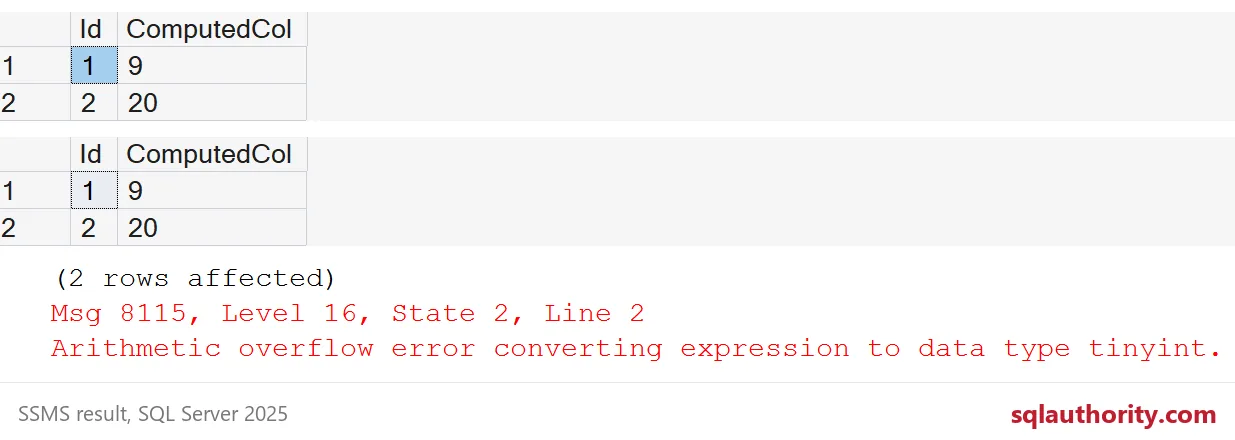
The bad row sat quietly in the table until somebody selected it. That is the 2 AM page: the load passed, and the morning report died.
Why two tinyints stay tinyint
The rule is short. When both operands share a type, the result has that type. When the types differ, the lower type is promoted to the higher one. A plain number like 100 is an int, so it pulls the result up with it.
SELECT CAST(200 AS tinyint) + 100 AS WithIntLiteral;
SELECT CAST(200 AS smallint) + CAST(200 AS smallint) AS TwoSmallints;
SELECT SQL_VARIANT_PROPERTY(
         CASE WHEN 1 = 1 THEN CAST(1 AS tinyint) ELSE CAST(1 AS int) END,
         'BaseType') AS CaseType;
SELECT CAST(200 AS tinyint) + CAST(100 AS tinyint) AS TwoTinyints;
The first gives 300 and the second gives 400, with no error. The CASE returns int, because CASE promotes its branches the same way. The last one, two tinyints adding to 300, hits the same Msg 8115.
PERSISTED moves the failure to the insert
Mark the column PERSISTED and SQL Server stores the value, so it must calculate it when the row is written. Now the bad row never gets in.
DROP TABLE IF EXISTS dbo.CalcPersisted;
CREATE TABLE dbo.CalcPersisted (
    Id int IDENTITY(1,1) PRIMARY KEY,
    FirstCol tinyint NOT NULL,
    SecondCol tinyint NOT NULL,
    ThirdCol tinyint NOT NULL,
    ComputedCol AS (FirstCol + SecondCol) * ThirdCol PERSISTED);
INSERT dbo.CalcPersisted (FirstCol, SecondCol, ThirdCol) VALUES (6, 6, 100);
SELECT COUNT(*) AS RowsStored FROM dbo.CalcPersisted;
The insert fails with the same Msg 8115 and RowsStored is 0. I like that better. The error lands in the loading code, not in a report. The column is still tinyint, though.
Fix it by casting an operand, not the result
The mistake I see most often is casting the whole expression to int. The math still runs in tinyint first, so it still overflows. Back on the first table, I replace the column with that version.
ALTER TABLE dbo.CalcDemo DROP COLUMN ComputedCol;
ALTER TABLE dbo.CalcDemo ADD ComputedCol AS CAST((FirstCol + SecondCol) * ThirdCol AS int);
SELECT Id, ComputedCol FROM dbo.CalcDemo ORDER BY Id;
Same error, same third row. The real fix is to cast an operand at the start of the math, so every step after it is int. A computed column definition changes by drop and add, as above.
ALTER TABLE dbo.CalcDemo DROP COLUMN ComputedCol;
ALTER TABLE dbo.CalcDemo ADD ComputedCol AS (CAST(FirstCol AS int) + SecondCol) * ThirdCol;
SELECT Id, ComputedCol FROM dbo.CalcDemo ORDER BY Id;
SELECT c.name AS ColumnName, t.name AS TypeName
FROM sys.columns AS c
JOIN sys.types AS t ON t.user_type_id = c.user_type_id
WHERE c.object_id = OBJECT_ID('dbo.CalcDemo') AND c.name = 'ComputedCol';
Now the rows are 9, 20 and 1,200, and the column is int. The inner sum, FirstCol + SecondCol, is tinyint math too, so I start at the first operand. That covers both steps.

Audit your own computed columns
You do not have to wait for the page. This query lists every computed column in the current database with its type and its definition. Look for small integer types that do multiplication or addition. Those are the ones that can overflow after the data grows.
SELECT OBJECT_NAME(cc.object_id) AS TableName, cc.name AS ColumnName,
       t.name AS TypeName, cc.definition
FROM sys.computed_columns AS cc
JOIN sys.types AS t ON t.user_type_id = cc.user_type_id
ORDER BY TableName, ColumnName;
Here it shows CalcDemo as int and CalcPersisted as tinyint. The persisted one still has the old definition. Once a column holds sums or products, test it with the largest values the business could plausibly send.
DROP TABLE IF EXISTS dbo.CalcPersisted;
DROP TABLE IF EXISTS dbo.CalcDemo;
Check any computed column that does math on small integer types before the data checks it for you.
A computed column is not a type you choose, it is a type you inherit.
Published by Pinal Dave on SQLAuthority. More of my work at pinaldave.com.
Discover more from SQL Authority with Pinal Dave
Subscribe to get the latest posts sent to your email.




1 Comment. Leave new
In some cases you can also just cast the entire result as part of your calculation, for instance if you need to stay under the 28 decimal limit present in .Net but your computed column is sometimes coming out to more than 28:
–Example showing computation resulting in a field length of 30
CREATE TABLE #MyTable
(
ID TINYINT NOT NULL IDENTITY (1, 1),
FirstCol numeric(18,6) NOT NULL,
SecondCol numeric(18,6) NOT NULL,
ComputedCol AS (FirstCol/SecondCol)
) ON [PRIMARY]
GO
INSERT INTO #MyTable
([FirstCol],[SecondCol])
VALUES (100000000,0.75)
GO
SELECT *, len(ComputedCol) as Length
FROM #MyTable
–Fixed to only be a field length of 16
drop table #MyTable
CREATE TABLE #MyTable
(
ID TINYINT NOT NULL IDENTITY (1, 1),
FirstCol numeric(18,6) NOT NULL,
SecondCol numeric(18,6) NOT NULL,
ComputedCol AS cast((FirstCol/SecondCol) as numeric(18,6))
) ON [PRIMARY]
GO
INSERT INTO #MyTable
([FirstCol],[SecondCol])
VALUES (100000000,0.75)
GO
SELECT *, len(ComputedCol) as Length
FROM #MyTable