
Full Text Index helps to perform complex queries against character data. These queries can include words or phrase searching. We can create a full-text index on a table or indexed view in a database. Only one full-text index is allowed per table or indexed view. The index can contain up to 1024 columns. Software developer Monica Monica, who helped with screenshots also informed that this feature works with the RTM (Ready to Manufacture) version of SQL Server 2008 and does not work on CTP (Community Technology Preview) versions. Let us learn about Creating Full Text Catalog and Full Text Search in this blog post.
To create an Index, follow the steps:
- Create a Full-Text Catalog
- Create a Full-Text Index
- Populate the Index
1) Create a Full-Text Catalog
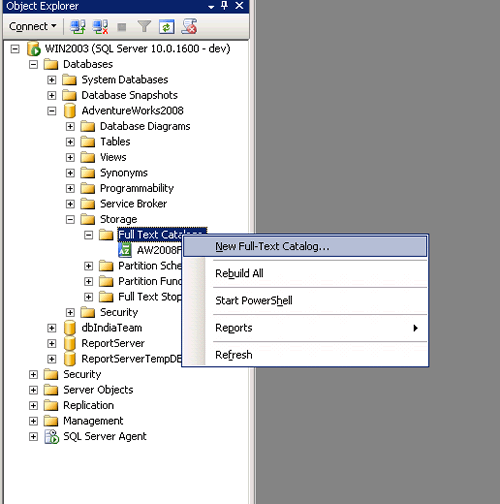


Full – Text can also be created while creating a Full-Text Index in its Wizard.
2) Create a Full-Text Index


3) Populate the Index


As the Index Is created and populated, you can write the query and use in searching records on that table which provides better performance.
For Example,
We will find the Employee Records who has “Marking “in their Job Title.
FREETEXT( ) Is predicate used to search columns containing character-based data types. It will not match the exact word, but the meaning of the words in the search condition. When FREETEXT is used, the full-text query engine internally performs the following actions on the freetext_string, assigns each term a weight, and then finds the matches.
- Separates the string into individual words based on word boundaries (word-breaking).
- Generates inflectional forms of the words (stemming).
- Identifies a list of expansions or replacements for the terms based on matches in the thesaurus.
CONTAINS( ) is similar to the Freetext but with the difference that it takes one keyword to match with the records, and if we want to combine other words as well in the search then we need to provide the “and” or “or” in search else it will throw an error.
USE AdventureWorks2008
GO

SELECT BusinessEntityID, JobTitle
FROM HumanResources.Employee
WHERE FREETEXT(*, 'Marketing Assistant');

SELECT BusinessEntityID,JobTitle
FROM HumanResources.Employee
WHERE CONTAINS(JobTitle, 'Marketing OR Assistant');

SELECT BusinessEntityID,JobTitle
FROM HumanResources.Employee
WHERE CONTAINS(JobTitle, 'Marketing AND Assistant');
GO

Conclusion
Full text indexing is a great feature that solves a database problem, the searching of textual data columns for specific words and phrases in SQL Server databases. Full Text Index can be used to search words, phrases and multiple forms of a word or phrase using FREETEXT () and CANTAINS () with “and” or “or” operators.
Reference : Pinal Dave (https://blog.sqlauthority.com)




154 Comments. Leave new
Thanks for the article. its really useful
Thank U Very Much.
But I Have some doubts.
Please Explain with details the following Queries cost and execution Plan
SELECT pageid,pagename
FROM dbo.Pages
WHERE FREETEXT(*, ‘Recruitment Targets’);
SELECT pageid,pagename
FROM dbo.Pages
WHERE CONTAINS(PageName, ‘Recruitment’);
select pageid,pagename
from dbo.pages
where Pagename like ‘Recruitment%’
Thank you very much. Good step by step instruction.
I have SQL Server 2008 Express with Advanced Services.
I was unable to enable the Full-Text Filter Daemon Launcher from the Configuration Manager.
Using the stored procedures in this article worked well as an alternative way to enable full text on a database.
I have 5 primary Key fields in my table how to use fulltext
please help me…..
i am getting following error when i tries to use full text catalog for more than 10 times.
There is insufficient system memory in resource pool ‘default’ to run this query
please help me to resolve same
Query Problem
——————–
Select * from mst_Table
where contains(resume,'”Cognos 8″‘)
I require that the SQL query should output “Cognos 8” and not “Cognos” or “8”.
currently when i run the query i get results such as
Environment: Cognos Impromptu 6.0, Cognos Power play 6.6, IWR Server 6.0, Cognos Scheduler, PowerPlay Enterprise Server, IIS Web Server. Open Solutions, Austin TX Feb 03 – April 04 QA analyst.
In this above paragraph “Cognos 8” is not present still the query outputs this row.
please help.
Hi Pinal
i regularly read your blogs. I like it very much. This blog is very fantastic and helpful.
Regards,
Ankit Doshi
Dear Pinal,
Please give some time from your busy schedule.
I have an issue in Full Text Search. I have few resume and i have posted that resume in one table. i have configured with full text search. In that table i have data of all resume i have. suppose two resume have content “Jayant Solanki”. Whenever i tried to search word “Jayant”. it will display proper result. i have another data like “Ajay Jain.”. I tried to search like “jay”. Now i want result data of “Jayant” and “Ajay” because “jay” is available in both the name. So how could i do that? Please help. Any suggestion?
I am newbee to Sql Server .. And IT is quite good article to Understand Indexes..
Hi,
I would like to know whether the part of word can be used in CONTAINS to get the match.
For e.g. we can match the part of the word in LIKE with the help of %
Select * from table_name where column_name like ‘test%’
which will return the result even if its having a row with ‘testing’ since it starts with ‘test’
How can we get the same result in CONTAINS. It always returns the exact word match. Please help
Try this
Select * from table_name where ‘ ‘+column_name+’ ‘ like ‘ test %’
My SQL Server 2008 Express Edition, don;t have Full text functionality.
Do I need to install it will new version?
Just use:
EXEC sp_fulltext_database ‘enable’
to enable Full-Text Indexing
Hi Pinal,
I have created FTI in SQL Server 2005 and i am trying to use HTML iFilter with FTS. But always i am getting zero row as a result. can u please help me. Please review following detail.
Table Structure :
———————
Id – int (PrimaryKey)
Name – nvarchar(50)
SearchData – varbinary(MAX) (full text index column)
DocType – nvarchar(10) (full text index type column)
———————
I have to store data in HTML content of different language (i.e. English, Spanish, etc.)
Hi Pinal Dave,
I would like to give Arabic text search word break in catalog.
there is not option to choose the Arabic.
is there any thing need to install ?
How does one use FTS to search for an exact phrase? I thought placing double-quotes around the phrase inside of the single quotes with CONTAINS would for it to search for a single phrase but that does not work. For example…
CONTAINS(col1, ‘ “this is a complete phrase” ‘)
will still return rows that contains some of the words but not the complete phrase. So how does one search for an exact phrase with FTS?
Hi Don, Did you ever get a solution to your question? I have the similar issue. Please let me know how did you solve the single phrase searching.
Also I have brackets in the search phrase. Thank you!
Hi Janki – Sorry no. Apparently this is another Microsoft product that sort of works but has enough gotchas that using it a challenge. If your search phrase works without the brackets, you may have to write code to remove them before the phrase is passed into the contains clause. I have learned that some symbols and also any words or characters in the exclusion list can affect the search. If you find a solution, please share back here.
Don, Thanks for responding! When I search for a phrase eg. ‘highly advantageous’ it works fine, but when I search only for the word ‘highly’ it returns me documents where ‘highly’ is not present at all..not sure what can be the issue here.
Regarding the search phrase having brackets, its not working…If I remove the brackets and search, then it doesnt return any result because 22 (X)(1)(F) then becomes 22X1F. I will keep on trying and will let you know if it works ever!
2 issues:
1 – FTI slowing down search results. When we have FTI enabled, the search results are slow. Anyone know why this is or how performance can be improved?
2 – looking for way the search can find segments of a word. IE: return an item ABC123 when I search for BC. Anyone know how to do this?
Hi there,
Good Article, But I’m having problem with Varbinary(Max) data Type, so that i can use for doc/xls/pdf file.
Urgent.
Please help me
Abu
Hi Pinal,
I am using MSSQL Server 2005 with the Full Text Search on the Column
tblProducts.ProductName and tblProducts.KeywordsUser
When I run the following query I could not get any result for the specific word phrase Mirror My Soul.
Can you help to find the issue with the word.
This query is working for another word e.g. One Small Drop
SELECT tblProducts.*
FROM tblProducts
INNER JOIN CONTAINSTABLE (tblProducts, (ProductName,KeywordsUser),'”*Mirror My Soul*”‘) AS KEY_TBL
ON tblProducts.ID = KEY_TBL.[KEY]
Any help to find out the issue is appreciated.
Regards
Shyam
Further Mirror My Soul are present in both the places in the database table columns.
I hope this is due to Noise words *My*.