
Full Text Index helps to perform complex queries against character data. These queries can include words or phrase searching. We can create a full-text index on a table or indexed view in a database. Only one full-text index is allowed per table or indexed view. The index can contain up to 1024 columns. Software developer Monica Monica, who helped with screenshots also informed that this feature works with the RTM (Ready to Manufacture) version of SQL Server 2008 and does not work on CTP (Community Technology Preview) versions. Let us learn about Creating Full Text Catalog and Full Text Search in this blog post.
To create an Index, follow the steps:
- Create a Full-Text Catalog
- Create a Full-Text Index
- Populate the Index
1) Create a Full-Text Catalog
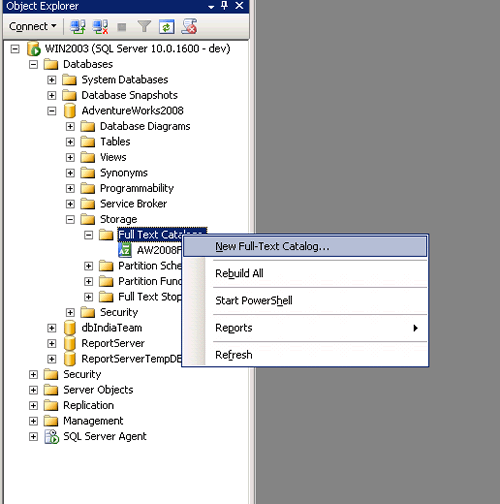


Full – Text can also be created while creating a Full-Text Index in its Wizard.
2) Create a Full-Text Index


3) Populate the Index


As the Index Is created and populated, you can write the query and use in searching records on that table which provides better performance.
For Example,
We will find the Employee Records who has “Marking “in their Job Title.
FREETEXT( ) Is predicate used to search columns containing character-based data types. It will not match the exact word, but the meaning of the words in the search condition. When FREETEXT is used, the full-text query engine internally performs the following actions on the freetext_string, assigns each term a weight, and then finds the matches.
- Separates the string into individual words based on word boundaries (word-breaking).
- Generates inflectional forms of the words (stemming).
- Identifies a list of expansions or replacements for the terms based on matches in the thesaurus.
CONTAINS( ) is similar to the Freetext but with the difference that it takes one keyword to match with the records, and if we want to combine other words as well in the search then we need to provide the “and” or “or” in search else it will throw an error.
USE AdventureWorks2008
GO

SELECT BusinessEntityID, JobTitle
FROM HumanResources.Employee
WHERE FREETEXT(*, 'Marketing Assistant');

SELECT BusinessEntityID,JobTitle
FROM HumanResources.Employee
WHERE CONTAINS(JobTitle, 'Marketing OR Assistant');

SELECT BusinessEntityID,JobTitle
FROM HumanResources.Employee
WHERE CONTAINS(JobTitle, 'Marketing AND Assistant');
GO

Conclusion
Full text indexing is a great feature that solves a database problem, the searching of textual data columns for specific words and phrases in SQL Server databases. Full Text Index can be used to search words, phrases and multiple forms of a word or phrase using FREETEXT () and CANTAINS () with “and” or “or” operators.
Reference : Pinal Dave (https://blog.sqlauthority.com)




154 Comments. Leave new
Hi all,
Got it.
Please check it at :
Thanks.
Thanks Jim Geurts – you just solved a problem for me that was causing no end of heartache. Cheers!
Hi Pinaldev,
i’ve a full text search catalog on my DB(ex: abcd) and while populating it ran successfully but the population status was still idle.
The abcd DB is restored from another SQL server machine. both sql server configurations are same as mentioned below.
while checking the SQL server log i’ve found the below error message on the FT catalog population process.
“SQL Server failed to communicate with filter daemon launch service (Windows error: The service cannot be started either because it is disabled or because it has no enabled devices associated with it.). Full-Text filter daemon process failed to start. Full-text search functionality will not be available.
Error: 9954 Severity: 16 State: 1.”
i’m using SQL Server 2008 (Standard Edition, version: 10.0.1600.22)
To run the Full-Text search catalog successfully, what i’ve to do. please give me any suggesstions to run this FT search.
Thanks, Rosebabu.
Hi,
The error stated on my comment is fixed by starting “SQL Full-text Filter Daemon Launcher” service. and i made this service to start automatically.
Now i’m not having the error as ‘SQL Server failed to communicate with filter daemon launch service…”.
while trying to populate the FT catalog now, i’d error on the “Full-Text Search crawl log”. the log file was located in %ProgramFiles%\Microsoft SQL Server\MSSQL10.MSSQLSERVER\MSSQL\LOG folder
and in that folder the log file has the following error message.
“A fatal error occurred during a full-text population and caused the population to be cancelled.
Population type is: FULL;
database name is adj001 (id: 9);
catalog name is adjcat001 (id: 11);
table name tblAssociation (id: 2117582582).
Fix the errors that are logged in the full-text crawl log. Then, resume the population.
The basic Transact-SQL syntax for this is: ALTER FULLTEXT INDEX ON table_name RESUME POPULATION.”
Please give any suggesstion to run the FT searching successfully on the db server.
Thanks,
Rose.
Hi,
Never Mind for further discussion,
Finally i got the solution for my problem (Full Text Index Searching).
while installing the SQL server 2008 i selected all the services to be installed and the service a/c as Network Service.
Now i went to Administrative Tools->Services then i selected the “SQL Full-text Filter Daemon Launcher” service.
then right click it and on the “Log on” tab, i changed the log on as “Local System Account” and restarted the service.
and as well as i did for the “SQL Server Agent” and restarted the service.
Now the Full text searching is populating and running fine.
Thnks.
Original Article was very useful to me!
Thanks Pinal.
Nice artical like your baby shaya
keep rocking.. bhai
Hi,
This article has been great, but one question.
How do you order by the relevance from the results given?
i.e. SELECT BusinessEntityID,JobTitle
FROM HumanResources.Employee
WHERE CONTAINS(JobTitle, ‘Marketing OR Assistant’);
You should expect to ‘Marketing Assistant’ to be at the top of the results… . I see in your example you have scrolled down to row 4 so it looks like it is ordered by relevance.
Or my own example it certainly hasn’t ordered by relevance so is there any way of doing this?
Many Thanks
Shane
Make sure your service login is a member of local policy “act as part of the operating system”. Worked for me.
Can’t see the images!!
Hi,
I have a big problem. Full-Text Index option is greyed. I have installed SQL Server 2008 on Windows Server 2003 R2. While installing I have selected all components to get installed.
Now I need to create an Index on a table as it is given by Pinal. But found that Full-text Index option is greyed(disable). I searched on many websites and blogs but didn’t find any suitable solution.
Looking for your support..
Thanks in advance
Hi,
I got the solution for my problem. I just created a new database and suprisingly Full-Text Index is showing enabled.
Hello,
I want to search a database column for a phrase, but the words can be in any order or even less. I figured FREETEXT function, looks at the meaning and not at the exact phrase. how can I order my query results by their weight/rank
for example: search phrase is ” The FOX Rocks 99.3 FM ”
my Data base column can contain:
the fox
the fox rocks
the fox rocks 99.3 FM
The fox Rocks 99.3
Fox Rocks 99.3 FM
the fox rocks fm
fox is an animal <——————I dont want to include this record since 1 word matches
As we can see the third record has the closest match, can I get the results:
the fox rocks 99.3 fm
the fox rocks 99.3
Fox Rocks 99.3 FM
the fox rocks fm
the fox rock
the fox
Thank you,
Hello Mike,
The desired result can be returned by creating a fulltext index and using the CONTAINS function.
Regards,
Pinal Dave
I followed everything above but is having trouble indexing pdfs. I installed the ifilter so pdf is one of my document types, however, I am unable to search through pdfs. I can search through docs fine but not pdfs. Have any idea what my problem could be?
Hi,
I am unable to search HTML documents with FTS and HTML iFilter. I am new to FTS. Could you please list check list for FST with iFilter and with sample query also.
Thanks in advance.
I am using SQL Server 2005.
Hi Pinal,
I am getting the following error while try to create fulltext search.I hope u wil help about it..
TITLE: Microsoft SQL Server
——————————
This wizard will close because it encountered the following error:
For help, click:
——————————
ADDITIONAL INFORMATION:
Could not load type ‘Microsoft.SqlServer.Management.Smo.Agent.JobBaseCollection’ from assembly ‘Microsoft.SqlServer.Smo, Version=9.0.242.0, Culture=neutral, PublicKeyToken=89845dcd8080cc91’. (SqlManagerUI)
——————————
BUTTONS:
OK
——————————
Is it possible to perform queries such as
WHERE x LIKE ‘test%’
WHERE x LIKE ‘tes%
WHERE x LIKE ‘%est%’
Superb post. Thanks a million.
Hola!!! alguien sabe como evitar que se envien mensajes del catalogo de texto al log :) gracias
Can you show an example using varbinary(MAX) and store some document such as a Word doc?
I tried it and I dont get any search results. When I remove the varbinary(max) column and just do a search on the title field for example, I get results…
I’m wondering if you’ve successfully stored a document in a varbinary(MAX) column and used full-text search to index it and search against it using CONTAINS or FREETEXT…
It isn’t working for me…